
HTML DOM 输入 DatetimeLocal 表单属性
htmlweb developmentfront end technology更新于 2025/9/18 7:40:17
HTML DOM 输入 DatetimeLocal 表单属性返回输入 DatetimeLocal 的封装表单的引用。
语法
以下是语法 −
返回对 form 对象的引用
inputDatetimeLocalObject.form
示例
让我们看一个 输入 DatetimeLocal 表单 属性的示例 −
<!DOCTYPE html>
<html>
<head>
<title>Input DatetimeLocal form</title>
<style>
   form {
      width:70%;
      margin: 0 auto;
      text-align: center;
   }
   * {
      padding: 2px;
      margin:5px;
   }
   input[type="button"] {
      border-radius: 10px;
   }
</style>
</head>
<body>
<form id="Mathematics">
<fieldset>
<legend>Datetime-Local-form</legend>
<label for="datetimeLocalSelect">Examination Time:
<input type="datetime-local" id="datetimeLocalSelect" value="2019-09-01T09:00">
</label>
<input type="button" onclick="showExamination()" value="Which exam is on this date? ">
<div id="divDisplay"></div>
</fieldset>
</form>
<script>
   var divDisplay = document.getElementById("divDisplay");
   var inputDatetimeLocal = document.getElementById("datetimeLocalSelect");
   function showExamination() {
      divDisplay.textContent = 'Exam: '+inputDatetimeLocal.form.id;
   }
</script>
</body>
</html>
输出
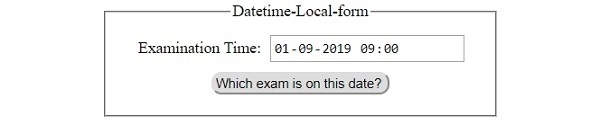
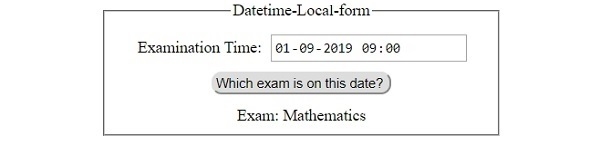
这将产生以下输出 −
点击"此日期有哪场考试?"按钮之前 −
勾选"此日期有哪场考试?"按钮之后 −
相关文章
有用资源
html 参考教程 - 该教程包含有关 html 的更多信息:https://www.cainiaomax.com/html/

