
HTML DOM Input Password required 属性
htmlweb developmentfront end technology更新于 2025/10/13 18:20:17
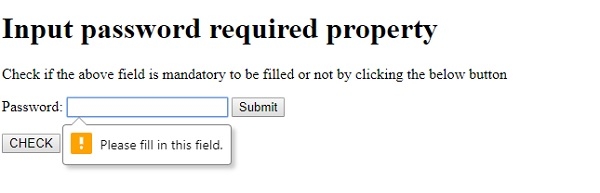
HTML DOM Input Password required 属性与 <input> 元素的 required 属性相关联。required 属性用于设置并返回在表单提交到服务器之前是否需要填写某些密码字段。如果用户将具有 required 属性的密码字段留空,则表单将无法提交。
语法
以下是语法 −
设置 required 属性 −
textObject.required = true|false
其中,true 表示文本字段必须填写,false 表示在提交表单之前可选填写。
示例
让我们看一个输入密码 required 属性的示例 −
<!DOCTYPE html>
<html>
<body>
<h1>Input password required property</h1>
<p>Check if the above field is mandatory to be filled or not by clicking the below button</p>
<form action="/Sample_page.php">
Password: <input type="password" id="PASS1" name=”passW” required>
<input type="submit">
</form>
<br>
<button onclick="checkReq()">CHECK</button>
<p id="Sample"></p>
<script>
   function checkReq() {
      var Req=document.getElementById("PASS1").required;
      if(Req==true)
         document.getElementById("Sample").innerHTML="The password field must be filled before submitting";
      else
         document.getElementById("Sample").innerHTML="The password field is optional and can be left blank by the user";
   }
</script>
</body>
</html>
输出
这将产生以下输出 −
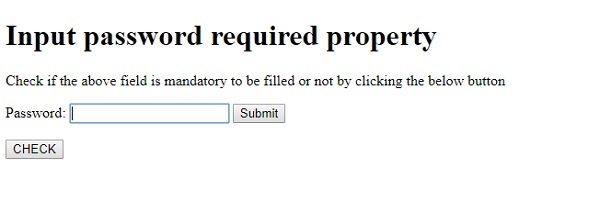
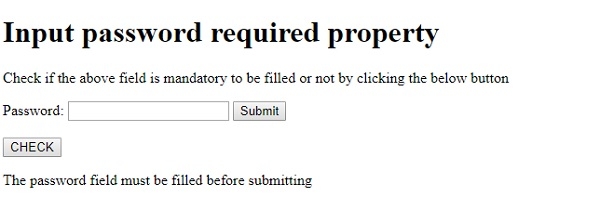
点击"检查"按钮后 −
如果 required 属性设置为 true,并且您点击了"提交" −
在上面的例子中 −
我们首先创建了一个输入密码字段,id 为"PASS1",名称为"passW"并将 required 属性设置为 true。密码字段包含在 action=”Sample_page.php” 的表单中,该表单指定点击提交按钮时提交表单数据的位置。
<form action="/Sample_page.php">
Password: <input type="password" id="PASS1" name=”passW” required>
<input type="submit">
</form>
然后,我们创建了一个"CHECK"按钮,当用户点击该按钮时,它将执行 checkReq() 方法 −
<button onclick="checkReq()">CHECK</button>
checkReq() 使用 getElementById() 方法获取类型为 password 的输入元素,并获取其 required 属性,在本例中返回 true。返回的布尔值被赋值给变量 Req,并根据返回值的 true 或 false,使用其 innerHTML 属性在 id 为"Sample"的段落中显示相应的消息 −
function checkReq() {
   var Req=document.getElementById("PASS1").required;
   if(Req==true)
      document.getElementById("Sample").innerHTML="The password field must be filled before submitting";
   else
      document.getElementById("Sample").innerHTML="The password field is optional and can be left blank by theuser";
}
相关文章
有用资源
html 参考教程 - 该教程包含有关 html 的更多信息:https://www.cainiaomax.com/html/

