
HTML DOM insertAdjacentHTML( ) 方法
htmlweb developmentfront end technology更新于 2025/9/14 3:24:17
HTML DOM insertAdjacentHTML() 方法将文本字符串以 HTML 格式插入到指定位置。
语法
以下是语法 −
使用positionString和HTML代码作为参数调用insertAdjacentHTML()
node.insertAdjacentHTML(“positionString”, “htmlString”)
位置字符串
此处,“positionString”可以是以下 −
| positionString | 描述 |
|---|---|
| afterbegin | 在节点元素开始后插入 htmlString |
| afterend | 在节点元素后插入 htmlString |
| beforebegin | 在节点元素前插入 htmlString |
| beforeend | 插入节点元素末尾之前的 htmlString |
HTML 字符串
并且,"htmlString"可以是以下
| positionString | <span>new span</span> 或 <p>This is a new paragraph</p> 或任何其他有效的 html 代码 |
示例
让我们看一个 InsertAdjacentHTML() 方法的示例 −
<!DOCTYPE html>
<html>
<head>
<title>insertAdjacentHTML()</title>
<style>
   form {
      width:70%;
      margin: 0 auto;
      text-align: center;
   }
   * {
      padding: 2px;
      margin:5px;
   }
   input[type="button"] {
      border-radius: 10px;
   }
</style>
</head>
<body>
<form>
<fieldset>
<legend>insertAdjacentHTML( )</legend>
<h1>Family Tree</h1>
<span id="GrandFather">Grand Father --></span>
<span id="Father">Father --></span>
<span id="Myself">Myself</span>
<input type="button" onclick="rectifyTree()" value="Son is born">
</fieldset>
</form>
<script>
   function rectifyTree() {
      var MSpan = document.getElementById("Myself");
      MSpan.insertAdjacentHTML("afterend", "<span id='Son'>-->Son</span>");
   }
</script>
</body>
</html>
输出
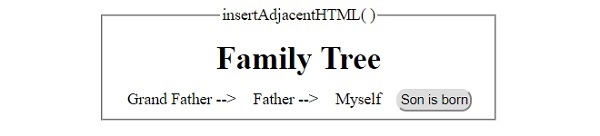
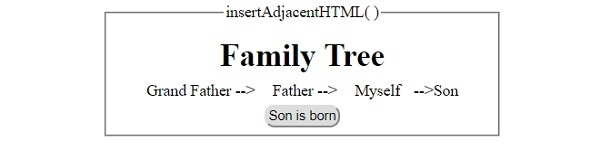
这将产生以下输出 −
点击"儿子出生了"按钮前 −
点击"儿子出生了"按钮后 −
相关文章
有用资源
html 参考教程 - 该教程包含有关 html 的更多信息:https://www.cainiaomax.com/html/

