
HTML DOM insertBefore( ) 方法
htmlweb developmentfront end technology更新于 2025/9/16 6:36:17
HTML DOM insertBefore() 方法在现有子节点前插入新节点。
语法
以下是语法 −
使用positionString和text参数调用insertBefore()
node.insertBefore(newNode, existingNode)
此处,参数可以是以下 −
参数
| 参数 | 描述 |
|---|---|
| newNode | 它是新创建的子节点,将被附加到begin |
| existingNode | 它是已经存在的节点 |
示例
让我们看一个 InsertBefore() 方法的示例 −
<!DOCTYPE html>
<html>
<head>
<title>insertBefore()</title>
<style>
   form {
      width:70%;
      margin: 0 auto;
      text-align: center;
   }
   * {
      padding: 2px;
      margin:5px;
   }
   input[type="button"] {
      border-radius: 10px;
   }
   ol {
      width:30%;
      margin: 0 auto;
   }
</style>
</head>
<body>
<form>
<fieldset>
<legend>insertBefore( )</legend>
<h1>How to make tea</h1>
<h3>Steps:</h3>
<ol id="stepList">
<li>Add Tea Bag</li>
<li>Add Sugar</li>
<li>Add Milk</li>
</ol>
<input type="button" onclick="addStep()" value="Add">
</fieldset>
</form>
<script>
   function addStep() {
      var newIngredient = document.createElement("LI");
      var textnode = document.createTextNode("Boil Water");
      newIngredient.appendChild(textnode);
      var stepList = document.getElementById("stepList");
      stepList.insertBefore(newIngredient, stepList.childNodes[0]);
   }
</script>
</body>
</html>
输出
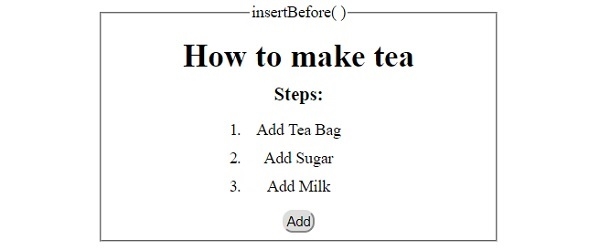
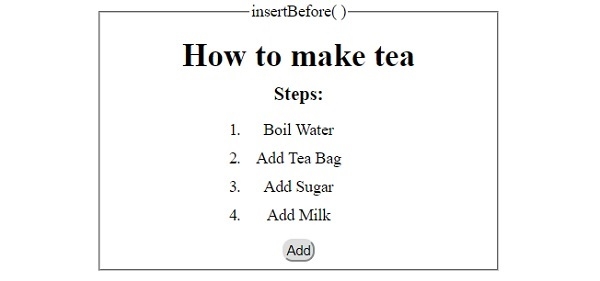
这将产生以下输出 −
点击"添加"按钮之前 −
点击"添加"按钮之后 −
相关文章
有用资源
html 参考教程 - 该教程包含有关 html 的更多信息:https://www.cainiaomax.com/html/

