
HTML DOM Location reload() 方法
htmlweb developmentfront end technology更新于 2025/7/19 17:48:17
HTML DOM Location reload() 方法用于重新渲染当前文档。它提供与浏览器中的"重新加载"按钮相同的功能。
语法
以下是语法 −
location.reload(forceGetParameter)
参数
此处,"forceGetParameter" 可以是以下 −
| forceGetParameter | 详情 |
|---|---|
| true | 定义当前文档已重新加载从服务器重新加载。 |
| false | 它定义当前文档从浏览器缓存重新加载。 |
示例
让我们看一个 Location reload() 属性的示例 −
<!DOCTYPE html>
<html>
<head>
<title>Location reload()</title>
<style>
   form {
      width:70%;
      margin: 0 auto;
   text-align: center;
   }
   * {
      padding: 2px;
      margin:5px;
   }
   input[type="button"] {
      border-radius: 10px;
   }
</style>
</head>
<body>
<form>
<fieldset>
<legend>Location-reload( )</legend>
<label for="urlSelect">Email: </label>
<input type="email" id="emailSelect"><br>
<label for="urlSelect">Password: </label>
<input type="password" id="passSelect"><br>
<input type="button" onclick="doReload()" value="Reload">
<div id="divDisplay"></div>
</fieldset>
</form>
<script>
   var divDisplay = document.getElementById("divDisplay");
   var emailSelect = document.getElementById("emailSelect");
   var passSelect = document.getElementById("passSelect");
   divDisplay.textContent = 'Do not reload, all the details will be lost';
   function doReload(){
      alert('Page reloaded, all the details are lost');
      location.reload();
   }
</script>
</body>
</html>
输出
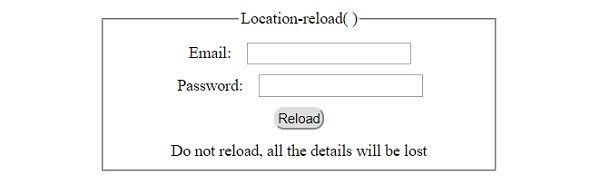
这将产生以下输出 −
点击"重新加载"按钮前 −
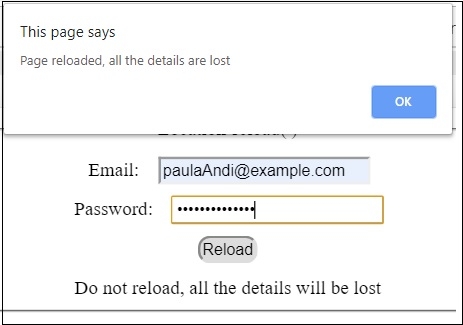
填写详情后点击"重新加载"按钮 −
相关文章
有用资源
html 参考教程 - 该教程包含有关 html 的更多信息:https://www.cainiaomax.com/html/

