
HTML DOM 样式 backgroundPosition 属性
htmlweb developmentfront end technology更新于 2025/9/29 17:16:17
backgroundPosition 属性用于设置或获取元素背景图像相对于原点的初始位置。
语法
以下是语法 −
设置 backgroundPosition 属性 −
object.style.backgroundPosition = 值
值
以下是值 −
| 值 | 描述 |
|---|---|
| top left top center top right center left center center center right bottom left bottom center bottom right |
定位可以通过其名称来理解。如果只写入一个值,则另一个值始终为中心。 |
| xpos ypos | 用于指示水平 (x) 和垂直 (y) 位置。它从左上角的 0,0 处开始。像素是首选单位,但您也可以使用任何其他 CSS 单位。 |
| x% y% | 用于以百分比形式指定水平 (x) 和垂直 (y) 位置。它从左上角的 0% 0% 处开始,到右下角的 100% 100% 处开始。因为指定一个值意味着另一个值将位于中心,即位于 50% 的位置。 |
| initial | 用于将此属性设置为初始值。 |
| inherit | 用于继承父级属性值。 |
示例
让我们来看一个 backgroundPosition 属性的示例 −
<!DOCTYPE html>
<html>
<head>
<style>
   body{
      background-image: url("https://www.cainiaomax.com/power_bi/images/power-bi-minilogo.jpg");
      background-repeat: no-repeat;
      background-attachment: fixed;
      background-position: 20% 60%;
   }
</style>
<script>
   function changeBackPosition(){
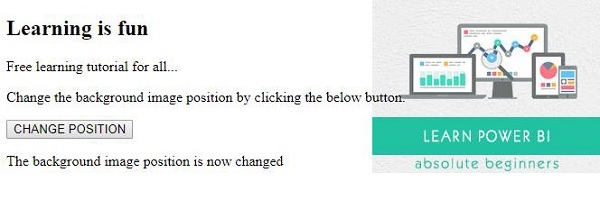
      document.body.style.backgroundPosition="top right";
      document.getElementById("Sample").innerHTML="The background image position is now changed";
   }
</script>
</head>
<body>
<h2>Learning is fun</h2>
<p>Free learning tutorial for all...</p>
<p>Change the background image position by clicking the below button.</p>
<button onclick="changeBackPosition()">CHANGE POSITION</button>
<p id="Sample"></p>
</body>
</html>
输出
这将产生以下输出 −
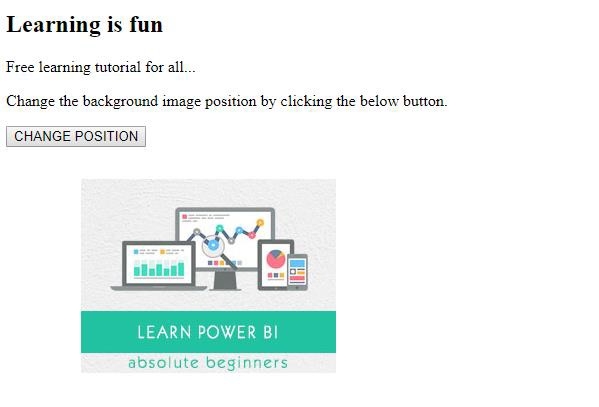
点击"更改位置"按钮 −
相关文章
有用资源
html 参考教程 - 该教程包含有关 html 的更多信息:https://www.cainiaomax.com/html/

