
HTML DOM 样式 borderImageRepeat 属性
htmlweb developmentfront end technology更新于 2025/10/2 8:44:17
HTML DOM borderImageRepeat 属性用于定义边框图像中图像切片的重复方式。该属性设置或获取 borderImage 是否应进行圆角、重复或拉伸。
语法
以下是语法 −
设置 borderImageRepeat 属性。
object.style.borderImageRepeat = "stretch|repeat|round|initial|inherit"
值
属性值解释如下 −
| Sr.No | 值 &说明 |
|---|---|
| 1 | Stretch 这将使图像拉伸以填充区域。这是默认值。 |
| 2 | Repeat 此选项使图像重复填充区域。 |
| 3 | Round 图像通常会重复填充区域,如果重复次数未达到整数倍,则会重新缩放。 |
| 4 | Space 与圆形相同,但如果图像重复次数未达到整数倍,则图块周围的空间将被分散。 |
| 5 | initial 将此属性设置为初始值。 |
| 6 | inherit 继承父级属性值 |
示例
我们来看一个 borderImageRepeat 属性的示例 −
<!DOCTYPE html>
<html>
<head>
<style>
   #b1 {
      border: 30px solid transparent;
      padding: 5px;
      border-image-source:
      url("https://www.cainiaomax.com/data_structures_algorithms/images/data-structurealgorithm.jpg");
      border-image-repeat: repeat;
      border-image-slice: 30;
   }
</style>
<script>
   function changeBorderRepeat(){
      document.getElementById("b1").style.borderImageRepeat="stretch";
      document.getElementById("Sample").innerHTML="The border image will now be
      stretched";
   }
</script>
</head>
<body>
<h2>Demo Heading</h2>
<p id="b1">This is some random text inside the paragraph. Here is another line in this paragraph</p>
<p>Change the above div border image repeat property by clicking the below button</p>
<button onclick="changeBorderRepeat()">Change Border Repeat</button>
<p id="Sample"></p>
</body>
</html>
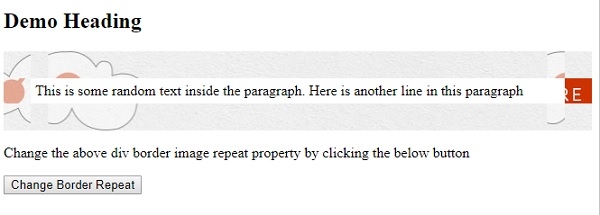
输出
这将产生以下输出 −
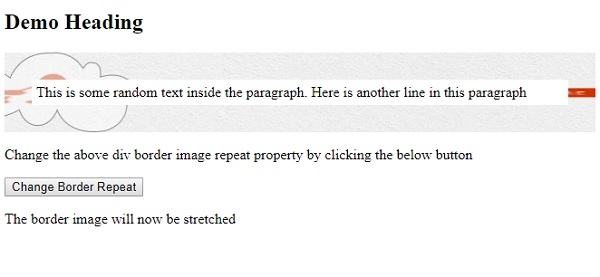
点击"折叠边框"按钮 −
相关文章
有用资源
html 参考教程 - 该教程包含有关 html 的更多信息:https://www.cainiaomax.com/html/

