
HTML DOM 样式 borderImageSlice 属性
htmldomweb developmentfront end technology更新于 2024/3/9 17:48:17
HTML DOM 样式 borderImageSlice 属性用于定义边框图像如何划分区域。这可以通过指定边框图像偏移量的百分比、数值或全局值来实现。
以下是语法 −
设置 borderImageSlice 属性 −
object.style.borderImageSlice = "number|%|fill|initial|inherit"
以上属性解释如下 −
| 值 | 描述 |
|---|---|
| number | 用于表示光栅图像中的像素或矢量图像中的矢量坐标。 |
| % | 用于指定相对于图片大小的水平和垂直偏移量。其默认值为 100%。 |
| ill | 用于保留边框图像的中间部分。 |
| initial | 用于将此属性设置为默认值。 |
| inherit | 用于继承父级属性值。 |
让我们看一个 borderImageSlice 属性的示例 −
示例
<!DOCTYPE html>
<html>
<head>
<style>
   div {
      width: 50%;
   }
   #b1 {
      border: 30px solid transparent;
      padding: 5px;
      font-size:20px;
      border-image: url("https://www.cainiaomax.com/xamarin/images/xamarin-mini-logo.jpg");
      border-image-slice: 60%;
   }
</style>
<script>
   function changeBorderSlice(){
      document.getElementById("b1").style.borderImageSlice="10%";
      document.getElementById("Sample").innerHTML="The border image slice is now changed";
   }
</script>
</head>
<body>
<div id="b1">This is some sample text inside div</div>
<p>Change the above div border image slice…</p>
<button onclick="changeBorderSlice()">Change Border Slice</button>
<p id="Sample"></p>
</body>
</html>
输出
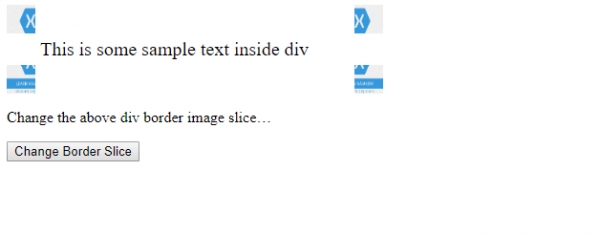
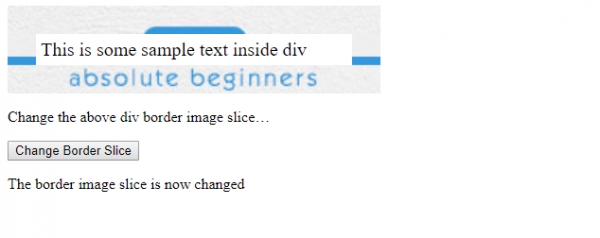
点击"更改边框切片"按钮 −
相关文章
有用资源
html 参考教程 - 该教程包含有关 html 的更多信息:https://www.cainiaomax.com/html/

