
HTML DOM touchstart 事件
htmlweb developmentfront end technology更新于 2025/7/24 0:12:17
当触摸屏被触摸时,会触发 HTML DOM touchstart 事件。
注意 − 此事件仅适用于触摸设备。
以下是语法 −
在 HTML 中触发 touchstart 事件 −
ontouchstart = "eventFunction()"
在 JavaScript 中触发 touchstart 事件 −
eventObject.ontouchstart = eventFunction
注意 − 我们在移动设备或支持触摸访问的系统上访问的在线 HTML 编辑器上运行了触摸事件示例。这样做是为了让我们能够执行触摸操作,例如触摸屏幕 2 秒。
让我们看一个 touchstart 事件 属性的示例 −
示例
<!DOCTYPE html>
<html>
<head>
<title>HTML DOM touchstart event</title>
<style>
   form {
      width:70%;
      margin: 0 auto;
      text-align: center;
   }
   * {
      padding: 2px;
      margin:5px;
   }
   input[type="button"] {
      border-radius: 50%;
      font-size: 20px;
      padding: 20px;
      border: 5px solid rgb(220, 53, 69);
      background: rgba(220, 53, 69, 0.5);
      color: #fefefe;
   }
</style>
</head>
<body>
   <form>
      <fieldset>
         <legend>HTML-DOM-touchstart-event</legend>
         <label for="textSelect">Game Time</label>
         <input type="button" id="gameSelect" value="Hold On">
         <div id="divDisplay">Hold On for 1 - sec to Win</div>
      </fieldset>
   </form>
<script>
   var divDisplay = document.getElementById("divDisplay");
   var gameSelect = document.getElementById("gameSelect");
   var duration = 1000;
   var timer;
   gameSelect.ontouchstart = startEventAction;
   function startEventAction() {
      timer = setTimeout(victory, duration);
   }
   gameSelect.ontouchend = endEventAction;
   function endEventAction(){
      if(timer)
         clearTimeout(timer);
   }
   function victory(){
      divDisplay.textContent = "You Win"
   }
</script>
</body>
</html>
输出
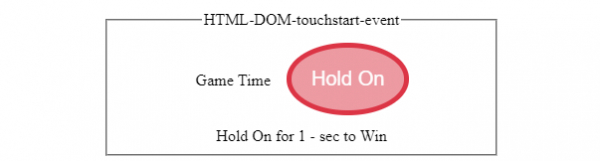
触摸"按住"按钮之前 −
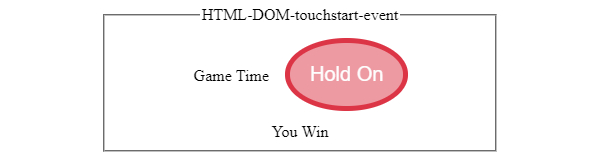
触摸屏幕上的"按住"按钮后 −
相关文章
有用资源
html 参考教程 - 该教程包含有关 html 的更多信息:https://www.cainiaomax.com/html/

