
HTML 输入占位符属性
htmlweb developmentfront end technology更新于 2025/7/11 7:40:17
<input> 元素的 placeholder 属性用于为输入设置提示,该提示会简要描述该特定输入中预期的内容。此属性适用于以下输入类型:text、url、search、email、password 和 tel。该属性在 HTML5 中引入。
以下是语法 −
<input placeholder="placeholder_text">
其中,placeholder_text 是简短提示,即占位符,用户每次访问该网页时都会看到它。
现在让我们看一个实现 <input> 元素 placeholder 属性的示例。 −
示例
<!DOCTYPE html>
<html>
<body>
<h2>Register</h2>
<form action="" method="get">
   Id − <input type="text" name="id" placeholder="Enter UserId here..."><br>
   Password − <input type="password" name="pwd" placeholder="Enter password here..."><br>
   DOB − <input type="date" name="dob"><br>
   Telephone − <input type="tel" name="tel" placeholder="Enter mobile number here..."><br>
   Email − <input type="email" name="email" placeholder="Enter email here..."><br><br>
   <button type="submit" value="Submit">Submit</button>
</form>
</body>
</html>
输出
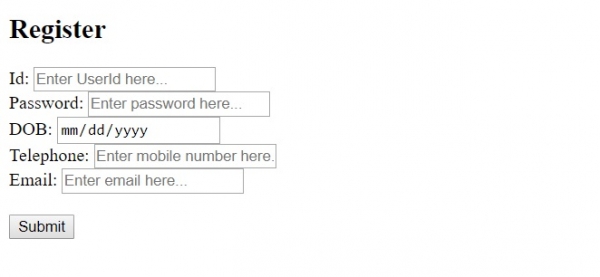
在上面的例子中,我们有一个包含一些字段的表单 −
<form action="" method="get">
   Id − <input type="text" name="id" placeholder="Enter UserId here..."><br>
   Password − <input type="password" name="pwd" placeholder="Enter password here..."><br>
   DOB − <input type="date" name="dob"><br>
   Telephone − <input type="tel" name="tel" placeholder="Enter mobile number here..."><br>
   Email − <input type="email" name="email" placeholder="Enter email here..."><br><br>
   <button type="submit" value="Submit">Submit</button>
</form>
所有字段(例如 −)都设置了占位符。
<input type="password" name="pwd" placeholder="Enter password here...">
只需使用占位符属性并设置简短提示即可 −
placeholder="Enter password here..."
相关文章
有用资源
html 参考教程 - 该教程包含有关 html 的更多信息:https://www.cainiaomax.com/html/

