
HTML textarea disabled 属性
htmlweb developmentfront end technology更新于 2025/11/25 1:16:17
<textarea> 元素的 disabled 属性用于禁用 <textarea>。禁用后,您将无法从 <textarea> 中选择文本。
语法
以下是语法 −
<textarea disabled>
示例
现在让我们看一个实现 <textarea> 元素的 disabled 属性的示例 −
<!DOCTYPE html>
<html>
<body>
<h2>Candidate Details</h2>
Student Name: <input type="text" value="David"><br>
Student Id: <input type="number" value="007"><br>
<p>Educational Qualification (Graduation)</p>
<select>
<option value="bca">B.Tech</option>
<option value="btech">BCA</option>
<option value="bcom">B.COM</option>
<option value="bsc">B.SC</option>
<option value="bba">BBA</option>
</select>
<p>Educational Qualification (Post-Graduation)</p>
<select>
<option value="mca">MCA</option>
<option value="mtech">M.Tech</option>
<option value="mcom">M.COM</option>
<option value="msc">M.SC</option>
</select></br>
<p>Info:</p>
<textarea rows="5" cols="30" disabled>
You need to also bring the certificates for the degrees mentioned above.
</textarea>
</body>
</html>
输出
这将产生以下输出 −
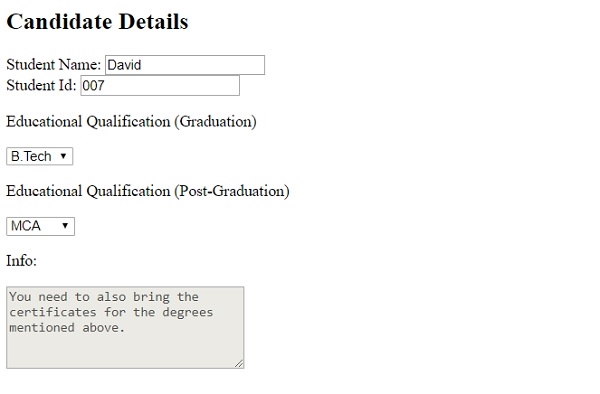
在上面的例子中,我们设置了一个下拉列表和一个文本区域 −
<select>
<option value="mca">MCA</option>
<option value="mtech">M.Tech</option>
<option value="mcom">M.COM</option>
<option value="msc">M.SC</option>
</select></br>
<p>Info:</p>
<textarea rows="5" cols="30" disabled>
You need to also bring the certificates for the degrees mentioned above.
</textarea>
使用 disabled 属性禁用了 <textarea>,即访问者将无法编辑它 −
<textarea rows="5" cols="30" disabled>
You need to also bring the certificates for the degrees mentioned above.
</textarea>
相关文章
有用资源
html 参考教程 - 该教程包含有关 html 的更多信息:https://www.cainiaomax.com/html/

