
HTML textarea placeholder 属性
htmlweb developmentfront end technology更新于 2025/8/19 17:16:17
<textarea> 元素的 placeholder 属性用于在文本区域中设置占位符文本。占位符被视为提示,例如"请输入您的姓名"、"请输入手机号码"、"请写 100 个字"等。
以下是语法−
<textarea placeholder="text">
上面的 text 是您想要为文本区域设置的占位符文本提示。
现在让我们看一个实现 <textarea> 元素的 placeholder 属性的示例 −
示例
<!DOCTYPE html>
<html>
<body>
<h2>Interview Questions</h2>
<p>Q1</p>
<textarea rows="6" cols="70" placeholder="Why do you want go for the Editor Job Profile? (100 words)">
</textarea>
<p>Q2</p>
<textarea rows="6" cols="70" placeholder="Do you have any previous publishing experience? (100 words)">
</textarea>
</body>
</html>
输出
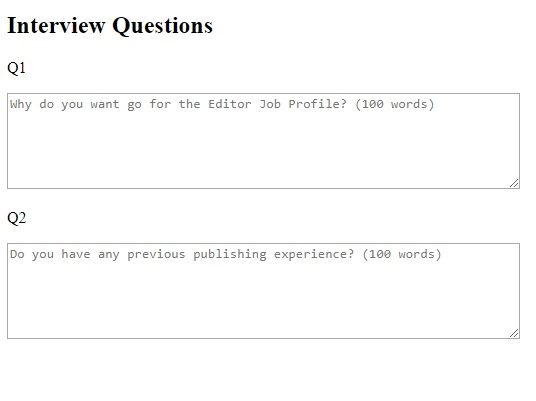
在上面的例子中,我们设置了两个textarea−
<p>Q1</p>
<textarea rows="6" cols="70" placeholder="Why do you want go for the Editor Job Profile? (100 words)">
</textarea>
<p>Q2</p>
<textarea rows="6" cols="70" placeholder="Do you have any previous publishing experience? (100 words)">
</textarea>
要显示占位符文本,请使用 placeholder 属性,例如 −
placeholder="Why do you want go for the Editor Job Profile? (100 words)"
相关文章
有用资源
html 参考教程 - 该教程包含有关 html 的更多信息:https://www.cainiaomax.com/html/

