
使用 CSS 设置链接样式
cssweb developmentfront end technology更新于 2025/1/20 22:36:17
CSS 允许我们根据需要设置链接样式。我们可以设置文本格式,例如添加颜色、背景、放大等。此外,还可以添加动画来营造愉悦的视觉效果。
为了确保功能正常,伪选择器的顺序如下::link、:visited、:hover、:active。
示例
以下示例演示了如何使用 CSS 设置链接样式 −
<!DOCTYPE html>
<html>
<head>
<style>
p {
   margin: 25px;
}
#mod {
   padding: 10px;
   color: darkturquoise;
   border: thin solid;
   background-color: lemonchiffon;
}
#mod:hover {
   color: white;
   box-shadow: 0 0 0 1px black;
   background-color: slateblue;
}
</style>
</head>
<body>
<p>
<a href="mailto:user@example.com">Demo link</a>
</p>
<p>
<a id="mod" href="mailto:user@example.com">Modified demo link</a>
</p>
</body>
</html>
输出
这将给出以下输出 −
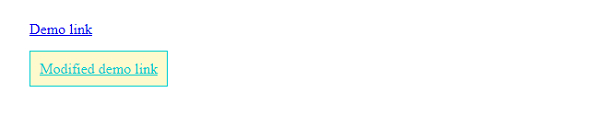
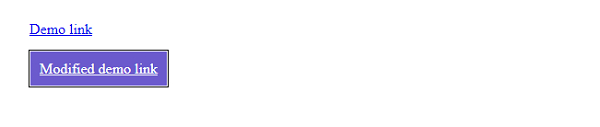
鼠标悬停在第二个链接上时,我们得到以下输出 −
示例
<!DOCTYPE html>
<html>
<head>
<style>
div {
   margin: 25px;
   display: flex;
   float: left;
   border: thin solid;
   background-color: snow;
   padding: 20px;
}
body * {
   border-radius: 5%;
}
#mod {
   padding: 10px;
   color: royalblue;
   text-decoration: none;
}
#mod:hover {
   box-shadow: 0 0 10px 2px black;
   text-decoration: overline;
   font-size: 1.2em;
}
</style>
</head>
<body>
<div>
<button><a href="#">Demo</a></button>
<a id="mod" href="#">Demo</a>
</div>
</body>
</html>
输出
这将给出以下输出 −
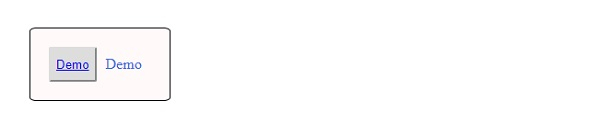
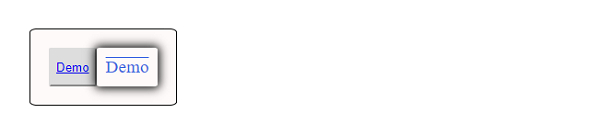
将鼠标悬停在第二个链接上,我们得到以下输出
相关文章
有用资源
css 参考教程 - 该教程包含有关 css 的更多信息:https://www.cainiaomax.com/css/

