
使用 CSS 设置字间距
cssweb developmentfront end technology更新于 2025/1/19 9:16:17
CSS 的 word-spacing 属性用于指定元素中单词之间的间距。
语法
CSS word-spacing 属性的语法如下 −
Selector {
   word-spacing: /*value*/
}
示例
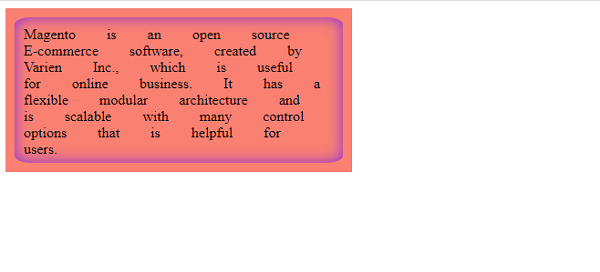
以下示例演示了 CSS word-spacing 属性 −
<!DOCTYPE html>
<html>
<head>
<style>
div {
   display: flex;
   float: left;
   padding: 10px;
   background-color: salmon;
}
div > div {
   word-spacing: 30px;
   width: 340px;
   height: 140px;
   border-radius: 5%;
   box-shadow: inset 0 0 15px blueviolet;
}
</style>
</head>
<body>
<div>
<div>
Magento is an open source E-commerce software, created by Varien Inc., which is useful for
online business. It has a flexible modular architecture and is scalable with many control
options that is helpful for users.</div>
</div>
</body>
</html>
输出
这将给出以下输出 −
示例
<!DOCTYPE html>
<html>
<head>
<style>
q {
   display: flex;
   padding: 10px;
   word-spacing: 6em;
   background-color: orange;
   font-size: 1.2em;
}
</style>
</head>
<body>
<h2>What is Java?</h2>
According to Java's official documentation,
<hr>
<q cite="https://www.java.com/en/download/faq/whatis_java.xml">Java is a programming language and computing platform first released by Sun Microsystems in 1995.</q>
</body>
</html>
输出
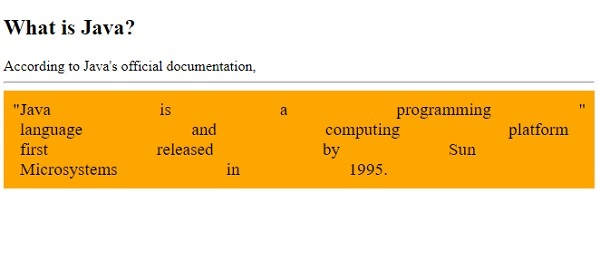
这将给出以下输出 −
相关文章
有用资源
css 参考教程 - 该教程包含有关 css 的更多信息:https://www.cainiaomax.com/css/

