ASP.NET - LINQ 语言集成查询
大多数应用程序都是以数据为中心的,但是大多数数据存储库都是关系数据库。 多年来,设计人员和开发人员都基于对象模型设计了应用程序。
这些对象负责连接到数据访问组件 - 称为数据访问层 (DAL)。 这里我们需要考虑三点:
应用程序中所需的所有数据并不存储在同一源中。 源可以是关系数据库、某些业务对象、XML 文件或 Web 服务。
访问内存中对象比访问数据库或 XML 文件中的数据更简单且成本更低。
访问的数据不直接使用,而是需要进行排序、排序、分组、更改等操作
因此,如果有一种工具可以使所有类型的数据访问变得容易,允许连接来自不同数据源的数据并执行标准的数据处理操作,只需几行代码,这将有很大的帮助。
LINQ(语言集成查询)就是这样一个工具。 LINQ 是 .Net Framework 3.5 及其托管语言的一组扩展,将查询设置为对象。 它定义了通用语法和编程模型,以使用通用语言查询不同类型的数据。
关系运算符,如选择、项目、连接、分组、分区、集合操作等,是在 .Net Framework 3.5 中的 LINQ 以及 C# 和 VB 编译器中实现的,这些编译器支持 LINQ 语法,使得无需借助 ADO.NET 即可使用已配置的数据存储。
例如,查询Northwind数据库中的Customers表,使用C#中的LINQ查询,代码为:
var data = from c in dataContext.Customers
where c.Country == "Spain"
select c;
其中:
"from"关键字在逻辑上循环遍历集合的内容。
针对集合中的每个对象计算带有"where"关键字的表达式。
"select"语句选择要添加到返回列表中的求值对象。
"var"关键字用于变量声明。由于不知道返回对象的确切类型,因此表明将动态推断信息。
LINQ查询可以应用于任何继承自IEnumerable<T>的数据承载类,这里T是任何数据类型,例如List<Book>。
让我们看一个例子来理解这个概念。 该示例使用以下类:Books.cs
public class Books
{
   public string ID {get; set;}
   public string Title { get; set; }
   public decimal Price { get; set; }
   public DateTime DateOfRelease { get; set; }

   public static List<Books> GetBooks()
   {
      List<Books> list = new List<Books>();
      list.Add(new Books { ID = "001",
         Title = "Programming in C#",
         Price = 634.76m,
         DateOfRelease = Convert.ToDateTime("2010-02-05") });

      list.Add(new Books { ID = "002",
         Title = "Learn Java in 30 days",
         Price = 250.76m,
         DateOfRelease = Convert.ToDateTime("2011-08-15") });

      list.Add(new Books { ID = "003",
         Title = "Programming in ASP.Net 4.0",
         Price = 700.00m,
         DateOfRelease = Convert.ToDateTime("2011-02-05") });

      list.Add(new Books { ID = "004",
         Title = "VB.Net Made Easy",
         Price = 500.99m,
         DateOfRelease = Convert.ToDateTime("2011-12-31") });

      list.Add(new Books { ID = "005",
         Title = "Programming in C",
         Price = 314.76m,
         DateOfRelease = Convert.ToDateTime("2010-02-05") });

      list.Add(new Books { ID = "006",
         Title = "Programming in C++",
         Price = 456.76m,
         DateOfRelease = Convert.ToDateTime("2010-02-05") });

      list.Add(new Books { ID = "007",
         Title = "Datebase Developement",
         Price = 1000.76m,
         DateOfRelease = Convert.ToDateTime("2010-02-05") });

      return list;
   }
}
使用此类的网页有一个简单的标签控件,它显示书籍的标题。 Page_Load 事件创建图书列表并使用 LINQ 查询返回标题:
public partial class simplequery : System.Web.UI.Page
{
   protected void Page_Load(object sender, EventArgs e)
   {
      List<Books> books = Books.GetBooks();
      var booktitles = from b in books select b.Title;

      foreach (var title in booktitles)
         lblbooks.Text += String.Format("{0} <br />", title);
   }
}
页面执行时,标签显示查询结果:
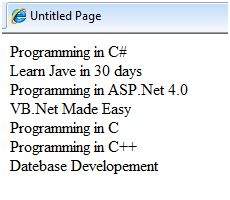
上面的 LINQ 表达式:
var booktitles =
from b in books
select b.Title;
相当于以下 SQL 查询:
SELECT Title from Books
LINQ 运算符
除了目前使用的运算符之外,还有其他几个运算符,它们实现了所有查询子句。 让我们看一下一些运算符和子句。
Join 子句
SQL 中的"join 子句"用于连接两个数据表并显示包含两个表中的列的数据集。 LINQ 也能做到这一点。 要检查这一点,请在上一个项目中添加另一个名为 Saledetails.cs 的类:
public class Salesdetails
{
   public int sales { get; set; }
   public int pages { get; set; }
   public string ID {get; set;}

   public static IEnumerable<Salesdetails> getsalesdetails()
   {
      Salesdetails[] sd =
      {
         new Salesdetails { ID = "001", pages=678, sales = 110000},
         new Salesdetails { ID = "002", pages=789, sales = 60000},
         new Salesdetails { ID = "003", pages=456, sales = 40000},
         new Salesdetails { ID = "004", pages=900, sales = 80000},
         new Salesdetails { ID = "005", pages=456, sales = 90000},
         new Salesdetails { ID = "006", pages=870, sales = 50000},
         new Salesdetails { ID = "007", pages=675, sales = 40000},
      };

      return sd.OfType<Salesdetails>();
   }
}
在 Page_Load 事件处理程序中添加代码,以使用 join 子句查询两个表:
protected void Page_Load(object sender, EventArgs e)
{
   IEnumerable<Books> books = Books.GetBooks();
   IEnumerable<Salesdetails> sales = Salesdetails.getsalesdetails();

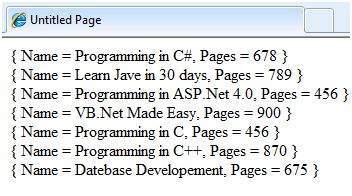
   var booktitles = from b in books join s in sales on b.ID equals s.ID
      select new { Name = b.Title, Pages = s.pages };

   foreach (var title in booktitles)
      lblbooks.Text += String.Format("{0} <br />", title);
}
结果页面如图所示:
Where 子句
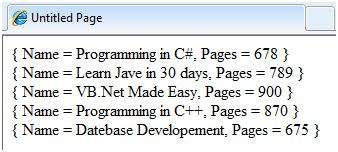
"where 子句"允许向查询添加一些条件过滤器。 例如,如果您要查看页数超过 500 的书籍,请将 Page_Load 事件处理程序更改为:
var booktitles = from b in books join s in sales on b.ID equals s.ID
   where s.pages > 500 select new { Name = b.Title, Pages = s.pages };
查询仅返回页数超过 500 的行:
Orderby 和 Orderbydescending 子句
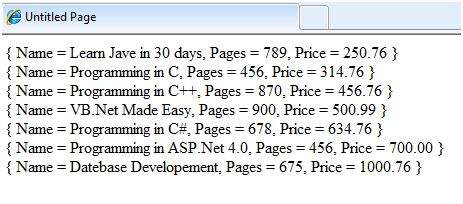
这些子句允许对查询结果进行排序。 要查询图书的标题、页数和价格(按价格排序),请在 Page_Load 事件处理程序中编写以下代码:
var booktitles = from b in books join s in sales on b.ID equals s.ID
   orderby b.Price select new { Name = b.Title,  Pages = s.pages, Price = b.Price};
返回的元组是:
Let 子句
let 子句允许定义变量并为其分配根据数据值计算得出的值。 例如,要计算上述两项销售额的总销售额,您需要计算:
TotalSale = Price of the Book * Sales
要实现此目的,请在 Page_Load 事件处理程序中添加以下代码片段:
let 子句允许定义变量并为其分配根据数据值计算得出的值。 例如,要计算上述两项销售额的总销售额,您需要计算:
var booktitles = from b in book join s in sales on b.ID equals s.ID
   let totalprofit = (b.Price * s.sales)
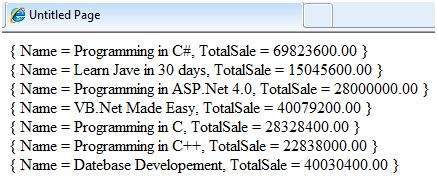
   select new { Name = b.Title, TotalSale = totalprofit};
查询结果页面如图所示: