ASP.NET - Panel 面板控件
Panel 控件充当页面上其他控件的容器。 它控制其包含的控件的外观和可见性。 它还允许以编程方式生成控件。
Panel 面板控件的基本语法如下:
<asp:Panel ID= "Panel1"  runat = "server">
</asp:Panel>
Panel 控件派生自 WebControl 类。 因此它继承了它的所有属性、方法和事件。 它没有自己的任何方法或事件。 但它有自己的以下属性:
| 属性 | 描述 |
|---|---|
| BackImageUrl | 面板背景图片的URL。 |
| DefaultButton | 获取或设置Panel控件中包含的默认按钮的标识符。 |
| Direction | 面板中的文本方向。 |
| GroupingText | 允许将文本分组为字段。 |
| HorizontalAlign | 面板中内容的水平对齐。 |
| ScrollBars | 指定面板内滚动条的可见性和位置。 |
| Wrap | 允许文本换行。 |
使用Panel面板控件
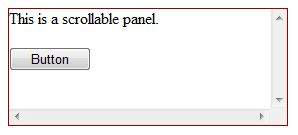
让我们从一个具有特定高度和宽度以及边框样式的简单可滚动面板开始。 ScrollBars 属性设置为两个滚动条,因此两个滚动条都会呈现。
源文件中有以下面板标签代码:
<asp:Panel ID="Panel1" runat="server" BorderColor="#990000" BorderStyle="Solid"
   Borderstyle="width:1px" Height="116px" ScrollBars="Both" style="width:278px">

   这是一个可滚动的面板。
   <br />
   <br />

   <asp:Button ID="btnpanel" runat="server" Text="Button" style="width:82px" />
</asp:Panel>
面板呈现如下:
示例
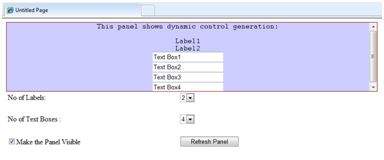
以下示例演示了动态内容生成。 用户提供要在面板上生成的标签控件和文本框的数量。 控件以编程方式生成。
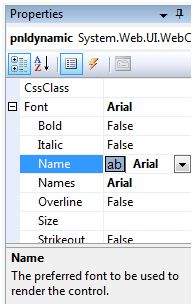
使用属性窗口更改面板的属性。 当您在设计视图上选择一个控件时,属性窗口会显示该特定控件的属性,并允许您无需键入即可进行更改。
示例源文件如下:
<form id="form1" runat="server">
   <div>
      <asp:Panel ID="pnldynamic" runat="server" BorderColor="#990000"
         BorderStyle="Solid" Borderstyle="width:1px" Height="150px"  ScrollBars="Auto" style="width:60%" BackColor="#CCCCFF"  Font-Names="Courier" HorizontalAlign="Center">

         This panel shows dynamic control generation:
         <br />
         <br />
      </asp:Panel>
   </div>

   <table style="width: 51%;">
      <tr>
         <td class="style2">No of Labels:</td>
         <td class="style1">
            <asp:DropDownList ID="ddllabels" runat="server">
               <asp:ListItem>0</asp:ListItem>
               <asp:ListItem>1</asp:ListItem>
               <asp:ListItem>2</asp:ListItem>
               <asp:ListItem>3</asp:ListItem>
               <asp:ListItem>4</asp:ListItem>
            </asp:DropDownList>
         </td>
      </tr>

      <tr>
         <td class="style2"> </td>
         <td class="style1"> </td>
      </tr>

      <tr>
         <td class="style2">No of Text Boxes :</td>
         <td class="style1">
            <asp:DropDownList ID="ddltextbox" runat="server">
               <asp:ListItem>0</asp:ListItem>
               <asp:ListItem Value="1"></asp:ListItem>
               <asp:ListItem>2</asp:ListItem>
               <asp:ListItem>3</asp:ListItem>
               <asp:ListItem Value="4"></asp:ListItem>
            </asp:DropDownList>
         </td>
      </tr>

      <tr>
         <td class="style2"> </td>
         <td class="style1"> </td>
      </tr>

      <tr>
         <td class="style2">
            <asp:CheckBox ID="chkvisible" runat="server"
               Text="Make the Panel Visible" />
         </td>

         <td class="style1">
            <asp:Button ID="btnrefresh" runat="server" Text="Refresh Panel"
               style="width:129px" />
         </td>
      </tr>
   </table>
</form>
Page_Load 事件背后的代码负责动态生成控件:
public partial class _Default : System.Web.UI.Page
{
   protected void Page_Load(object sender, EventArgs e)
   {
      //使面板可见
      pnldynamic.Visible = chkvisible.Checked;

      //生成标签控件:
      int n = Int32.Parse(ddllabels.SelectedItem.Value);
      for (int i = 1; i <= n; i++)
      {
         Label lbl = new Label();
         lbl.Text = "Label" + (i).ToString();
         pnldynamic.Controls.Add(lbl);
         pnldynamic.Controls.Add(new LiteralControl("<br />"));
      }

      //生成文本框控件:

      int m = Int32.Parse(ddltextbox.SelectedItem.Value);
      for (int i = 1; i <= m; i++)
      {
         TextBox txt = new TextBox();
         txt.Text = "Text Box" + (i).ToString();
         pnldynamic.Controls.Add(txt);
         pnldynamic.Controls.Add(new LiteralControl("<br />"));
      }
   }
}
执行时,面板呈现为: