Cordova - 加速度计
加速度计插件也称为device-motion。它用于跟踪三维设备运动。
步骤 1 - 安装加速度计插件
我们将使用cordova-CLI安装此插件。在命令提示符窗口中输入以下代码。
C:\Users\username\Desktop\CordovaProject>cordova plugin add cordova-plugindevice-motion
步骤 2 - 添加按钮
在此步骤中,我们将在index.html文件中添加两个按钮。一个用于获取当前加速度,另一个用于监视加速度变化。
<button id = "getAcceleration">获取加速度</button>
<button id = "watchAcceleration">监视加速度</button>
步骤 3 - 添加事件监听器
现在让我们将按钮的事件监听器添加到 index.js 中的 onDeviceReady 函数中。
document.getElementById("getAcceleration").addEventListener("click", getAcceleration);
document.getElementById("watchAcceleration").addEventListener(
	"click", watchAcceleration);
第 4 步 - 创建函数
现在,我们将创建两个函数。第一个函数将用于获取当前加速度,第二个函数将监视加速度,并且每三秒触发一次有关加速度的信息。我们还将添加由 setTimeout 函数包装的 clearWatch 函数,以在指定的时间范围后停止监视加速度。frequency 参数用于每三秒触发一次回调函数。
function getAcceleration() {
   navigator.accelerometer.getCurrentAcceleration(
      accelerometerSuccess, accelerometerError);

   function accelerometerSuccess(acceleration) {
      alert('Acceleration X: ' + acceleration.x + '
' +
         'Acceleration Y: ' + acceleration.y + '
' +
         'Acceleration Z: ' + acceleration.z + '
' +
         'Timestamp: '      + acceleration.timestamp + '
');
   };

   function accelerometerError() {
      alert('onError!');
   };
}

function watchAcceleration() {
   var accelerometerOptions = {
      frequency: 3000
   }
   var watchID = navigator.accelerometer.watchAcceleration(
      accelerometerSuccess, accelerometerError, accelerometerOptions);

   function accelerometerSuccess(acceleration) {
      alert('Acceleration X: ' + acceleration.x + '
' +
         'Acceleration Y: ' + acceleration.y + '
' +
         'Acceleration Z: ' + acceleration.z + '
' +
         'Timestamp: '      + acceleration.timestamp + '
');

      setTimeout(function() {
         navigator.accelerometer.clearWatch(watchID);
      }, 10000);
   };

   function accelerometerError() {
      alert('onError!');
   };

}
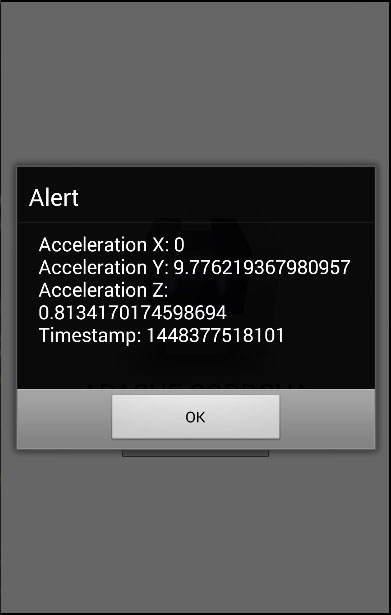
现在,如果我们按下 GET ACCELERATION 按钮,我们将获得当前加速度值。如果我们按下 WATCH ACCELERATION 按钮,警报将每三秒触发一次。显示第三个警报后,将调用 clearWatch 函数,并且由于我们将超时设置为 10000 毫秒,因此我们将不会再收到任何警报。