
DynamoDB - 创建项目
在 DynamoDB 中创建项目主要包括项目和属性规范以及指定条件的选项。 每个项目都作为一组属性存在,每个属性都被命名并分配有特定类型的值。
值类型包括标量、文档或集合。 项目的大小限制为 400KB,任何数量的属性都可能符合该限制。 名称和值大小(二进制和 UTF-8 长度)决定项目大小。 使用短属性名称有助于最小化项目大小。
注意 − 必须指定所有主键属性,主键只需要分区键; 以及需要分区键和排序键的复合键。
此外,请记住表没有预定义的架构。 您可以在一张表中存储截然不同的数据集。
使用 GUI 控制台、Java 或其他工具来执行此任务。
如何使用 GUI 控制台创建项目?
导航到控制台。 在左侧导航窗格中,选择表格。 选择用作目标的表名称,然后选择项目选项卡,如以下屏幕截图所示。
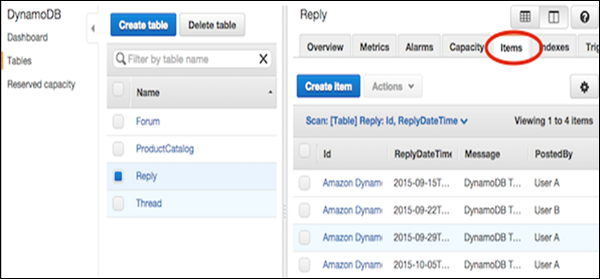
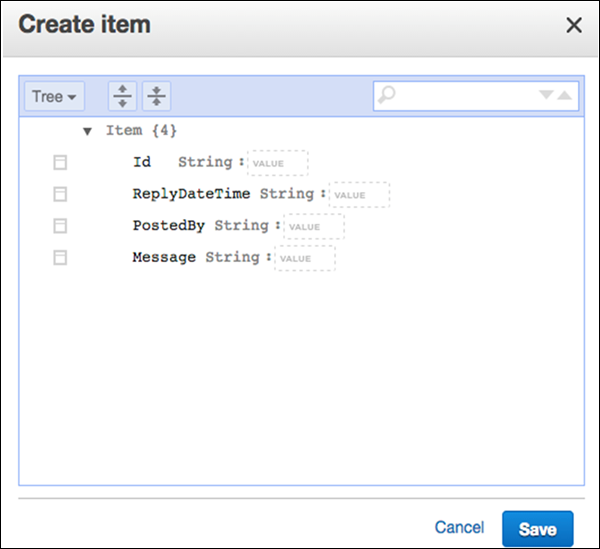
选择创建项目。 创建项目屏幕提供了用于输入所需属性值的界面。 还必须输入任何二级索引。
如果您需要更多属性,请选择消息左侧的操作菜单。 然后选择追加和所需的数据类型。
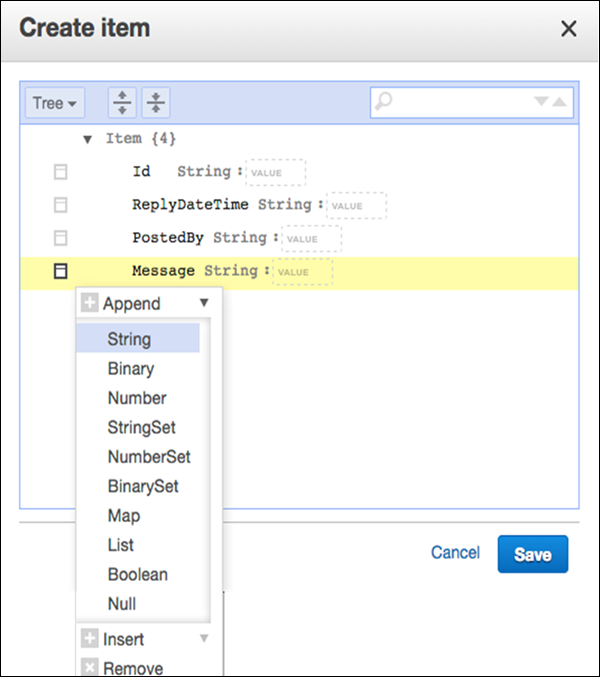
输入所有基本信息后,选择保存以添加项目。
如何在项目创建中使用 Java?
在项目创建操作中使用 Java 包括创建 DynamoDB 类实例、Table 类实例、Item 类实例,以及指定要创建的项目的主键和属性。 然后使用 putItem 方法添加新项目。
示例
DynamoDB dynamoDB = new DynamoDB (new AmazonDynamoDBClient(
   new ProfileCredentialsProvider()));
Table table = dynamoDB.getTable("ProductList");

// Spawn a related items list
List<Number> RELItems = new ArrayList<Number>();
RELItems.add(123);
RELItems.add(456);
RELItems.add(789);

//Spawn a product picture map
Map<String, String> photos = new HashMap<String, String>();
photos.put("Anterior", "http://xyz.com/products/101_front.jpg");
photos.put("Posterior", "http://xyz.com/products/101_back.jpg");
photos.put("Lateral", "http://xyz.com/products/101_LFTside.jpg");

//Spawn a product review map
Map<String, List<String>> prodReviews = new HashMap<String, List<String>>();
List<String> fiveStarRVW = new ArrayList<String>();
fiveStarRVW.add("Shocking high performance.");
fiveStarRVW.add("Unparalleled in its market.");
prodReviews.put("5 Star", fiveStarRVW);
List<String> oneStarRVW = new ArrayList<String>();
oneStarRVW.add("The worst offering in its market.");
prodReviews.put("1 Star", oneStarRVW);

// Generate the item
Item item = new Item()
   .withPrimaryKey("Id", 101)
   .withString("Nomenclature", "PolyBlaster 101")
   .withString("Description", "101 description")
   .withString("Category", "Hybrid Power Polymer Cutter")
   .withString("Make", "Brand – XYZ")
   .withNumber("Price", 50000)
   .withString("ProductCategory", "Laser Cutter")
   .withBoolean("Availability", true)
   .withNull("Qty")
   .withList("ItemsRelated", RELItems)
   .withMap("Images", photos)
   .withMap("Reviews", prodReviews);

// Add item to the table
PutItemOutcome outcome = table.putItem(item);
您还可以查看以下更大的示例。
注意 − 以下示例可能假设先前创建的数据源。 在尝试执行之前,获取支持库并创建必要的数据源(具有所需特征的表或其他引用源)。
以下示例还使用 Eclipse IDE、AWS 凭证文件以及 Eclipse AWS Java 项目中的 AWS Toolkit。
package com.amazonaws.codesamples.document;

import java.io.IOException;
import java.util.Arrays;
import java.util.HashMap;
import java.util.HashSet;
import java.util.Map;

import com.amazonaws.auth.profile.ProfileCredentialsProvider;
import com.amazonaws.services.dynamodbv2.AmazonDynamoDBClient;
import com.amazonaws.services.dynamodbv2.document.DeleteItemOutcome;
import com.amazonaws.services.dynamodbv2.document.DynamoDB;
import com.amazonaws.services.dynamodbv2.document.Item;
import com.amazonaws.services.dynamodbv2.document.Table;

import com.amazonaws.services.dynamodbv2.document.UpdateItemOutcome;
import com.amazonaws.services.dynamodbv2.document.spec.DeleteItemSpec;
import com.amazonaws.services.dynamodbv2.document.spec.UpdateItemSpec;
import com.amazonaws.services.dynamodbv2.document.utils.NameMap;
import com.amazonaws.services.dynamodbv2.document.utils.ValueMap;
import com.amazonaws.services.dynamodbv2.model.ReturnValue;

public class CreateItemOpSample {
   static DynamoDB dynamoDB = new DynamoDB(new AmazonDynamoDBClient (
      new ProfileCredentialsProvider()));
   static String tblName = "ProductList";

   public static void main(String[] args) throws IOException {
      createItems();
      retrieveItem();

      // Execute updates
      updateMultipleAttributes();
      updateAddNewAttribute();
      updateExistingAttributeConditionally();

      // Item deletion
      deleteItem();
   }
   private static void createItems() {
      Table table = dynamoDB.getTable(tblName);
      try {
         Item item = new Item()
            .withPrimaryKey("ID", 303)
            .withString("Nomenclature", "Polymer Blaster 4000")
            .withStringSet( "Manufacturers",
            new HashSet<String>(Arrays.asList("XYZ Inc.", "LMNOP Inc.")))
            .withNumber("Price", 50000)
            .withBoolean("InProduction", true)
            .withString("Category", "Laser Cutter");

         table.putItem(item);
         item = new Item()
            .withPrimaryKey("ID", 313)
            .withString("Nomenclature", "Agitatatron 2000")
            .withStringSet( "Manufacturers",
            new HashSet<String>(Arrays.asList("XYZ Inc,", "CDE Inc.")))
            .withNumber("Price", 40000)
            .withBoolean("InProduction", true)
            .withString("Category", "Agitator");

         table.putItem(item);
      } catch (Exception e) {
         System.err.println("Cannot create items.");
         System.err.println(e.getMessage());
      }
   }
}

