
DynamoDB - UpdateItem 更新项目
更新 DynamoDB 中的项目主要包括指定项目的完整主键和表名称。 它需要为您修改的每个属性提供一个新值。 该操作使用 UpdateItem,它会修改现有项目或在发现缺失项目时创建它们。
在更新中,您可能希望通过显示操作之前和之后的原始值和新值来跟踪更改。 UpdateItem 使用 ReturnValues 参数来实现此目的。
注意 − 该操作不会报告容量单位消耗,但您可以使用ReturnConsumedCapacity参数。
使用 GUI 控制台、Java 或任何其他工具来执行此任务。
如何使用 GUI 工具更新项目?
导航到控制台。 在左侧导航窗格中,选择表格。 选择所需的表格,然后选择项目选项卡。
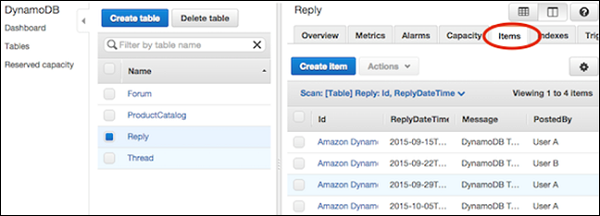
选择所需更新的项目,然后选择操作 | 编辑。
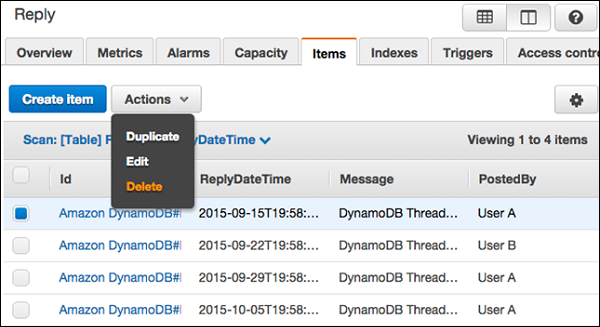
在编辑项目窗口中修改任何必要的属性或值。
使用 Java 更新项目
在项目更新操作中使用 Java 需要创建一个 Table 类实例,并调用其 updateItem 方法。 然后指定项目的主键,并提供一个 UpdateExpression 详细说明属性修改。
以下是相同的示例 −
DynamoDB dynamoDB = new DynamoDB(new AmazonDynamoDBClient(
   new ProfileCredentialsProvider()));

Table table = dynamoDB.getTable("ProductList");

Map<String, String> expressionAttributeNames = new HashMap<String, String>();
expressionAttributeNames.put("#M", "Make");
expressionAttributeNames.put("#P", "Price
expressionAttributeNames.put("#N", "ID");

Map<String, Object> expressionAttributeValues = new HashMap<String, Object>();
expressionAttributeValues.put(":val1",
   new HashSet<String>(Arrays.asList("Make1","Make2")));
expressionAttributeValues.put(":val2", 1);       //Price

UpdateItemOutcome outcome =  table.updateItem(
   "internalID",                                 // key attribute name
   111,                                          // key attribute value
   "add #M :val1 set #P = #P - :val2 remove #N", // UpdateExpression
   expressionAttributeNames,
   expressionAttributeValues);
updateItem 方法还允许指定条件,如以下示例所示 −
Table table = dynamoDB.getTable("ProductList");
Map<String, String> expressionAttributeNames = new HashMap<String, String>();
expressionAttributeNames.put("#P", "Price");

Map<String, Object> expressionAttributeValues = new HashMap<String, Object>();
expressionAttributeValues.put(":val1", 44);  // change Price to 44
expressionAttributeValues.put(":val2", 15);  // only if currently 15

UpdateItemOutcome outcome = table.updateItem (new PrimaryKey("internalID",111),
   "set #P = :val1",                        // Update
   "#P = :val2",                            // Condition
   expressionAttributeNames,
   expressionAttributeValues);
使用计数器更新项目
DynamoDB 允许原子计数器,这意味着使用 UpdateItem 递增/递减属性值而不影响其他请求; 此外,计数器始终更新。
以下示例解释了如何完成此操作。
注意 − 以下示例可能假设先前创建的数据源。 在尝试执行之前,获取支持库并创建必要的数据源(具有所需特征的表或其他引用源)。
此示例还使用 Eclipse IDE、AWS 凭证文件以及 Eclipse AWS Java 项目中的 AWS Toolkit。
package com.amazonaws.codesamples.document;

import java.io.IOException;
import java.util.Arrays;
import java.util.HashMap;
import java.util.HashSet;
import java.util.Map;

import com.amazonaws.auth.profile.ProfileCredentialsProvider;
import com.amazonaws.services.dynamodbv2.AmazonDynamoDBClient;
import com.amazonaws.services.dynamodbv2.document.DeleteItemOutcome;
import com.amazonaws.services.dynamodbv2.document.DynamoDB;
import com.amazonaws.services.dynamodbv2.document.Item;
import com.amazonaws.services.dynamodbv2.document.Table;

import com.amazonaws.services.dynamodbv2.document.UpdateItemOutcome;
import com.amazonaws.services.dynamodbv2.document.spec.DeleteItemSpec;
import com.amazonaws.services.dynamodbv2.document.spec.UpdateItemSpec;
import com.amazonaws.services.dynamodbv2.document.utils.NameMap;
import com.amazonaws.services.dynamodbv2.document.utils.ValueMap;
import com.amazonaws.services.dynamodbv2.model.ReturnValue;

public class UpdateItemOpSample {
   static DynamoDB dynamoDB = new DynamoDB(new AmazonDynamoDBClient(
      new ProfileCredentialsProvider()));
   static String tblName = "ProductList";

   public static void main(String[] args) throws IOException {
      createItems();
      retrieveItem();

      // Execute updates
      updateMultipleAttributes();
      updateAddNewAttribute();
      updateExistingAttributeConditionally();

      // Item deletion
      deleteItem();
   }
   private static void createItems() {
      Table table = dynamoDB.getTable(tblName);
      try {
         Item item = new Item()
            .withPrimaryKey("ID", 303)
            .withString("Nomenclature", "Polymer Blaster 4000")
            .withStringSet( "Manufacturers",
            new HashSet<String>(Arrays.asList("XYZ Inc.", "LMNOP Inc.")))
            .withNumber("Price", 50000)
            .withBoolean("InProduction", true)
            .withString("Category", "Laser Cutter");
            table.putItem(item);

         item = new Item()
            .withPrimaryKey("ID", 313)
            .withString("Nomenclature", "Agitatatron 2000")
            .withStringSet( "Manufacturers",
            new HashSet<String>(Arrays.asList("XYZ Inc,", "CDE Inc.")))
            .withNumber("Price", 40000)
            .withBoolean("InProduction", true)
            .withString("Category", "Agitator");
            table.putItem(item);
      } catch (Exception e) {
         System.err.println("Cannot create items.");
         System.err.println(e.getMessage());
      }
   }
   private static void updateAddNewAttribute() {
      Table table = dynamoDB.getTable(tableName);
      try {
         Map<String, String> expressionAttributeNames = new HashMap<String, String>();
         expressionAttributeNames.put("#na", "NewAttribute");
         UpdateItemSpec updateItemSpec = new UpdateItemSpec()
            .withPrimaryKey("ID", 303)
            .withUpdateExpression("set #na = :val1")
            .withNameMap(new NameMap()
            .with("#na", "NewAttribute"))
            .withValueMap(new ValueMap()
            .withString(":val1", "A value"))
            .withReturnValues(ReturnValue.ALL_NEW);
            UpdateItemOutcome outcome =  table.updateItem(updateItemSpec);

         // Confirm
         System.out.println("Displaying updated item...");
         System.out.println(outcome.getItem().toJSONPretty());
      } catch (Exception e) {
         System.err.println("Cannot add an attribute in " + tableName);
         System.err.println(e.getMessage());
      }
   }
}

