
GWT - CellTree 小部件
简介
CellTree 小部件表示树的视图。
类声明
以下是 com.google.gwt.user.cellview.client.CellTree 类的声明 −
public class CellTree
   extends AbstractCellTree
      implements HasAnimation, Focusable
类构造函数
| Sr.No. | 构造函数 &描述 |
|---|---|
| 1 |
CellTree(TreeViewModel viewModel, T rootValue) 构造一个新的 CellTree。 |
| 2 |
CellTree(TreeViewModel viewModel, T rootValue, CellTree.Resources resources) 构造一个新的 CellTree。 |
类方法
| Sr.No. | 函数名称 &描述 |
|---|---|
| 1 |
protected char getAccessKey() 获取访问密钥。 |
| 2 |
CellTree.NodeAnimation getAnimation() 如果启用了动画,则获取用于打开和关闭此树中的节点的动画。 |
| 3 |
int getDefaultNodeSize() 获取每个树节点下显示的默认最大子节点数。 |
| 4 |
TreeNode getRootTreeNode() 获取根 TreeNode。 |
| 5 |
int getTabIndex() 获取小部件在选项卡索引中的位置。 |
| 6 |
boolean isAnimationEnabled() 如果启用了动画,则返回 true,否则返回 false。 |
| 7 |
protected void onBlur() 调用时键盘选定的节点失去焦点。 |
| 8 |
void onBrowserEvent(Event event) 每当收到浏览器事件时触发。 |
| 9 |
protected void onFocus() 键盘选定的节点获得焦点时调用。 |
| 10 |
void setAccessKey(char key) 设置小部件的"访问键"。 |
| 11 |
void setAnimation(CellTree.NodeAnimation animation) 设置用于打开和关闭此树中的节点的动画。 |
| 12 |
void setAnimationEnabled(boolean enable) 启用或禁用动画。 |
| 13 |
void setDefaultNodeSize(int defaultNodeSize) 设置每个子节点下显示的默认子节点数。 |
| 14 |
void setFocus(boolean focused) 明确聚焦/取消聚焦此小部件。 |
| 15 |
void setTabIndex(int index) 设置小部件在选项卡索引中的位置。 |
继承的方法
该类继承了以下类的方法 −
com.google.gwt.user.client.ui.UIObject
com.google.gwt.user.client.ui.Widget
com.google.gwt.user.client.ui.Composite
com.google.gwt.user.cellview.client.AbstractCellTree
java.lang.Object
CellTree Widget 示例
此示例将带您通过简单的步骤展示 GWT 中 CellTree Widget 的使用方法。按照以下步骤更新我们在 GWT - 创建应用程序 一章中创建的 GWT 应用程序 −
| 步骤 | 描述 |
|---|---|
| 1 | 在 com.tutorialspoint 包下创建一个名为 HelloWorld 的项目,如 GWT - 创建应用程序 一章中所述。 |
| 2 | 修改 HelloWorld.gwt.xml、HelloWorld.css、HelloWorld.html 和 HelloWorld.java,如下所述。其余文件保持不变。 |
| 3 | 编译并运行应用程序以验证实现逻辑的结果。 |
以下是修改后的模块描述符src/com.tutorialspoint/HelloWorld.gwt.xml的内容。
<?xml version = "1.0" encoding = "UTF-8"?>
<module rename-to = 'helloworld'>
   <!-- Inherit the core Web Toolkit stuff.                        -->
   <inherits name = 'com.google.gwt.user.User'/>

   <!-- Inherit the default GWT style sheet.                       -->
   <inherits name = 'com.google.gwt.user.theme.clean.Clean'/>

   <!-- Specify the app entry point class.                         -->
   <entry-point class = 'com.tutorialspoint.client.HelloWorld'/>

   <!-- Specify the paths for translatable code                    -->
   <source path ='client'/>
   <source path = 'shared'/>

</module>
以下是修改后的样式表文件war/HelloWorld.css的内容。
body {
   text-align: center;
   font-family: verdana, sans-serif;
}

h1 {
   font-size: 2em;
   font-weight: bold;
   color: #777777;
   margin: 40px 0px 70px;
   text-align: center;
}
以下是修改后的 HTML 主机文件 war/HelloWorld.html 的内容。
<html>
   <head>
      <title>Hello World</title>
      <link rel = "stylesheet" href = "HelloWorld.css"/>
      <script language = "javascript" src = "helloworld/helloworld.nocache.js">
      </script>
   </head>

   <body>
      <h1>CellTree Widget Demonstration</h1>
      <div id = "gwtContainer"></div>
   </body>
</html>
让我们来看看 Java 文件 src/com.tutorialspoint/HelloWorld.java 的以下内容,它将演示如何使用 CellTree 小部件。
package com.tutorialspoint.client;

import java.util.ArrayList;
import java.util.List;

import com.google.gwt.cell.client.AbstractCell;
import com.google.gwt.cell.client.Cell;
import com.google.gwt.cell.client.TextCell;
import com.google.gwt.core.client.EntryPoint;
import com.google.gwt.core.client.GWT;
import com.google.gwt.safehtml.shared.SafeHtmlBuilder;
import com.google.gwt.user.cellview.client.CellTree;
import com.google.gwt.user.cellview.client.
HasKeyboardSelectionPolicy.KeyboardSelectionPolicy;
import com.google.gwt.user.cellview.client.TreeNode;
import com.google.gwt.user.client.ui.RootPanel;
import com.google.gwt.user.client.ui.VerticalPanel;
import com.google.gwt.view.client.ListDataProvider;
import com.google.gwt.view.client.SingleSelectionModel;
import com.google.gwt.view.client.TreeViewModel;

public class HelloWorld implements EntryPoint {

   /**
    * A list of songs.
    */

   private static class Playlist {
     private final String name;
     private final List<String> songs = new ArrayList<String>();

     public Playlist(String name) {
       this.name = name;
     }

      /**
       * Add a song to the playlist.
       *
       * @param name the name of the song
       */

      public void addSong(String name) {
         songs.add(name);
      }

      public String getName() {
         return name;
      }

      /**
       * Return the list of songs in the playlist.
       */

      public List<String> getSongs() {
         return songs;
      }
   }

   /**
    * A composer of classical music.
    */

   private static class Composer {
      private final String name;
      private final List<Playlist> playlists = new ArrayList<Playlist>();

      public Composer(String name) {
         this.name = name;
      }

      /**
       * Add a playlist to the composer.
       *
       * @param playlist the playlist to add
       */

      public Playlist addPlaylist(Playlist playlist) {
         playlists.add(playlist);
         return playlist;
      }

      public String getName() {
         return name;
      }

      /**
       * Return the rockin' playlist for this composer.
       */

      public List<Playlist> getPlaylists() {
         return playlists;
      }
   }

   /**
    * The model that defines the nodes in the tree.
    */
   private static class CustomTreeModel implements TreeViewModel {

   private final List<Composer> composers;

   /**
    * This selection model is shared across all leaf nodes.
    * A selection model can also be shared across all nodes
    * in the tree, or each set of child nodes can have
    * its own instance. This gives you flexibility to
    * determine how nodes are selected.
    */
   private final SingleSelectionModel<String> selectionModel
   = new SingleSelectionModel<String>();

      public CustomTreeModel() {
         // Create a database of information.
         composers = new ArrayList<Composer>();

         // Add compositions by Beethoven.
         {
            Composer beethoven = new Composer("Beethoven");
            composers.add(beethoven);

            Playlist concertos = beethoven.addPlaylist(
            new Playlist("Concertos"));
            concertos.addSong("No. 1 - C");
            concertos.addSong("No. 2 - B-Flat Major");
            concertos.addSong("No. 3 - C Minor");
            concertos.addSong("No. 4 - G Major");
            concertos.addSong("No. 5 - E-Flat Major");

            Playlist quartets = beethoven.addPlaylist(
            new Playlist("Quartets"));
            quartets.addSong("Six String Quartets");
            quartets.addSong("Three String Quartets");
            quartets.addSong("Grosse Fugue for String Quartets");

            Playlist sonatas = beethoven.addPlaylist(
            new Playlist("Sonatas"));
            sonatas.addSong("Sonata in A Minor");
            sonatas.addSong("Sonata in F Major");

            Playlist symphonies = beethoven.addPlaylist(
            new Playlist("Symphonies"));
            symphonies.addSong("No. 2 - D Major");
            symphonies.addSong("No. 2 - D Major");
            symphonies.addSong("No. 3 - E-Flat Major");
            symphonies.addSong("No. 4 - B-Flat Major");
            symphonies.addSong("No. 5 - C Minor");
            symphonies.addSong("No. 6 - F Major");
            symphonies.addSong("No. 7 - A Major");
            symphonies.addSong("No. 8 - F Major");
            symphonies.addSong("No. 9 - D Minor");
         }

         // Add compositions by Brahms.
         {
            Composer brahms = new Composer("Brahms");
            composers.add(brahms);
            Playlist concertos = brahms.addPlaylist(
            new Playlist("Concertos"));
            concertos.addSong("Violin Concerto");
            concertos.addSong("Double Concerto - A Minor");
            concertos.addSong("Piano Concerto No. 1 - D Minor");
            concertos.addSong("Piano Concerto No. 2 - B-Flat Major");

            Playlist quartets = brahms.addPlaylist(
            new Playlist("Quartets"));
            quartets.addSong("Piano Quartet No. 1 - G Minor");
            quartets.addSong("Piano Quartet No. 2 - A Major");
            quartets.addSong("Piano Quartet No. 3 - C Minor");
            quartets.addSong("String Quartet No. 3 - B-Flat Minor");

            Playlist sonatas = brahms.addPlaylist(
            new Playlist("Sonatas"));
            sonatas.addSong("Two Sonatas for Clarinet - F Minor");
            sonatas.addSong("Two Sonatas for Clarinet - E-Flat Major");

            Playlist symphonies = brahms.addPlaylist(
            new Playlist("Symphonies"));
            symphonies.addSong("No. 1 - C Minor");
            symphonies.addSong("No. 2 - D Minor");
            symphonies.addSong("No. 3 - F Major");
            symphonies.addSong("No. 4 - E Minor");
         }

         // Add compositions by Mozart.
         {
            Composer mozart = new Composer("Mozart");
            composers.add(mozart);
            Playlist concertos = mozart.addPlaylist(
            new Playlist("Concertos"));
            concertos.addSong("Piano Concerto No. 12");
            concertos.addSong("Piano Concerto No. 17");
            concertos.addSong("Clarinet Concerto");
            concertos.addSong("Violin Concerto No. 5");
            concertos.addSong("Violin Concerto No. 4");
         }
      }

      /**
       * Get the {@link NodeInfo} that provides the children of the
       * specified value.
       */

      public <T> NodeInfo<?> getNodeInfo(T value) {
         if (value == null) {
            // LEVEL 0.
            // We passed null as the root value. Return the composers.

            // Create a data provider that contains the list of composers.
            ListDataProvider<Composer> dataProvider
            = new ListDataProvider<HelloWorld.Composer>(
            composers);

            // Create a cell to display a composer.
            Cell<HelloWorld.Composer> cell
            = new AbstractCell<HelloWorld.Composer>() {
               @Override
               public void render(Composer value, Object key,
               SafeHtmlBuilder sb) {
                  if (value != null) {
                	 sb.appendHtmlConstant("    ");
                     sb.appendEscaped(value.getName());
                  }
               }
            };

            // Return a node info that pairs the data provider and the cell.
            return new DefaultNodeInfo<Composer>(dataProvider, cell);
         } else if (value instanceof Composer) {

            // LEVEL 1.
            // We want the children of the composer. Return the playlists.
            ListDataProvider<HelloWorld.Playlist> dataProvider
            = new ListDataProvider<HelloWorld.Playlist>(
            ((Composer) value).getPlaylists());
            Cell<HelloWorld.Playlist> cell =
            new AbstractCell<HelloWorld.Playlist>() {
               @Override
               public void render(Playlist value, Object key, SafeHtmlBuilder sb) {
                  if (value != null) {
                     sb.appendHtmlConstant("    ");
                     sb.appendEscaped(value.getName());
                  }
               }
            };
            return new DefaultNodeInfo<Playlist>(dataProvider, cell);
         } else if (value instanceof Playlist) {
            // LEVEL 2 - LEAF.
            // We want the children of the playlist. Return the songs.
            ListDataProvider<String> dataProvider
            = new ListDataProvider<String>(
            ((Playlist) value).getSongs());

            // Use the shared selection model.
            return new DefaultNodeInfo<String>(dataProvider, new TextCell(),
            selectionModel, null);
         }

         return null;
      }

      /**
       * Check if the specified value represents a leaf node.
       * Leaf nodes cannot be opened.
       */
      public boolean isLeaf(Object value) {

      // The leaf nodes are the songs, which are Strings.
      if (value instanceof String) {
         return true;
      }

      return false;
      }
   }

   public void onModuleLoad() {

    // 为树创建模型。
    TreeViewModel model = new CustomTreeModel();
    //使用其 BasicResources 获取 CellTree 样式
    //CellTree.Resources res = GWT.create(CellTree.BasicResources.class);

    /*
    * 使用模型创建树。我们使用 <code>null</code>
    * 作为根节点的默认值。默认值将
    * 传递给 CustomTreeModel#getNodeInfo();
    */
    CellTree tree = new CellTree(model, null);

    tree.setKeyboardSelectionPolicy(KeyboardSelectionPolicy.ENABLED);

    // 默认打开第一个播放列表。
    TreeNode rootNode = tree.getRootTreeNode();
    TreeNode firstPlaylist = rootNode.setChildOpen(0, true);
    firstPlaylist.setChildOpen(0, true);

    VerticalPanel panel = new VerticalPanel();
    panel.setBorderWidth(1);
    panel.setWidth("300");
    panel.add(tree);


     // 将小部件添加到根面板。
     RootPanel.get().add(panel);
   }
}
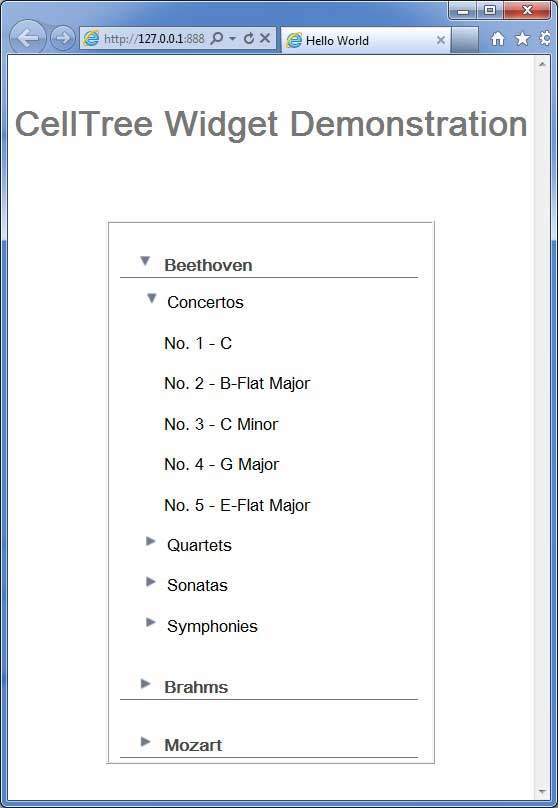
完成所有更改后,让我们像在 GWT - 创建应用程序 一章中一样,在开发模式下编译并运行应用程序。如果您的应用程序一切正常,这将产生以下结果 −
 gwt_complex_widgets.html
