
GWT - RichTextArea 小部件
简介
RichTextArea 小部件代表一个允许复杂样式和格式的富文本编辑器。由于某些浏览器不支持富文本编辑,而其他浏览器仅支持有限的功能子集,因此有两个格式化程序接口,可通过 getBasicFormatter() 和 getExtendedFormatter() 访问。
完全不支持富文本编辑的浏览器将对这两个都返回 null,而仅支持基本功能的浏览器将对后者 getExtendedFormatter() 返回 null。
类声明
以下是 com.google.gwt.user.client.ui.RichTextArea 类的声明 −
public class RichTextArea
    extends FocusWidget
        implements HasHTML, HasInitializeHandlers, HasSafeHtml
CSS 样式规则
以下默认 CSS 样式规则将应用于所有 TextBox 小部件。您可以根据您的要求覆盖它。
.gwt-RichTextArea {}
类构造函数
| Sr.No. | 构造函数 &描述 |
|---|---|
| 1 |
RichTextArea() 创建一个新的、空白的 RichTextArea 对象,没有样式表。 |
类方法
| Sr.No. | 函数名称 &描述 |
|---|---|
| 1 |
HandlerRegistration addInitializeHandler(InitializeHandler handler) 添加 InitializeEvent 处理程序。 |
| 2 |
RichTextArea.BasicFormatter getBasicFormatter() 已弃用。请改用 getFormatter()。 |
| 3 |
RichTextArea.ExtendedFormatter getExtendedFormatter() 已弃用。改用 getFormatter()。 |
| 4 |
RichTextArea.Formatter getFormatter() 获取富文本格式化接口。 |
| 5 |
java.lang.String getHTML() 以 HTML 格式获取此对象的内容。 |
| 6 |
java.lang.String getText() 获取此对象的文本。 |
| 7 |
boolean isEnabled() 获取此小部件是否已启用。 |
| 8 |
protected void onAttach() 当小部件附加到浏览器文档时,将调用此方法。 |
| 9 |
protected void onDetach() 当小部件从浏览器文档分离时,将调用此方法。 |
| 10 |
void setEnabled(boolean enabled) 设置此小部件是否已启用。 |
| 11 |
void setFocus(boolean focused) 明确聚焦/取消聚焦此小部件。 |
| 12 |
void setHTML(java.lang.String safeHtml) 通过安全 HTML 设置此对象的内容。 |
| 13 |
void setHTML(java.lang.String html) 通过HTML。 |
| 14 |
void setText(java.lang.String text) 设置此对象的文本。 |
继承的方法
该类继承了以下类的方法 −
com.google.gwt.user.client.ui.UIObject
com.google.gwt.user.client.ui.Widget
com.google.gwt.user.client.ui.FocusWidget
java.lang.Object
RichTextBox Widget 示例
此示例将带您通过简单的步骤展示如何在 GWT 中使用 RichTextBox Widget。按照以下步骤更新我们在 GWT - 创建应用程序 一章中创建的 GWT 应用程序 −
| 步骤 | 描述 |
|---|---|
| 1 | 在 com.tutorialspoint 包下创建一个名为 HelloWorld 的项目,如 GWT - 创建应用程序 一章中所述。 |
| 2 | 修改 HelloWorld.gwt.xml、HelloWorld.css、HelloWorld.html 和 HelloWorld.java,如下所述。其余文件保持不变。 |
| 3 | 编译并运行应用程序以验证实现逻辑的结果。 |
以下是修改后的模块描述符src/com.tutorialspoint/HelloWorld.gwt.xml的内容。
<?xml version = "1.0" encoding = "UTF-8"?>
<module rename-to = 'helloworld'>
   <!-- Inherit the core Web Toolkit stuff.                        -->
   <inherits name = 'com.google.gwt.user.User'/>

   <!-- Inherit the default GWT style sheet.                       -->
   <inherits name = 'com.google.gwt.user.theme.clean.Clean'/>

   <!-- Specify the app entry point class.                         -->
   <entry-point class = 'com.tutorialspoint.client.HelloWorld'/>

   <!-- Specify the paths for translatable code                    -->
   <source path = 'client'/>
   <source path = 'shared'/>

</module>
以下是修改后的样式表文件war/HelloWorld.css的内容。
body {
   text-align: center;
   font-family: verdana, sans-serif;
}

h1 {
   font-size: 2em;
   font-weight: bold;
   color: #777777;
   margin: 40px 0px 70px;
   text-align: center;
}

.gwt-RichTextArea {
   padding:10px;
}
以下是修改后的 HTML 主机文件 war/HelloWorld.html 的内容。
<html>
   <head>
      <title>Hello World</title>
      <link rel = "stylesheet" href = "HelloWorld.css"/>
      <script language = "javascript" src = "helloworld/helloworld.nocache.js">
      </script>
   </head>

   <body>
      <h1>RichTextArea Widget Demonstration</h1>
      <div id = "gwtContainer"></div>
   </body>
</html>
让我们来看看 Java 文件 src/com.tutorialspoint/HelloWorld.java 的以下内容,它将演示 TextBox 小部件的使用。
package com.tutorialspoint.client;

import com.google.gwt.core.client.EntryPoint;
import com.google.gwt.user.client.ui.RichTextArea;
import com.google.gwt.user.client.ui.RootPanel;
import com.google.gwt.user.client.ui.VerticalPanel;

public class HelloWorld implements EntryPoint {
   public void onModuleLoad() {
    //创建 RichTextArea 元素
    RichTextArea richTextArea = new RichTextArea();

    richTextArea.setHeight("200");
    richTextArea.setWidth("200");

    //将文本添加到文本区域
    richTextArea.setHTML("<b>Hello World!</b> <br/> <br/>" +
    "<i>Be Happy!</i> </br> <br/> <u>Stay Cool!</u>");

    // 将文本框添加到根面板。
    VerticalPanel panel = new VerticalPanel();
    panel.add(richTextArea);

    RootPanel.get("gwtContainer").add(panel);
   }
}
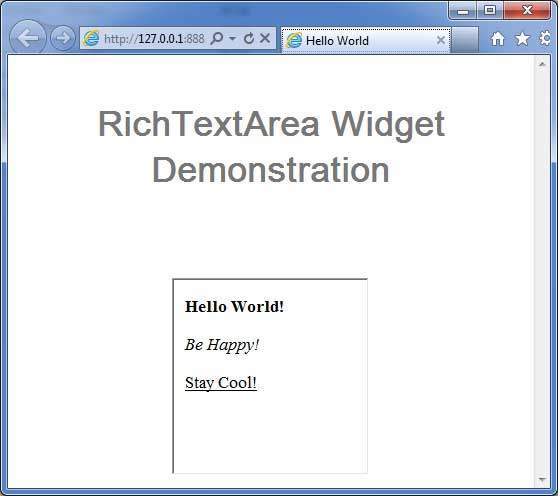
完成所有更改后,让我们像在 GWT - 创建应用程序 一章中一样,在开发模式下编译并运行应用程序。如果您的应用程序一切正常,这将产生以下结果 −
 gwt_form_widgets.html
