
报告脚本
我们在前面的章节中看到,报告上显示的数据通常是从报告参数和报告字段中提取的。可以使用报告变量及其表达式来处理这些数据。在某些情况下,使用报告表达式或变量无法轻松实现复杂的功能。例如,复杂的字符串操作、Map 的构建、内存中的对象列表或使用第三方 Java API 的日期操作。对于这种情况,JasperReports 为我们提供了一种简单而强大的方法,即使用 脚本 来实现这一点。
脚本是每次发生报告事件时执行的 Java 代码序列。报告变量的值可以通过脚本来影响。
脚本声明
我们可以通过两种方式声明脚本 −
使用 <scriptlet> 元素。此元素具有 name 属性和 class 属性。class 属性应指定扩展 JRAbstractScriptlet 类的类的名称。该类必须在报告填充时在类路径中可用,并且必须具有空的构造函数,以便引擎可以动态实例化它。
在报告模板 (JRXML) 中使用元素 <jasperReport> 的属性 scriptletClass。通过使用 scriptlet 的完全限定名称(包括整个包名称)设置此属性,我们表明我们想要使用 scriptlet。使用此属性创建的脚本实例的作用类似于脚本列表中的第一个脚本,并具有 预定义名称 REPORT。
Scriptlet 类
Scriptlet 是一个 Java 类,必须扩展以下任一类 −
net.sf.jasperreports.engine.JRAbstractScriptlet − 此类包含许多抽象方法,必须在每次实现中覆盖这些方法。JasperReports 会在适当的时候自动调用这些方法。开发人员必须实现所有抽象方法。
net.sf.jasperreports.engine.JRDefaultScriptlet − 此类包含 JRAbstractScriptlet 中每个方法的默认空实现。开发人员只需实现其项目所需的方法即可。
下表列出了上述类中的方法。在报告填充阶段,报告引擎将在适当的时间调用这些方法。
| S.NO | 方法和说明 |
|---|---|
| 1 | public void beforeReportInit() 在报告初始化之前调用。 |
| 2 | public void afterReportInit() 在报告初始化之后调用。 |
| 3 | public void beforePageInit() 在每个页面初始化之前调用。 |
| 4 | public void afterPageInit() 在每个页面初始化之后调用初始化。 |
| 5 | public void beforeColumnInit() 在初始化每列之前调用。 |
| 6 | public void afterColumnInit() 在初始化每列之后调用。 |
| 7 | public void beforeGroupInit(String groupName) 在初始化参数中指定的组之前调用。 |
| 8 | public void afterGroupInit(String groupName) 在参数中指定的组初始化后调用。 |
| 9 | public void beforeDetailEval() 在评估报告详细信息部分中的每个记录之前调用。 |
| 10 | public void afterDetailEval() 在评估报告详细信息部分中的每个记录之后调用。 |
每个报告可以指定任意数量的脚本。如果没有为报告指定脚本,引擎仍会创建单个 JRDefaultScriptlet 实例并将其注册到内置 REPORT_SCRIPTLET 参数中。
我们可以将所需的任何其他方法添加到脚本中。报告可以使用内置参数 REPORT_SCRIPTLET 调用这些方法。
全局脚本
我们可以通过另一种方式将脚本与报告关联,即全局声明脚本。这使得脚本适用于给定 JasperReports 部署中正在填写的所有报告。由于可以将脚本作为扩展添加到 JasperReports,因此这很容易实现。脚本扩展点由 net.sf.jasperreports.engine.scriptlets.ScriptletFactory 接口表示。JasperReports 将在运行时加载通过扩展提供的所有脚本工厂。然后,它将向每个工厂询问它们想要应用于正在运行的当前报告的脚本实例列表。当请求脚本实例列表时,引擎会提供一些上下文信息,工厂可以使用这些信息来决定哪些脚本实际上适用于当前报告。
报告管理器
管理器只是全局脚本的扩展,使我们能够解决报告引擎在生成报告时在运行时进入无限循环的问题。在设计时无法检测到无效的报告模板,因为大多数情况下,进入无限循环的条件取决于运行时输入到引擎的实际数据。报告管理器有助于确定某个报告是否已进入无限循环,并且可以停止它。这可以防止运行报告的机器资源耗尽。
JasperReports 有两个简单的报告管理器,它们可以根据指定的最大页数或指定的超时间隔停止报告执行。它们是 −
net.sf.jasperreports.governors.MaxPagesGovernor − 这是一个全局脚本,它正在寻找两个配置属性来决定它是否适用于当前正在运行的报告。配置属性是 −
net.sf.jasperreports.governor.max.pages.enabled=[true|false]
net.sf.jasperreports.governor.max.pages=[integer]
net.sf.jasperreports.governors.TimeoutGovernor− 这也是一个全局脚本,它正在寻找以下两个配置属性来决定是否适用。
配置属性是 −
net.sf.jasperreports.governor.timeout.enabled=[true|false]
net.sf.jasperreports.governor.timeout=[milliseconds]
这两个调控器的属性都可以在 jasperreports.properties 文件中全局设置,也可以在报告级别设置为自定义报告属性。这很有用,因为不同的报告可能具有不同的估计大小或超时限制,也可能因为您可能希望为所有报告打开调控器,同时关闭某些报告,反之亦然。
示例
让我们编写一个脚本类(MyScriptlet)。文件 C:\tools\jasperreports-5.0.1\test\src\com.tutorialspoint\MyScriptlet.java 的内容如下 −
package com.tutorialspoint;

import net.sf.jasperreports.engine.JRDefaultScriptlet;
import net.sf.jasperreports.engine.JRScriptletException;

public class MyScriptlet extends JRDefaultScriptlet {

   public void afterReportInit() throws JRScriptletException{
      System.out.println("call afterReportInit()");
      // this.setVariableValue("AllCountries", sbuffer.toString());
      this.setVariableValue("someVar", new String("This variable value
         was modified by the scriptlet."));
   }

   public String hello() throws JRScriptletException {
      return "Hello! I'm the report's scriptlet object.";
   }

}
上述 scriptlet 类的详细信息如下 −
在 afterReportInit 方法中,我们为变量 "someVar" 设置了一个值 this.setVariableValue("someVar", new String("This variable value was modified by the scriptlet."))。
在类的末尾,定义了一个名为 'hello' 的额外方法。这是一个可以添加到 Scriptlet 中的方法示例,该方法实际上返回一个值,而不是设置一个变量。
接下来,我们将在现有的报告模板中添加 scriptlet 类引用(章节 报告设计)。修改后的报告模板 (jasper_report_template.jrxml) 如下。保存到C:\tools\jasperreports-5.0.1\test目录 −
<?xml version = "1.0"?>
<!DOCTYPE jasperReport PUBLIC
   "//JasperReports//DTD Report Design//EN"
   "http://jasperreports.sourceforge.net/dtds/jasperreport.dtd">

<jasperReport xmlns = "http://jasperreports.sourceforge.net/jasperreports"
   xmlns:xsi = "http://www.w3.org/2001/XMLSchema-instance"
   xsi:schemaLocation = "http://jasperreports.sourceforge.net/jasperreports
   http://jasperreports.sourceforge.net/xsd/jasperreport.xsd"
   name = "jasper_report_template" pageWidth = "595"
   pageHeight = "842" columnWidth = "515"
   leftMargin = "40" rightMargin = "40" topMargin = "50" bottomMargin = "50"
   scriptletClass = "com.tutorialspoint.MyScriptlet">

   <style name = "alternateStyle" fontName = "Arial" forecolor = "red">

      <conditionalStyle>
         <conditionExpression>
            <![CDATA[new Boolean($V{countNumber}.intValue() % 2 == 0)]]>
         </conditionExpression>

         <style forecolor = "blue" isBold = "true"/>
      </conditionalStyle>
   </style>

   <parameter name = "ReportTitle" class = "java.lang.String"/>
   <parameter name = "Author" class = "java.lang.String"/>

   <queryString>
      <![CDATA[]]>
   </queryString>

   <field name = "country" class = "java.lang.String">
      <fieldDescription>
         <![CDATA[country]]>
      </fieldDescription>
   </field>

   <field name = "name" class = "java.lang.String">
      <fieldDescription>
         <![CDATA[name]]>
      </fieldDescription>
   </field>

   <variable name = "countNumber" class = "java.lang.Integer"
      calculation = "Count">
      <variableExpression><
         ![CDATA[Boolean.TRUE]]>
      </variableExpression>
   </variable>

   <variable name = "someVar" class = "java.lang.String">
      <initialValueExpression>
        <![CDATA["This is the initial variable value."]]>
      </initialValueExpression>
   </variable>

   <title>
      <band height = "100">

         <line>
            <reportElement x = "0" y = "0" width = "515" height = "1"/>
         </line>

         <textField isBlankWhenNull = "true" bookmarkLevel = "1">
            <reportElement x = "0" y = "10" width = "515" height = "30"/>

            <textElement textAlignment = "Center">
              <font size = "22"/>
            </textElement>

            <textFieldExpression class = "java.lang.String">
              <![CDATA[$P{ReportTitle}]]>
            </textFieldExpression>

            <anchorNameExpression>
               <![CDATA["Title"]]>
            </anchorNameExpression>
         </textField>

         <textField isBlankWhenNull = "true">
            <reportElement  x = "0" y = "40" width = "515" height = "20"/>

            <textElement textAlignment = "Center">
               <font size = "10"/>
            </textElement>

            <textFieldExpression class = "java.lang.String">
               <![CDATA[$P{Author}]]>
            </textFieldExpression>
         </textField>

         <textField isBlankWhenNull = "true">
            <reportElement  x = "0" y = "50" width = "515"
               height = "30" forecolor = "#993300"/>

            <textElement textAlignment = "Center">
               <font size = "10"/>
            </textElement>

            <textFieldExpression class = "java.lang.String">
               <![CDATA[$V{someVar}]]>
            </textFieldExpression>

         </textField>

      </band>
   </title>

   <columnHeader>
      <band height = "23">

         <staticText>
            <reportElement mode = "Opaque" x = "0" y = "3"
               width = "535" height = "15"
               backcolor = "#70A9A9" />

            <box>
               <bottomPen lineWidth = "1.0" lineColor = "#CCCCCC" />
            </box>

            <textElement />

            <text>
               <![CDATA[]]>
            </text>

         </staticText>

         <staticText>
            <reportElement x = "414" y = "3" width = "121" height = "15" />

            <textElement textAlignment = "Center" verticalAlignment = "Middle">
               <font isBold = "true" />
            </textElement>

            <text><![CDATA[Country]]></text>
         </staticText>

         <staticText>
            <reportElement x = "0" y = "3" width = "136" height = "15" />

            <textElement textAlignment = "Center" verticalAlignment = "Middle">
               <font isBold = "true" />
            </textElement>

            <text><![CDATA[Name]]></text>
         </staticText>

      </band>
   </columnHeader>

   <detail>
      <band height = "16">

         <staticText>
            <reportElement mode = "Opaque" x = "0" y = "0"
               width = "535"	height = "14"
               backcolor = "#E5ECF9" />

            <box>
               <bottomPen lineWidth = "0.25" lineColor = "#CCCCCC" />
            </box>

            <textElement />

            <text>
               <![CDATA[]]>
            </text>
         </staticText>

         <textField>
            <reportElement style = "alternateStyle" x="414" y = "0"
               width = "121" height = "15" />

            <textElement textAlignment = "Center" verticalAlignment = "Middle">
               <font size = "9" />
            </textElement>


            <textFieldExpression class = "java.lang.String">
               <![CDATA[$F{country}]]>
            </textFieldExpression>
         </textField>

         <textField>
            <reportElement x = "0" y = "0" width = "136" height = "15" />
            <textElement textAlignment = "Center" verticalAlignment = "Middle" />

            <textFieldExpression class = "java.lang.String">
               <![CDATA[$F{name}]]>
            </textFieldExpression>
         </textField>

      </band>
   </detail>

   <summary>
      <band height = "45">

         <textField isStretchWithOverflow = "true">
            <reportElement x = "0" y = "10" width = "515" height = "15" />
            <textElement textAlignment = "Center"/>

            <textFieldExpression class = "java.lang.String">
               <![CDATA["There are " + String.valueOf($V{REPORT_COUNT}) +
                  " records on this report."]]>
            </textFieldExpression>
         </textField>

         <textField isStretchWithOverflow = "true">
            <reportElement positionType = "Float" x = "0" y = "30" width = "515"
               height = "15" forecolor = "# 993300" />

            <textElement textAlignment = "Center">
               <font size = "10"/>
            </textElement>

            <textFieldExpression class = "java.lang.String">
               <![CDATA[$P{REPORT_SCRIPTLET}.hello()]]>
            </textFieldExpression>

         </textField>

      </band>
   </summary>

</jasperReport>
修改后的报表模板的详细信息如下 −
我们在 <jasperReport> 元素的属性 scriptletClass 中引用了 MyScriptlet 类。
Scriptlet 只能访问但不能修改报表字段和参数。但是,Scriptlet 可以修改报表变量值。这可以通过调用 setVariableValue() 方法来实现。此方法在 JRAbstractScriptlet 类中定义,该类始终是任何 scriptlet 的父类。在这里,我们定义了一个变量 someVar,它将被 MyScriptlet 修改为具有值 This value was modified by the scriptlet。
上述报表模板在 Summary 带中有一个方法调用,它说明了如何编写新方法(在 scriptlet 中)并在报表模板中使用它们。 ($P{REPORT_SCRIPTLET}.hello())
报告填写的 java 代码保持不变。文件 C:\tools\jasperreports-5.0.1\test\src\com.tutorialspoint\JasperReportFill.java 的内容如下 −
package com.tutorialspoint;

import java.util.ArrayList;
import java.util.HashMap;
import java.util.Map;

import net.sf.jasperreports.engine.JRException;
import net.sf.jasperreports.engine.JasperFillManager;
import net.sf.jasperreports.engine.data.JRBeanCollectionDataSource;

public class JasperReportFill {
   @SuppressWarnings("unchecked")
   public static void main(String[] args) {
      String sourceFileName =
         "C://tools/jasperreports-5.0.1/test/jasper_report_template.jasper";

      DataBeanList DataBeanList = new DataBeanList();
      ArrayList<DataBean> dataList = DataBeanList.getDataBeanList();

      JRBeanCollectionDataSource beanColDataSource = new
         JRBeanCollectionDataSource(dataList);

      Map parameters = new HashMap();
      /**
       * Passing ReportTitle and Author as parameters
       */
      parameters.put("ReportTitle", "List of Contacts");
      parameters.put("Author", "Prepared By Manisha");

      try {
         JasperFillManager.fillReportToFile(
         sourceFileName, parameters, beanColDataSource);
      } catch (JRException e) {
         e.printStackTrace();
      }
   }
}
POJO 文件 C:\tools\jasperreports-5.0.1\test\src\com.tutorialspoint\DataBean.java 的内容如下 −
package com.tutorialspoint;

public class DataBean {
   private String name;
   private String country;

   public String getName() {
      return name;
   }

   public void setName(String name) {
      this.name = name;
   }

   public String getCountry() {
      return country;
   }

   public void setCountry(String country) {
      this.country = country;
   }
}
文件 C:\tools\jasperreports-5.0.1\test\src\com.tutorialspoint\DataBeanList.java 的内容如下 −
package com.tutorialspoint;

import java.util.ArrayList;

public class DataBeanList {
   public ArrayList<DataBean> getDataBeanList() {
      ArrayList<DataBean> dataBeanList = new ArrayList<DataBean>();

      dataBeanList.add(produce("Manisha", "India"));
      dataBeanList.add(produce("Dennis Ritchie", "USA"));
      dataBeanList.add(produce("V.Anand", "India"));
      dataBeanList.add(produce("Shrinath", "California"));

      return dataBeanList;
   }

   /**
    * This method returns a DataBean object,
    * with name and country set in it.
    */
   private DataBean produce(String name, String country) {
      DataBean dataBean = new DataBean();
      dataBean.setName(name);
      dataBean.setCountry(country);

      return dataBean;
   }
}
报告生成
我们将使用常规 ANT 构建过程编译并执行上述文件。文件 build.xml(保存在目录 C:\tools\jasperreports-5.0.1\test 下)的内容如下所示。
导入文件 - baseBuild.xml 取自环境设置一章,应放置在与 build.xml 相同的目录中。
<?xml version = "1.0" encoding = "UTF-8"?>
<project name = "JasperReportTest" default = "viewFillReport" basedir = ".">
   <import file = "baseBuild.xml" />

   <target name = "viewFillReport" depends = "compile,compilereportdesing,run"
      description = "Launches the report viewer to preview
      the report stored in the .JRprint file.">

      <java classname = "net.sf.jasperreports.view.JasperViewer" fork = "true">
         <arg value = "-F${file.name}.JRprint" />
         <classpath refid = "classpath" />
      </java>
   </target>

   <target name = "compilereportdesing" description = "Compiles the JXML file and
      produces the .jasper file.">

      <taskdef name = "jrc" classname = "net.sf.jasperreports.ant.JRAntCompileTask">
         <classpath refid = "classpath" />
      </taskdef>

      <jrc destdir = ".">
         <src>
            <fileset dir = ".">
               <include name = "*.jrxml" />
            </fileset>
         </src>
         <classpath refid = "classpath" />
      </jrc>

   </target>

</project>
接下来,让我们打开命令行窗口并转到放置 build.xml 的目录。最后,执行命令 ant -Dmain-class=com.tutorialspoint.JasperReportFill(viewFullReport 是默认目标),如下所示 −
C:\tools\jasperreports-5.0.1\test>ant -Dmain-class=com.tutorialspoint.JasperReportFill
Buildfile: C:\tools\jasperreports-5.0.1\test\build.xml

clean-sample:
   [delete] Deleting directory C:\tools\jasperreports-5.0.1\test\classes
   [delete] Deleting: C:\tools\jasperreports-5.0.1\test\jasper_report_template.jasper
   [delete] Deleting: C:\tools\jasperreports-5.0.1\test\jasper_report_template.jrprint

compile:
   [mkdir] Created dir: C:\tools\jasperreports-5.0.1\test\classes
   [javac] C:\tools\jasperreports-5.0.1\test\baseBuild.xml:28:
   warning: 'includeantruntime' was not set, defaulting to bu
   [javac] Compiling 4 source files to C:\tools\jasperreports-5.0.1\test\classes

compilereportdesing:
   [jrc] Compiling 1 report design files.
   [jrc] log4j:WARN No appenders could be found for logger
   (net.sf.jasperreports.engine.xml.JRXmlDigesterFactory).
   [jrc] log4j:WARN Please initialize the log4j system properly.
   [jrc] log4j:WARN See http://logging.apache.org/log4j/1.2/faq.html#noconfig for more info.
   [jrc] File : C:\tools\jasperreports-5.0.1\test\jasper_report_template.jrxml ... OK.

run:
   [echo] Runnin class : com.tutorialspoint.JasperReportFill
   [java] log4j:WARN No appenders could be found for logger
   (net.sf.jasperreports.extensions.ExtensionsEnvironment).
   [java] log4j:WARN Please initialize the log4j system properly.
   [java] call afterReportInit()
   [java] call afterReportInit()

viewFillReport:
   [java] log4j:WARN No appenders could be found for logger
   (net.sf.jasperreports.extensions.ExtensionsEnvironment).
   [java] log4j:WARN Please initialize the log4j system properly.

BUILD SUCCESSFUL
Total time: 18 minutes 49 seconds
上述编译完成后,将打开一个 JasperViewer 窗口,如下图所示 −
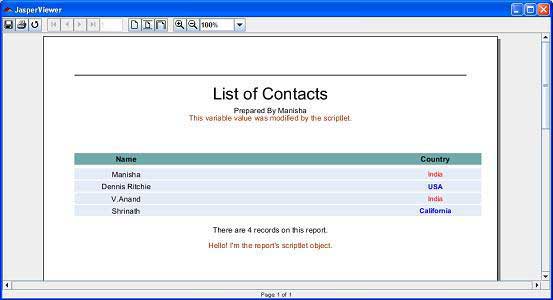
这里我们看到了来自 MyScriptlet 类的两条消息 −
- 在标题部分 − This variable value was modified by the scriptlet
- 在底部 − Hello! I'm the report's scriptlet object.

