
Joomla - 创建模块
在本章中,我们将研究在 Joomla 中创建模块。模块是灵活、轻量且可用于页面渲染的扩展。
创建模块
以下是在 Joomla 中创建模块的简单步骤。
步骤 1 − 在您的 Joomla → modules 文件夹中创建一个名为 mod_firstmodule 的文件夹。
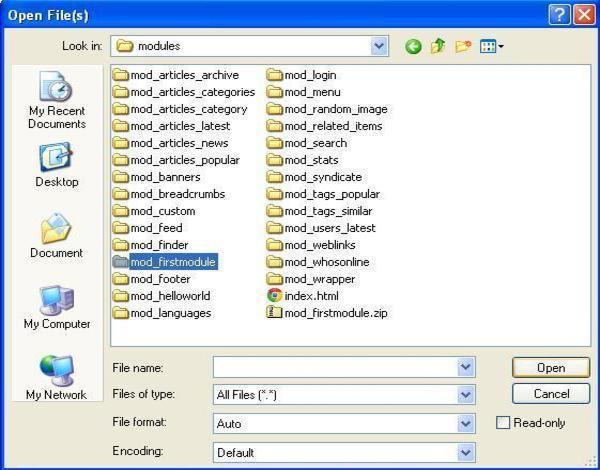
步骤 2 − 在 mod_firstmodule 文件夹中创建一个名为"helper.php"的文件。该文件包含类名作为帮助程序,它有助于在模块输出中显示检索到的数据。
helper.php
<?php
   /**
      * Helper class for Hello World! module
      *
      * @package    Joomla.Tutorials
      * @subpackage Modules
      * @link http://docs.joomla.org/J3.x:Creating_a_simple_module/Developing_a_Basic_Module
      * @license        GNU/GPL, see LICENSE.php
      * mod_helloworld is free software. This version may have been modified pursuant
      * to the GNU General Public License, and as distributed it includes or
      * is derivative of works licensed under the GNU General Public License or
      * other free or open source software licenses.
   */

   class ModHelloWorldHelper {
      /**
         * Retrieves the hello message
         *
         * @param   array  $params An object containing the module parameters
         *
        * @access public
      */

      public static function getHello($params) {
         return 'Hello, World!';
      }
   }

?>
步骤 3 − 创建一个名为 mod_helloworld.php 的文件。它是模块的入口点,用于执行初始化例程、收集必要数据并使用模板显示模块输出。
mod_helloworld.php
<?php
   /**
      * Hello World! Module Entry Point
      *
      * @package    Joomla.Tutorials
      * @subpackage Modules
      * @license    GNU/GPL, see LICENSE.php
      * @link       http://docs.joomla.org/J3.x:Creating_a_simple_module/Developing_a_Basic_Module
      * mod_helloworld is free software. This version may have been modified pursuant
      * to the GNU General Public License, and as distributed it includes or
      * is derivative of works licensed under the GNU General Public License or
      * other free or open source software licenses.
   */

   // No direct access
   defined('_JEXEC') or die;

   // Include the syndicate functions only once
   require_once dirname(__FILE__) . '/helper.php';

   $hello = modHelloWorldHelper::getHello($params);
   require JModuleHelper::getLayoutPath('mod_helloworld');
?>
步骤 4 − 创建 mod_helloworld.xml 文件。此文件包含有关模块的信息。此 xml 文件包含要在 Joomla 中为模块安装的文件的信息。
mod_helloworld.xml 文件
<?xml version = "1.0" encoding = "utf-8"?>

<extension type = "module" version = "3.1.0" client = "site" method="upgrade">

   <name>Hello, World!</name>
   <author>Tutorials Point</author>
   <version>1.0.0</version>
   <description>A simple Hello World! module.</description>

   <files>
      <filename>mod_helloworld.xml</filename>
      <filename module = "mod_helloworld">mod_helloworld.php</filename>
      <filename>index.html</filename>
      <filename>helper.php</filename>
      <filename>tmpl/default.php</filename>
      <filename>tmpl/index.html</filename>
   </files>

   <config>
   </config>

</extension>
步骤 5 − 创建一个名为 index.html 的简单 html 文件。编写此文件的目的是,创建的目录不应被浏览。当用户浏览这些目录时,index.html 文件会显示出来。您甚至可以将此文件保留为空。
index.html
<html>
   <body> Welcome to Tutorials Point!!!!! </body>
</html>
步骤 6 − 创建一个名为 tmpl 的文件夹。将 default.php 文件(如下所示)和 index.html(在步骤 (5) 中创建)放在 tmpl 文件夹下。default.php 文件是显示模块输出的模板。
default.php
<?php
   /**
      * @package Joomla.Site
      * @subpackage mod_firstmodule
      * @copyright Copyright (C) 2005 - 2012 Open Source Matters, Inc. All rights reserved.
      * @license GNU General Public License version 2 or later; see LICENSE.txt
   */
defined('_JEXEC') or die;
>

<p>Hello World!!!!!!</p>
创建完所有这些文件后,压缩整个文件夹 mod_firstmodule。
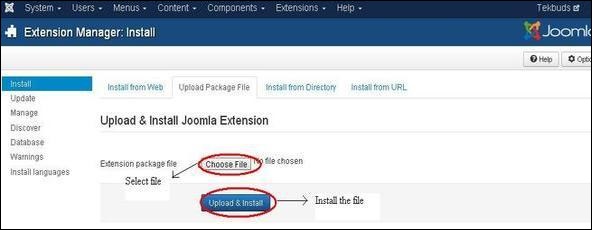
步骤 7 − 转到 Joomla 管理员中的 扩展 → 扩展管理器,您将看到以下屏幕。在这里,您可以上传和安装您创建的模块文件,即 mod_firstmodule 文件夹。单击 选择文件 并选择创建的模块文件(压缩文件)。单击 上传和安装 按钮上传模块文件。
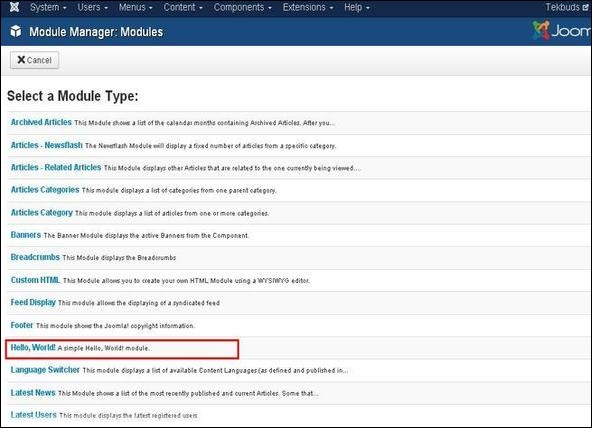
步骤 8 −上传和安装后,转到模块管理器并单击新建。在那里,您可以查看您创建的模块文件,如下所示。
步骤 9 − 您可以像分配其他模块一样分配此模块,然后发布它。

