
PDFBox - 文档属性
与其他文件一样,PDF 文档也具有文档属性。这些属性是键值对。每个属性都提供有关文档的特定信息。
以下是 PDF 文档的属性 −
| S.No. | 属性 &描述 |
|---|---|
| 1 | File 此属性保存文件的名称。 |
| 2 | Title 使用此属性,您可以设置文档的标题。 |
| 3 | Author 使用此属性,您可以设置文档作者的姓名。 |
| 4 | Subject 使用此属性,您可以指定 PDF 文档的主题。 |
| 5 | Keywords 使用此属性,您可以列出我们可以搜索文档的关键字。 |
| 6 | Created 使用此属性,您可以设置文档的创建日期。 |
| 7 | Modified 使用此属性,您可以设置文档的修改日期。 |
| 8 | Application 使用此属性,您可以设置文档的应用程序。 |
以下是 PDF 文档的文档属性表的屏幕截图。
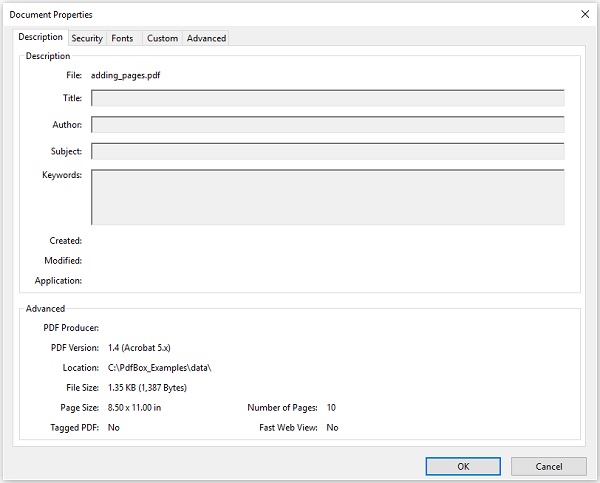
设置文档属性
PDFBox 为您提供了一个名为 PDDocumentInformation 的类。此类具有一组 setter 和 getter 方法。
此类的 setter 方法用于将值设置为文档的各种属性,getter 方法用于检索这些值。
以下是 PDDocumentInformation 类的 setter 方法。
| S.No. | 方法 &描述 |
|---|---|
| 1 | setAuthor(String author) 此方法用于设置 PDF 文档名为 Author 的属性的值。 |
| 2 | setTitle(String title) 此方法用于设置 PDF 文档名为 Title 的属性的值。 |
| 3 | setCreator(String creator) 此方法用于设置 PDF 文档中名为 Creator 的属性的值。 |
| 4 | setSubject(String subject) 此方法用于设置 PDF 文档中名为 Subject 的属性的值。 |
| 5 | setCreationDate(Calendar date) 此方法用于设置 PDF 文档中名为 CreationDate 的属性的值。 |
| 6 | setModificationDate(Calendar date) 此方法用于设置 PDF 文档的属性 ModificationDate 的值。 |
| 7 | setKeywords(String keywords list) 此方法用于设置 PDF 文档中名为 Keywords 的属性的值。 |
示例
PDFBox 提供了一个名为 PDDocumentInformation 的类,该类提供了各种方法。这些方法可以设置文档的各种属性并检索它们。
此示例演示如何向 PDF 文档添加 Author、Title、Date 和 Subject 等属性。在这里,我们将创建一个名为 doc_attributes.pdf 的 PDF 文档,向其添加各种属性,并将其保存在路径 C:/PdfBox_Examples/ 中。将此代码保存在名为添加属性.java.
import java.io.IOException;
import java.util.Calendar;
import java.util.GregorianCalendar;

import org.apache.pdfbox.pdmodel.PDDocument;
import org.apache.pdfbox.pdmodel.PDDocumentInformation;
import org.apache.pdfbox.pdmodel.PDPage;

public class AddingDocumentAttributes {
   public static void main(String args[]) throws IOException {

        //创建 PDF 文档对象
        PDDocument document = new PDDocument();

        //创建空白页
        PDPage blankPage = new PDPage();

        //将空白页添加到文档
        document.addPage( blankPage );

        //创建 PDDocumentInformation 对象
        PDDocumentInformation pdd = document.getDocumentInformation();

        //设置文档的作者
        pdd.setAuthor("Tutorialspoint");

        //设置文档的标题
        pdd.setTitle("Sample document");

        //设置文档的创建者
        pdd.setCreator("PDF Examples");

        //设置文档的主题
        pdd.setSubject("Example document");

        //设置文档的创建日期
        Calendar date = new GregorianCalendar();
        date.set(2015, 11, 5);
        pdd.setCreationDate(date);
        //设置文档的修改日期
        date.set(2016, 6, 5);
        pdd.setModificationDate(date);

        //设置文档的关键字
        pdd.setKeywords("sample, first example, my pdf");

        //保存文档
        document.save("C:/PdfBox_Examples/doc_attributes.pdf");

        System.out.println("Properties added successfully ");

        //关闭文档
        document.close();

   }
}
使用以下命令从命令提示符编译并执行已保存的 Java 文件。
javac AddingAttributes.java
java AddingAttributes
执行后,上述程序将所有指定的属性添加到文档中,并显示以下消息。
Properties added successfully
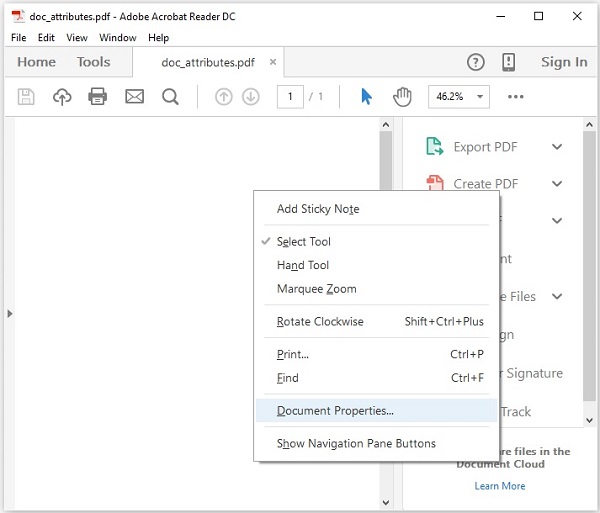
现在,如果您访问给定的路径,您可以找到在其中创建的 PDF。右键单击文档并选择文档属性选项,如下所示。
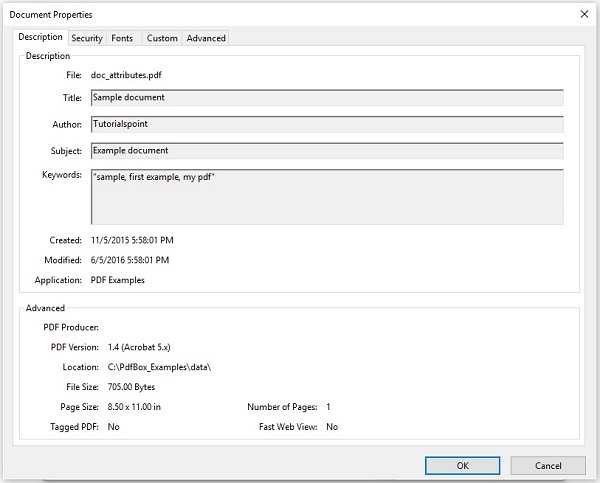
这将为您提供文档属性窗口,在这里您可以观察到文档的所有属性都设置为指定值。
检索文档属性
您可以使用 PDDocumentInformation 类提供的 getter 方法检索文档的属性。
以下是 PDDocumentInformation 类的 getter 方法。
| S.No. | 方法 &描述 |
|---|---|
| 1 | getAuthor() 此方法用于检索 PDF 文档中名为 Author 的属性的值。 |
| 2 | getTitle() 此方法用于检索 PDF 文档中名为 Title 的属性的值。 |
| 3 | getCreator() 此方法用于检索PDF 文档的名为 Creator 的属性。 |
| 4 | getSubject() 此方法用于检索 PDF 文档的名为 Subject 的属性的值。 |
| 5 | getCreationDate() 此方法用于检索 PDF 文档的名为 CreationDate 的属性的值。 |
| 6 | getModificationDate() 此方法用于检索 PDF 文档中名为 ModificationDate 的属性的值。 |
| 7 | getKeywords() 此方法用于检索 PDF 文档中名为 Keywords 的属性的值。 |
示例
此示例演示如何检索现有 PDF 文档的属性。在这里,我们将创建一个 Java 程序并加载名为 doc_attributes.pdf 的 PDF 文档(保存在路径 C:/PdfBox_Examples/ 中),并检索其属性。将此代码保存在名为 RetrivingDocumentAttributes.java 的文件中。
import java.io.File;
import java.io.IOException;

import org.apache.pdfbox.pdmodel.PDDocument;
import org.apache.pdfbox.pdmodel.PDDocumentInformation;

public class RetrivingDocumentAttributes {
   public static void main(String args[]) throws IOException {

        //加载现有文档
        File file = new File("C:/PdfBox_Examples/doc_attributes.pdf")
        PDDocument document = PDDocument.load(file);
        //获取 PDDocumentInformation 对象
        PDDocumentInformation pdd = document.getDocumentInformation();

        //检索 PDF 文档的信息
        System.out.println("Author of the document is :"+ pdd.getAuthor());
        System.out.println("Title of the document is :"+ pdd.getTitle());
        System.out.println("Subject of the document is :"+ pdd.getSubject());

        System.out.println("Creator of the document is :"+ pdd.getCreator());
        System.out.println("Creation date of the document is :"+ pdd.getCreationDate());
        System.out.println("Modification date of the document is :"+
         pdd.getModificationDate());
        System.out.println("Keywords of the document are :"+ pdd.getKeywords());

        //关闭文档
        document.close();
   }
}
使用以下命令从命令提示符编译并执行已保存的 Java 文件。
javac RetrivingDocumentAttributes.java
java RetrivingDocumentAttributes
执行后,上述程序将检索文档的所有属性并显示它们,如下所示。
Author of the document is :Tutorialspoint
Title of the document is :Sample document
Subject of the document is :Example document
Creator of the document is :PDF Examples
Creation date of the document is :11/5/2015
Modification date of the document is :6/5/2016
Keywords of the document are :sample, first example, my pdf

