
Phalcon - 脚手架应用程序
脚手架通常是指一种代码生成,我们将其指向 Web 应用程序数据库,从而创建一个基本的 CRUD(创建、读取、更新、删除)应用程序。
在设计 CRUD 应用程序之前,根据应用程序的需求设计数据库表非常重要。
步骤 1 − 创建一个包含所有 CRUD 操作的脚手架应用程序。
命令:phalcon scaffold <table-name>
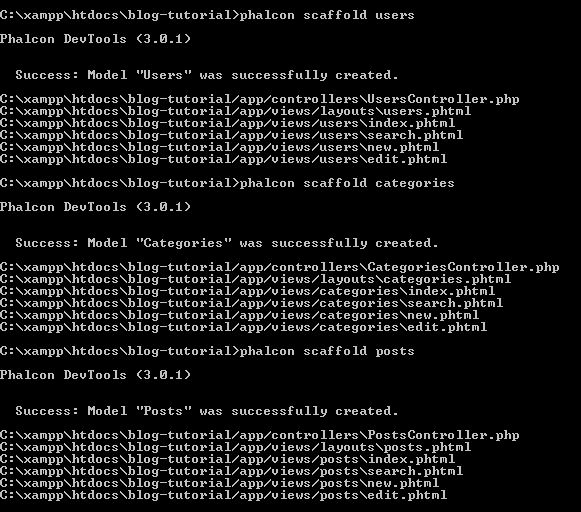
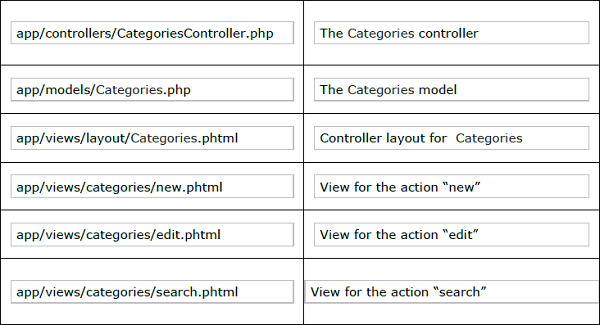
Phalcon 的脚手架生成器一旦执行,将创建下表中描述的文件和文件夹。
步骤 2 − 创建索引页(phtml 和 volt 的组合)。
要包含在用户文件夹中的 index.phtml 中的代码。
<?php use Phalcon\Tag as Tag ?>
<!DOCTYPE html>
<html>
   <head>
      <meta charset = "utf-8">
      <title>Blog Tutorial</title>
      <link rel = "stylesheet" type = "text/css"
         href = "http://netdna.bootstrapcdn.com/twitter-bootstrap/2.2.1/css/bootstrapcombined.min.css"/>
      <meta name = "viewport" content = "width = device-width, initial-scale = 1.0">
   </head>

   <body>
      <div class = "navbar navbar-fixed-top">
         <div class = "navbar-inner">
            <div class = "container">
               <a class = "btn btn-navbar" data-toggle = "collapse" datatarget = ".nav-collapse">
                  <span class = "icon-bar"></span>
                  <span class = "icon-bar"></span>
                  <span class = "icon-bar"></span>
               </a>
               <a class = "brand" href = "#">Blog Collection</a>

               <div class = "nav-collapse">
                  <ul class = "nav pull-left">
                     <li>
                        <?php echo Phalcon\Tag::linkTo('index', 'Home Page') ?>
                     </li>

                     <?php if ($this->session->has('auth')) { ?>
                        <li>
                           <?php echo Phalcon\Tag::linkTo('posts/index', '+Posts') ?>
                        </li>

                        <li>
                           <?php echo Phalcon\Tag::linkTo('categories/index', '+Categories') ?>
                        </li>

                        <li>
                           <?php echo Phalcon\Tag::linkTo('users/logout', 'Log out') ?>
                        </li>
                     <?php } else { ?>
                        <li>
                           <?php echo Phalcon\Tag::linkTo('users/index', 'Log in') ?>
                        </li>
                     <?php } ?>
                  </ul>
               </div>

            </div>
         </div>
      </div>
      <?php echo $this->getContent() ?>

      <script src = "http://netdna.bootstrapcdn.com/twitterbootstrap/2.2.1/js/bootstrap.min.js"></script>
   </body>
</html>
默认文件 index.volt 将包含以下代码。
<?php echo $this->getContent() ?>

<div align = "center">
   <h1>Welcome!</h1>
   <p>Welcome to the blog collection of Phalcon</p>
</div>
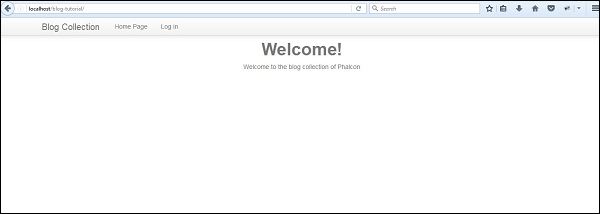
成功执行上述代码将产生以下输出。
步骤 3 − 使用相应的模型进行更改。
Users.php
<?php

class Users extends \Phalcon\Mvc\Model {
   /**
      * @var integer
      *
   */

   public $id;
   /**
      * @var string
      *
   */

   public $login;
   /**
      * @var string
      *
   */

   public $password;
   /**
      * Initializer method for model.
   */

   public function initialize() {
      $this->hasMany("id", "Posts", "users_id");
   }
}
名为'initialize'的函数有助于在 Posts 表中实现 id 和 users_id 之间的关系,这意味着每个唯一用户在表中都有许多相关的帖子。
Posts.php
<?php

class Posts extends \Phalcon\Mvc\Model {
   /**
      * @var integer
      *
   */

   public $id;
   /**
      * @var string
      *
   */

   public $title;
   /**
      * @var string
      *
   */

   public $slug;
   /**
      * @var string
      *
   */

   public $content;
   /**
      * @var string
      *
   */

   public $created;
   /**
      * @var integer
      *
   */

   public $users_id;
   /**
      * @var integer
      *
   */

   public $categories_id;
   /**
      * Initializer method for model.
      */

   public function initialize() {
      $this->belongsTo("users_id", "Users", "id");
      $this->belongsTo("categories_id", "Categories", "id");
   }
}
函数'initialize'包含关系约束,其中提到了与表的外键和主键关系。
users_id 指的是"Users"表中的 id。
categories_id 指的是"Categories"表中的 id。
Categories.php
<?php

class Categories extends \Phalcon\Mvc\Model {
   /**
      * @var integer
      *
   */

   public $id;
   /**
      * @var string
      *
   */

   public $name;
   /**
      * @var string
      *
   */

   public $slug;
   /**
      * Initializer method for model.
   */

   public function initialize() {
      $this->hasMany("id", "Posts", "categories_id");
   }
}
与用户模型类似,'initialize'函数指定它包含给定帖子的多个categories_id。
创建视图
以下是 Blog-tutorial-master 项目的完整结构。
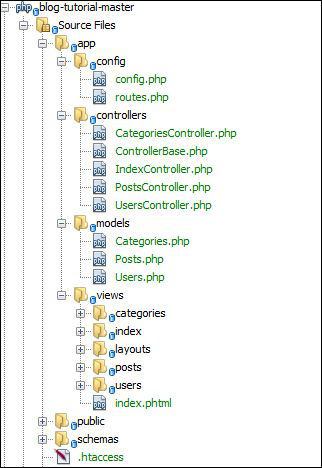
用户成功登录后显示主页的关联视图是"index.phtml"。
<?php use Phalcon\Tag as Tag ?>
<!DOCTYPE html>
<html>
   <head>
      <meta charset = "utf-8">
      <title>Blog Tutorial</title>
      <link rel = "stylesheet" type = "text/css" href = "http://netdna.bootstrapcdn.com/twitter-bootstrap/2.2.1/css/bootstrapcombined.min.css"/>
      <meta name = "viewport" content = "width = device-width, initial-scale = 1.0">
   </head>

   <body>
      <div class = "navbar navbar-fixed-top">
         <div class = "navbar-inner">
            <div class = "container">
               <a class = "btn btn-navbar" data-toggle = "collapse" datatarget = ".nav-collapse">
                  <span class = "icon-bar"></span>
                  <span class = "icon-bar"></span>
                  <span class = "icon-bar"></span>
               </a>
               <a class = "brand" href = "#">Blog Collection</a>

               <div class = "nav-collapse">
                  <ul class = "nav pull-left">
                     <li>
                        <?php echo Phalcon\Tag::linkTo('index', 'Home Page') ?>
                     </li>
                     <?php if ($this->session->has('auth')) { ?>
                        <li>
                           <?php echo Phalcon\Tag::linkTo('posts/index', '+Posts') ?>
                        </li>

                        <li>
                           <?php echo Phalcon\Tag::linkTo('categories/index', '+Categories') ?>
                        </li>

                        <li>
                           <?php echo Phalcon\Tag::linkTo('users/logout', 'Log out') ?>
                        </li>
                     <?php } else { ?>
                        <li>
                           <?php echo Phalcon\Tag::linkTo('users/index', 'Log in') ?>
                        </li>
                     <?php } ?>
                  </ul>
               </div>

            </div>
         </div>
      </div>
      <?php echo $this->getContent() ?>
      <script src = "http://netdna.bootstrapcdn.com/twitterbootstrap/2.2.1/js/bootstrap.min.js"></script>
   </body>
</html>

