Python Pyramid - 消息闪烁
Web 应用程序框架使用消息闪烁机制向用户提供有关他与应用程序交互的特定反馈。 闪现的消息由会话对象保存在一个队列中。
Flash 消息传递机制使得在一个视图中创建消息并在称为 next 的视图函数中呈现它成为可能。 与上一节一样,我们必须首先启用会话工厂才能处理会话。 要在消息队列中添加消息,请使用 session 会话对象的 flash() 方法。
request.session.flash('Hello World')
会话有 pop_flash() 和 peek_flash() 方法。 pop_flash() 方法从队列中删除最后添加的消息。 如果队列有消息,peek_flash() 方法返回 true,如果为空则返回 false。
这两种方法都用于模板网页中,以从队列中获取一个或多个消息并将其呈现为响应的一部分。
消息闪烁示例
下面的例子演示了消息闪烁的机制。 此处,login() 视图代码检查它是否已被 POST 或 GET 方法调用。 如果方法是 GET,它会呈现带有用户名和密码字段的登录表单。 提交的表单使用 POST 方法提交到相同的 URL。
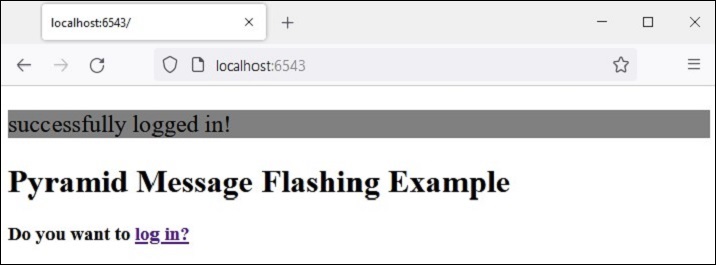
当检测到 POST 方法时,视图会进一步检查输入的有效性并将适当的消息闪烁到会话队列。 这些错误提示信息是由登录模板本身提取的,而在闪现成功提示信息后,客户端将被重定向到 index() 视图以呈现索引模板。
应用代码中的两个视图是 −
@view_config(route_name='login', renderer='templates/login.html')
def login(request):
   if request.method == 'POST':
   if request.POST['password']=='' or request.POST['username']=='':
      request.session.flash('User name and password is required')
      return HTTPFound(location=request.route_url('login'))
   if len(request.POST['password'])in range(1,9):
      request.session.flash('Weak password!')
   if request.POST['username']not in ['admin', 'manager', 'supervisor']:
      request.session.flash('successfully logged in!')
      return HTTPFound(location=request.route_url('index'))
   else:
      request.session.flash('Reserved user ID Forbidden!')
      return HTTPFound(location=request.route_url('login'))
   return {}

@view_config(route_name='index', renderer='templates/index.html')
def index(request):
   return {}
login.html模板有如下代码 −
<!doctype html>
<html>
<head>
   <style>
      p {background-color:grey; font-size: 150%}
   </style>
</head>
<body>
   <h1>Pyramid Message Flashing Example</h1>
   {% if request.session.peek_flash()%}
      <div id="flash">
         {% for message in request.session.pop_flash() %}
         <p>{{ message }}</p>
         {% endfor %}
      </div>
   {% endif %}
   <h3>Login Form</h3>
   <form action="" method="POST">
      <dl>
         <dt>Username:
            <dd><input type="text" name="username">
         <dt>Password:
         <dd><input type="password" name="password">
      </dl>
      <input type="submit" value="Login">
   </form>
</body>
</html>
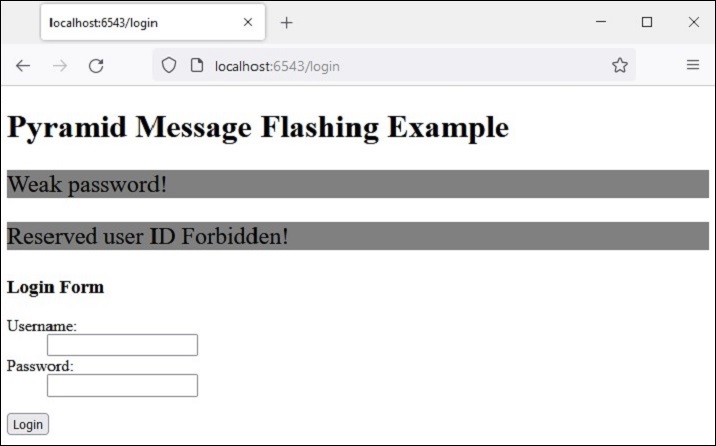
在显示登录表单之前,jinja2 模板代码遍历消息队列,弹出 <div id='flash'> 部分中的每条消息。
以下是 index.html 的脚本,它会闪烁 login() 视图插入的成功消息 −
<!doctype html>
<html>
<head>
   <style>
      p {background-color:grey; font-size: 150%}
   </style>
</head>
<body>
   {% if request.session.peek_flash()%}
   <div id="flash">
   {% for message in request.session.pop_flash() %}
   <p>{{ message }}</p>
   {% endfor %}
   {% endif %}
   <h1>Pyramid Message Flashing Example</h1>
   <h3>Do you want to <a href = "/login">
   <b>log in?</b></a></h3>
</body>
</html>
示例
此示例的应用程序代码是 main.py
from wsgiref.simple_server import make_server
from pyramid.config import Configurator
from pyramid.response import Response
from pyramid.view import view_config
from pyramid.session import SignedCookieSessionFactory
from pyramid.httpexceptions import HTTPFound

my_session_factory = SignedCookieSessionFactory(' abcQWE123!@#')
@view_config(route_name='login', renderer='templates/login.html')
def login(request):
   if request.method == 'POST':
      if request.POST['password']=='' or  request.POST['username']=='':
      request.session.flash('User name and password is required')
      return HTTPFound(location=request.route_url('login'))
   if len(request.POST['password'])in range(1,9):
      request.session.flash('Weak password!')
   if request.POST['username']not in ['admin', 'manager', 'supervisor']:
      request.session.flash('successfully logged in!')
      return HTTPFound(location=request.route_url('index'))
   else:
      request.session.flash('Reserved user ID Forbidden!')
      return HTTPFound(location=request.route_url('login'))
   return {}

@view_config(route_name='index', renderer='templates/index.html')
def index(request):
   return {}

if __name__ == '__main__':
   with Configurator() as config:
      config.set_session_factory(my_session_factory)
      config.include('pyramid_jinja2')
      config.add_jinja2_renderer(".html")
      config.add_route('login','/login')
      config.add_route('index','/')
      config.scan('flash')
      app = config.make_wsgi_app()
   server = make_server('0.0.0.0', 6543, app)
   server.serve_forever()
将此程序代码保存为app.py 到Pyramid 虚拟环境的flash 子文件夹中,并在其中放入空白__init__.py。 将两个模板("index.html"和"login.html")存储在 flush\templates 文件夹中。
输出
运行 main.py 并通过单击 http://localhost:6543/login 链接在浏览器中打开登录表单。
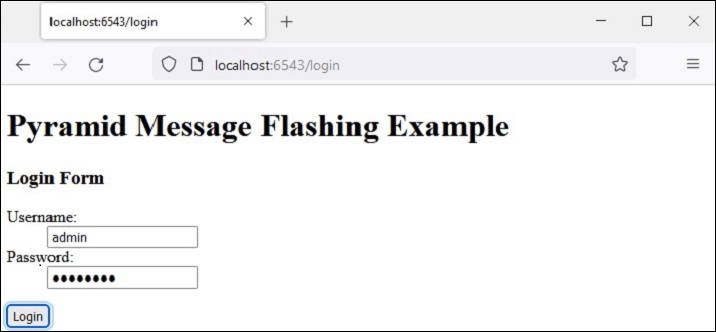
尝试输入保留的用户名"admin"、"manager"或"supervisor"之一。 错误消息将闪烁如下所示 −
这一次,输入可接受的凭据并查看结果 −