
Tailwind CSS - 配置
Tailwind CSS 配置允许您根据项目需求轻松自定义框架,方法是使用"tailwind.config.js"文件定义框架的各个方面,例如主题、颜色、屏幕、插件等。
如何生成配置文件?
以下是生成"tailwind.config.js"文件的分步指南。
- Tailwind CSS 安装: Tailwind CSS 的安装是必须首先完成的强制性步骤。运行以下命令生成默认配置文件:
npm install tailwindcss
- 生成配置文件: 使用以下命令可以轻松生成"tailwind.config.js"文件。
npx tailwind css init
- 结果文件: 将生成以下文件。
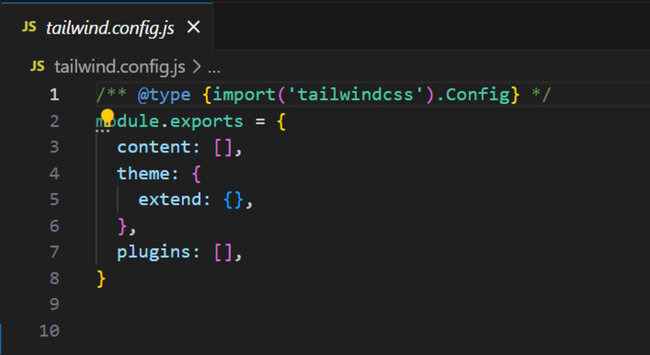
自定义配置
"tailwind.config.js"文件允许轻松自定义配置,并使实用程序类与项目特定的设计需求保持一致。我们可以轻松地自定义主题、字体、颜色、屏幕、间距、插件等,如下所示。
- 内容"tailwind.config.js"文件的内容部分允许您添加所有 HTML 模板、JS 组件以及其他包含 Tailwind CSS 类的文件的路径。
/** @type {import('tailwindcss').Config} */
module.exports = {
content: [
'./pages/**/*.{html,js}',
'./components/**/*.{html,js}',
],
// ...
}
/** @type {import('tailwindcss').Config} */
module.exports = {
// ...
theme: {
colors: {
  'blue': '#1fb6ff',
  'purple': '#7e5bef',
  'pink': '#ff49db',
},
fontFamily: {
  sans: ['Graphik', 'sans-serif'],
  serif: ['Merriweather', 'serif'],
},
extend: {
  spacing: {
    '8xl': '96rem',
    '9xl': '128rem',
  },
}
}
}
'tailwind.config.js' 文件的插件部分允许您添加额外的实用程序、组件、基本样式、自定义变体等,如下所示。
/** @type {import('tailwindcss').Config} */
module.exports = {
// ...
plugins: [
require('@tailwindcss/forms'),
require('@tailwindcss/aspect-ratio'),
require('@tailwindcss/typography'),
require('tailwindcss-children'),
],
}
/** @type {import('tailwindcss').Config} */
module.exports = {
prefix: 'tw-',
}
现在每个类都将使用配置的前缀生成:
.tw-text-left {
text-align: left;
}
.tw-text-center {
text-align: center;
}
.tw-text-right {
text-align: right;
}
/* etc. */
在前缀前添加短划线修饰符,即可获得负值。例如,如果前缀为 tw-,则 -mt-8 会变为 -tw-mt-8。
<div class="-tw-mt-8">
<!-- -->
</div>
注意:前缀仅适用于 Tailwind 生成的类,而不适用于您的自定义类。要为您自己的实用程序添加前缀,只需将前缀添加到类定义中:
@layer utilities {
.tw-bg-brand-gradient { /* ... */ }
}
/** @type {import('tailwindcss').Config} */
module.exports = {
important: true,
}
现在,Tailwind 的所有实用程序类都将生成为"!important":
.leading-none {
line-height: 1 !important;
}
.leading-tight {
line-height: 1.25 !important;
}
.leading-snug {
line-height: 1.375 !important;
}
/* etc. */
这也适用于使用 CSS 中的"@layer utility"指令创建的自定义实用程序。
/* Input */
@layer utilities {
.bg-brand-gradient {
background-image: linear-gradient(#3490dc, #6574cd);
}
}

/* Output */
.bg-brand-gradient {
background-image: linear-gradient(#3490dc, #6574cd) !important;
}
选择器策略:将 important 设置为 true 可能会导致与使用内联样式的第三方 JS 库发生冲突,因为 Tailwind 的 !important 实用程序会覆盖它们,并可能破坏您的设计。
为避免此问题,请遵循以下措施:
- 将 !important 设置为 ID 选择器,例如 '#app'。此配置会将给定的选择器作为实用程序的前缀,从而在不使用 !important 的情况下提高其特异性。
/** @type {import('tailwindcss').Config} */
module.exports = {
// ...
important: '#app',
}
<html>
<!-- ... -->
<style>
.high-specificity .nested .selector {
color: blue;
}
</style>
<body id="app">
<div class="high-specificity">
<div class="nested">
  <!-- Will be red-500 -->
  <div class="selector text-red-500"><!-- ... --></div>
</div>
</div>

<!-- Will be #bada55 -->
<div class="text-red-500" style="color: #bada55;"><!-- ... --></div>
</body>
</html>
重要修饰符 您还可以通过在实用程序名称开头添加"!"来使其变得重要。"!"应放在任何变体之后、任何前缀之前。这在您需要更明确地覆盖其他样式时非常有用。
/** @type {import('tailwindcss').Config} */
module.exports = {
// ...
important: '#app',
}
您可以使用 corePlugins 部分关闭任何不需要的默认 Tailwind 类。
/** @type {import('tailwindcss').Config} */
module.exports = {
corePlugins: {
float: false,
objectFit: false,
objectPosition: false,
}
}
如果您想将需要启用的核心插件列入安全列表,请将它们列在一个数组中。
/** @type {import('tailwindcss').Config} */
module.exports = {
corePlugins: [
'margin',
'padding',
'backgroundColor',
// ...
]
}
如果您想禁用所有 Tailwind 核心插件,仅使用自定义插件,请提供一个空数组。
/** @type {import('tailwindcss').Config} */
module.exports = {
corePlugins: []
}
以下是所有核心插件的列表,仅供参考:
| 核心插件 | 描述 |
|---|---|
| accentColor | accent-color 实用程序,例如 accent-green-800 |
| accessibility | The sr-only and not-sr-only utilities |
| alignContent | align-content 工具,例如 content-between |
| alignItems | align-items 工具,例如 items-center |
| alignSelf | align-self 工具,例如 self-end |
| animation | animation 工具,例如 animate-ping |
| appearance | appearance 工具,例如 appearance-none |
| aspectRatio | aspect-ratio 工具,例如 aspect-square |
| backdropBlur | 背景模糊工具,例如 backdrop-blur-md |
| backdropBrightness | backdrop亮度工具,例如 backdrop-brightness-100 |
| backdropContrast | backdrop对比度工具,例如 backdrop-contrast-100 |
| backdropFilter | backdrop滤镜工具,例如 backdrop-filter |
| backdropGrayscale | backdrop灰度工具,例如 backdrop-grayscale-0 |
| backdropHueRotate | backdrophuerotate工具,例如 backdrop-huerotate backdrop-hue-rotate-30 |
| backdropInvert | backdrop-invert 工具,例如 backdrop-invert-0 |
| backdropOpacity | backdrop-opacity 工具,例如 backdrop-opacity-50 |
| backdropSaturate | backdrop-saturate 工具,例如 backdrop-saturate-100 |
| backdropSepia | backdrop-sepia 工具,例如 backdrop-sepia-0 |
| backgroundAttachment | background-attachment 工具,例如 bg-local |
| backgroundBlendMode | 背景混合模式工具,例如 bg-blend-color-burn |
| backgroundClip | 背景剪辑工具,例如 bg-clip-padding |
| backgroundColor | 背景颜色工具,例如 bg-green-800 |
| backgroundImage | 背景图像工具,例如 bg-gradient-to-br |
| backgroundOpacity | 背景颜色不透明度工具,例如 bg-opacity-25 |
| backgroundOrigin | background-origin 工具,例如 bg-origin-padding |
| backgroundPosition | background-position 工具,例如 bg-left-top |
| backgroundRepeat | background-repeat 工具,例如 bg-repeat-x |
| backgroundSize | background-size 工具,例如 bg-cover |
| blur | blur 工具,例如 blur-md |
| borderCollapse | border-collapse 工具,例如边框折叠 |
| borderColor | 边框颜色工具,例如 border-e-green-800 |
| borderOpacity | 边框颜色不透明度工具,例如 border-opacity-25 |
| borderRadius | 边框半径工具,例如 rounded-ss-lg |
| borderSpacing | 边框间距工具,例如 border-spacing-x-28 |
| borderStyle | 边框样式工具,例如 border-dotted |
| borderWidth | 边框宽度工具,例如 border-e-4 |
| boxDecorationBreak | box-decoration-break 工具,例如 decoration-clone |
| boxShadow | box-shadow 工具,例如 shadow-lg |
| boxShadowColor | box-shadow-color 工具,例如 shadow-green-800 |
| boxSizing | box-sizing 工具,例如 box-border |
| breakAfter | break-after 工具,例如 break-after-avoid-page |
| breakBefore | break-before 工具,例如 break-before-avoid-page |
| breakInside | break-inside 工具,例如 break-inside-avoid |
| brightness | 亮度工具,例如 brightness-100 |
| captionSide | caption-side 工具,例如 caption-top |
| caretColor | caret-color 工具,例如 caret-green-800 |
| clear | 清除工具,例如clear-left |
| columns | columns 工具,例如 columns-auto |
| contain | container 工具,例如 contain-size |
| container | container 组件 |
| content | content 工具,例如 content-none |
| contrast | contrast 工具,例如 contrast-100 |
| cursor | cursor 工具,例如 cursor-grab |
| display | 显示工具,例如 table-column-group |
| divideColor | 元素间边框颜色工具,例如 divide-slate-500 |
| divideOpacity | divide-opacity 工具,例如 divide-opacity-50 |
| divideStyle | divide-style 工具,例如 divide-dotted |
| divideWidth | 元素间边框宽度工具,例如 divide-x-2 |
| dropShadow | drop-shadow 工具,例如drop-shadow-lg |
| fill | 填充工具,例如 fill-green-700 |
| filter | 滤镜工具,例如 filter |
| flex | 弹性工具,例如 flex-auto |
| flexBasis | flex-basis 工具,例如 basis-px |
| flexDirection | flex-direction 工具,例如 flex-row-reverse |
| flexGrow | flex-grow 工具,例如 flex-grow |
| flexShrink | flex-shrink 工具,例如 flex-shrink |
| flexWrap | flex-wrap 工具,例如 flex-wrap-reverse |
| float | float 工具,例如 float-right |
| fontFamily | font-family 工具,例如 font-serif |
| fontSize | font-size 工具,例如 text-3xl |
| fontSmoothing | 字体平滑工具,例如抗锯齿 |
| fontStyle | 字体样式工具,例如斜体 |
| fontVariantNumeric | font-variant-numeric 工具,例如 oldstyle-nums |
| fontWeight | 字体粗细工具,例如 font-medium |
| forcedColorAdjust | 强制颜色调整工具,例如 forced-color-adjust-auto |
| gap | gap 工具,例如 gap-x-28 |
| gradientColorStops | gradient-color-stops 工具,例如 via-emerald-700 |
| grayscale | 灰度工具,例如 grayscale-0 |
| gridAutoColumns | grid-auto-columns 工具,例如 auto-cols-min |
| gridAutoFlow | grid-auto-flow 工具,例如 grid-flow-dense |
| gridAutoRows | grid-auto-rows 工具,例如 auto-rows-min |
| gridColumn | grid-column 工具,例如 col-span-6 |
| gridColumnEnd | grid-column-end 工具,例如 col-end-7 |
| gridColumnStart | grid-column-start 工具,例如 col-start-7 |
| gridRow | grid-row 工具,例如 row-span-6 |
| gridRowEnd | grid-row-end 工具,例如 row-end-7 |
| gridRowStart | grid-row-start 工具,例如 row-start-7 |
| gridTemplateColumns | grid-template-columns 工具,例如 grid-cols-7 |
| gridTemplateRows | grid-template-rows 工具,例如 grid-rows-7 |
| height | height 工具,例如 h-96 |
| hueRotate | hue-rotate 工具,例如 hue-rotate-30 |
| 连字符 | 连字符工具,例如 hyphens-manual |
| 插入 | 插入工具,例如 end-44 |
| 反转 | 反转工具,例如 invert-0 |
| 隔离 | 隔离工具,例如 isolate |
| 对齐内容 | 对齐内容工具,例如 justify-center |
| 对齐项目 | 对齐项目工具,例如 justify-items-end |
| justifySelf | justify-self 工具,例如 justify-self-end |
| letterSpacing | letter-spacing 工具,例如 track-normal |
| lineClamp | line-clamp 工具,例如 line-clamp-4 |
| lineHeight | line-height 工具,例如 leading-9 |
| listStyleImage | list-style-image 工具,例如 list-image-none |
| listStylePosition | list-style-position 工具,例如 list-inside |
| listStyleType | list-style-type 工具,例如 list-disc |
| margin | margin 工具,例如 me-28 |
| maxHeight | max-height 工具,例如 max-h-44 |
| maxWidth | 最大宽度工具,例如 max-w-80 |
| minHeight | 最小高度工具,例如 min-h-44 |
| minWidth | 最小宽度工具,例如 min-w-36 |
| mixBlendMode | 混合模式工具,例如 mix-blend-hard-light |
| objectFit | 对象适配工具,例如 object-fill |
| objectPosition | 对象位置工具,例如object-left-top |
| opacity | opacity-50 等不透明度工具 |
| order | order 工具,例如 order-8 |
| outlineColor | 轮廓颜色工具,例如 outline-green-800 |
| outlineOffset | 轮廓偏移工具,例如 outline-offset-2 |
| outlineStyle | 轮廓样式工具,例如 outline-dashed |
| outlineWidth | 轮廓宽度工具,例如outline-2 |
| 溢出 | 溢出工具,例如 overflow-x-hidden |
| overscrollBehavior | overscroll-behavior 工具,例如 overscroll-y-contain |
| padding | padding 工具,例如 pe-28 |
| placeContent | place-content 工具,例如 place-content-between |
| placeItems | place-items 工具,例如 place-items-center |
| placeSelf | place-self 工具,例如 place-self-end |
| placeholderColor | 占位符颜色工具,例如 placeholder-red-600 |
| placeholderOpacity | 占位符颜色不透明度工具,例如 placeholder-opacity-25 |
| pointerEvents | pointer-events 工具,例如 pointer-events-none |
| position | 位置工具,例如 absolute |
| preflight | Tailwind 的 base/reset样式 |
| 调整大小 | 调整大小工具,例如 resize-y |
| ringColor | ring-color 工具,例如 ring-green-800 |
| ringOffsetColor | ring-offset-color 工具,例如 ring-offset-green-800 |
| ringOffsetWidth | ring-offset-width 工具,例如 ring-offset-2 |
| ringOpacity | ring-opacity 工具,例如 ring-opacity-50 |
| ringWidth | 类似 ring-4 的环宽度实用程序 |
| rotate | 旋转工具,例如 rotate-6 |
| saturate | saturate 工具,例如 saturate-100 |
| scale | scale 工具,例如 scale-x-95 |
| scrollBehavior | scroll-behavior 工具,例如 scroll-auto |
| scrollMargin | scroll-margin 工具,例如 scroll-me-28 |
| scrollPadding | scroll-padding 工具,例如 scroll-pe-28 |
| scrollSnapAlign | scroll-snap-align 工具,例如 snap-end |
| scrollSnapStop | scroll-snap-stop 工具,例如 snap-normal |
| scrollSnapType | scroll-snap-type 工具,例如 snap-y |
| sepia | sepia-0 工具,例如 sepia-0 |
| size | size 工具,例如 size-0.5 |
| skew | skew 工具,例如skew-x-12 |
| 空格 | "空格之间"类似 space-x-4 的工具 |
| stroke | 描边工具,例如 stroke-green-700 |
| strokeWidth | 描边宽度工具,例如 stroke-1 |
| tableLayout | 表格布局工具,例如 table-auto |
| textAlign | 文本对齐工具,例如 text-right |
| textColor | 文本颜色工具,例如 text-green-800 |
| textDecoration | 文本装饰工具,例如上划线 |
| textDecorationColor | text-decoration-color 工具,例如 decoration-green-800 |
| textDecorationStyle | text-decoration-style 工具,例如 decoration-dotted |
| textDecorationThickness | text-decoration-thickness 工具,例如 decoration-4 |
| textIndent | text-indent 工具,例如 indent-28 |
| textOpacity | text-opacity 工具,例如 text-opacity-50 |
| textOverflow | 文本溢出工具,例如 overflow-ellipsis |
| textTransform | 文本转换工具,例如 lowercase |
| textUnderlineOffset | 文本下划线偏移工具,例如 underline-offset-2 |
| textWrap | 文本换行工具,例如 text-nowrap |
| touchAction | 触摸操作工具,例如 touch-pan-right |
| transform | transform 工具(用于启用转换功能) |
| transformOrigin | transform-origin 实用程序,例如 origin-bottom-right |
| transitionDelay | transition-delay 工具,例如 delay-200 |
| transitionDuration | transition-duration 工具,例如 duration-200 |
| transitionProperty | transition-property 工具,例如 transition-colors |
| transitionTimingFunction | transition-timing-function 工具,例如 ease-in |
| translate | translate 工具,例如 translate-x-full |
| userSelect | user-select 工具,例如 select-text |
| verticalAlign | vertical-align 工具,例如 align-bottom |
| visibility | visibility 工具,例如 invisible |
| whitespace | whitespace 工具,例如 whitespace-pre |
| width | width 工具,例如 w-2.5 |
| willChange | will-change 工具,例如 will-change-scroll |
| wordBreak | word-break 工具,例如 break-words |
| zIndex | z-index 实用程序,例如 z-30 |
设置多个配置
对于包含多个 CSS 文件和不同 Tailwind 设置的项目,请使用 @config 指令为每个 CSS 文件选择配置文件。
@config "./tailwind.site.config.js";

@tailwind base;
@tailwind components;
@tailwind utility;
在 JavaScript 中管理引用
您可能需要在 JavaScript 代码中使用配置值,例如在向 React Vue 组件添加样式时。 Tailwind 的 resolveConfig 助手将这些值组合成一个对象,从而可以轻松访问这些值。
import resolveConfig from 'tailwindcss/resolveConfig'
import tailwindConfig from './tailwind.config.js'

const fullConfig = resolveConfig(tailwindConfig)

fullConfig.theme.width[4]
// => '1rem'

fullConfig.theme.screens.md
// => '768px'

fullConfig.theme.boxShadow['2xl']
// => '0 25px 50px -12px rgba(0, 0, 0, 0.25)'
TypeScript 类型
Tailwind CLI 会自动添加类型,但如果您需要自行添加,请在配置上方添加一行。
/** @type {import('tailwindcss').Config} */
module.exports = {
content: [
// ...
],
theme: {
extend: {},
},
plugins: [],
}

