
Tailwind CSS - 内容配置
Tailwind CSS 内容配置指定项目的源代码。"tailwind.config.js"文件的"内容"部分指定所有 HTML 模板、JavaScript 组件以及任何其他包含 Tailwind 类名的源文件。
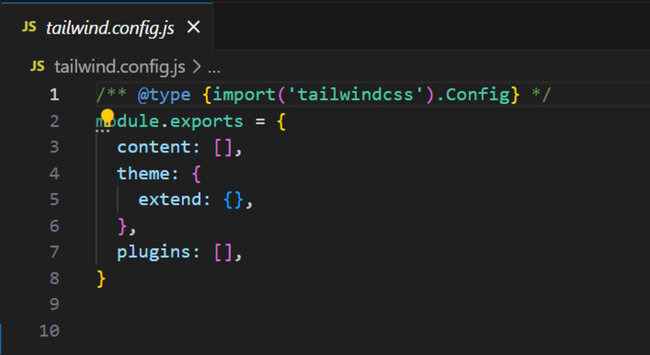
内容源路径配置
"tailwind.config.js"文件"内容"部分中的源路径配置可帮助 Tailwind CSS 扫描所有 HTML、JavaScript 组件以及任何其他包含类名的文件,并生成与这些样式对应的 CSS。
/** @type {import('tailwindcss').Config} */
module.exports = {
  content: [
    './pages/**/*.{html,js}',
    './components/**/*.{html,js}'
  ],
  // ...
}
Key Points
The key points to remember while configuring Content in Tailwind CSS.
- 使用通配符 (**/*) 递归匹配文件。
- 使用 { 和逗号分隔的值来匹配一系列选项,例如 {html,js}。
- 保留相对于项目根目录的路径。
内容配置模式提示
为了有效地配置内容,请遵循以下提示:
- 精确配置: 排除那些捕获不必要文件或目录(例如 node_modules)的宽泛模式。
content: [
'./components/**/*.{html,js}',
'./pages/**/*.{html,js}',
'./index.html',  // Include specific files if needed
],
content: [
'./public/index.html',
'./src/**/*.{html,js}',
],
content: [
'./src/**/*.js',
],
content: [
'./src/**/*.css',
],
深度类识别
Tailwind 使用正则表达式从源代码中提取潜在的类名,而无需解析或执行。
<div class="md:flex">
  <div class="md:flex-shrink-0">
    <img class="rounded-lg md:w-56" src="/img/shopping.jpg" alt="Woman paying for a purchase">
  </div>
  <div class="mt-4 md:mt-0 md:ml-6">
    <div class="uppercase tracking-wide text-sm text-indigo-600 font-bold">
      Marketing
    </div>
    <a href="/get-started" class="block mt-1 text-lg leading-tight font-semibold text-gray-900 hover:underline">
      Finding customers for your new business
    </a>
    <p class="mt-2 text-gray-600">
      Getting a new business off the ground is a lot of hard work.
      Here are five ideas you can use to find your first customers.
    </p>
  </div>
</div>
注意:Tailwind 可与任何语言(例如 JSX)配合使用,它会在任何地方(而不仅仅是 HTML)搜索类名。
动态类名
Tailwind 只会在您的代码中查找完整的类名。如果您使用字符串或部分内容构建类名,Tailwind 将无法识别它们,也不会生成相应的 CSS。
创建类名时应遵循的措施。
- 始终使用完整的类名,而不是动态构建类名。
<div class="{{ error ? 'text-red-600' : 'text-green-600' }}"></div>
function Button({ color, children }) {
  const colorVariants = {
    blue: "bg-blue-600 hover:bg-blue-500",
    red: "bg-red-600 hover:bg-red-500",
  };

  return <button className={`${colorVariants[color]} ...`}>{children}</button>;
}
使用外部库
使用第三方库并使用自定义 CSS 进行样式设置时,请尽量避免在不使用 Tailwind 的 @layer 功能的情况下编写这些样式。这将使 Tailwind 更容易扫描第三方库的源代码。
@tailwind base;
@tailwind components;

.select2-dropdown {
    @apply rounded-b-lg shadow-md;
}
.select2-search {
    @apply border border-gray-300 rounded;
}
.select2-results__group {
    @apply text-lg font-bold text-gray-900;
}
/* ... */

@tailwind utilities;
如果您在多个项目中使用 Tailwind 风格的组件,请确保已配置 Tailwind 来扫描它们的类名。
module.exports = {
    content: [
        './components/**/*.{html,js}',
        './pages/**/*.{html,js}',
        './node_modules/@my-company/tailwind-components/**/*.js',
    ],
    // ...
    }
如果您在工作区中使用 monorepo,则可能需要使用 require.resolve,以便 Tailwind 可以找到您的内容文件。
const path = require('path');

module.exports = {
    content: [
    './components/**/*.{html,js}',
    './pages/**/*.{html,js}',
    path.join(path.dirname(require.resolve('@my-company/tailwind-components')), '**/*.js'),
    ],
    // ...
}
使用相对路径
Tailwind 默认使用当前目录作为路径。为避免出现问题,请将"relative"属性设置为"true",以将路径绑定到"tailwind.config.js"文件。
module.exports = {
  content: {
    relative: true,
    files: ["./pages/**/*.{html,js}", "./components/**/*.{html,js}"],
  },
  // ...
};
设置原始内容
要在 Tailwind 中扫描原始内容而非文件内容,请使用带有"raw"键的对象(而不是文件路径)。这允许您配置 Tailwind 以扫描自定义内容。
/** @type {import('tailwindcss').Config} */
module.exports = {
    content: [
    './pages/**/*.{html,js}',
    './components/**/*.{html,js}',
    { raw: '<div class="font-bold">', extension: 'html' },
    ],
    // ...
}
将类添加到安全列表
如果您希望 Tailwind 生成内容文件中不存在的某些类名,请使用 safelist 选项。
/** @type {import('tailwindcss').Config} */
module.exports = {
    content: [
    './pages/**/*.{html,js}',
    './components/**/*.{html,js}',
    ],
    safelist: [
    'bg-red-500',
    'text-3xl',
    'lg:text-4xl',
    ]
    // ...
}
使用正则表达式
Tailwind 支持基于模式的安全列表,适用于需要将多个类列入安全列表的情况。
/** @type {import('tailwindcss').Config} */
module.exports = {
  content: [
    './pages/**/*.{html,js}',
    './components/**/*.{html,js}',
  ],
  safelist: [
    'text-2xl',
    'text-3xl',
    {
      pattern: /bg-(red|green|blue)-(100|200|300)/,
    },
  ],
  // ...
}
您可以通过将某些类添加到"variants"选项来强制 Tailwind 为某些类创建额外的样式。
/** @type {import('tailwindcss').Config} */
module.exports = {
  content: [
    './pages/**/*.{html,js}',
    './components/**/*.{html,js}',
  ],
  safelist: [
    'text-2xl',
    'text-3xl',
    {
      pattern: /bg-(red|green|blue)-(100|200|300)/,
      variants: ['lg', 'hover', 'focus', 'lg:hover'],
    },
  ],
  // ...
}
消除类
Tailwind 可能会创建不必要的类,例如即使未使用也会生成"容器"类,如下所示。
<div class="text-lg leading-8 text-gray-600">
  Every custom pool we design starts as a used shipping container, and is
  retrofitted with state of the art technology and finishes to turn it into
  a beautiful and functional way to entertain your guests all summer long.
</div>
为避免与现有 CSS 冲突,又不为所有 Tailwind 类添加前缀,请使用 blocklist 选项忽略特定类。
/** @type {import('tailwindcss').Config} */
module.exports = {
    content: [
    './pages/**/*.{html,js}',
    './components/**/*.{html,js}',
    ],
    blocklist: [
    'container',
    'collapse',
    ],
    // ...
}
源文件转换
如果您编写的内容会转换为 HTML(例如 Markdown),请在提取类之前先将内容转换为 HTML。使用"content.transform"转换文件,并使用"content.files"指定源路径。
const remark = require('remark')

module.exports = {
  content: {
    files: ['./src/**/*.{html,md}'],
    transform: {
      md: (content) => {
        return remark().process(content)
      }
    }
  },
  // ...
}
修改提取逻辑
使用"extract"自定义特定文件类型的类名检测。
注意:这是一项高级功能,您需要以不同的方式指定源路径。
/** @type {import('tailwindcss').Config} */
module.exports = {
  content: {
    files: ['./src/**/*.{html,wtf}'],
    extract: {
      wtf: (content) => {
        return content.match(/[^<>"'`\s]*/g)
      }
    }
  },
  // ...
}
常见问题排查
以下是在 Tailwind CSS 中配置内容时产生的一些常见问题,以及避免这些问题的措施。
- 缺少类:如果 Tailwind 没有生成类,请仔细检查您的内容配置和文件扩展名(例如,对于 React 组件,请用"jsx"而不是"js"),以确保它与所有源文件匹配。
module.exports = {
    content: [
        './src/**/*.{html,js}',
        './src/**/*.{html,js,jsx}'
    ],
    // ...
}
<!-- Incorrect -->
<div class="text-{{ error ? 'red' : 'green' }}-600"></div>

<!-- Correct -->
<div class="{{ error ? 'text-red-600' : 'text-green-600' }}"></div>
content:[
'./src/**/*.{html,js}',
'./src/pages/**/*.{html,js}',
'./src/components/**/*.{html,js}',
'./src/index.html',
],
// package.json
{
    // ...
    "scripts": {
    "start": "concurrently \"npm run start:css\" \"react-scripts start\"",
    "start:css": "tailwindcss -o src/tailwind.css --watch",
    "build": "npm run build:css && react-scripts build",
    "build:css": "NODE_ENV=production tailwindcss -o src/tailwind.css -m",
    },
}

