
XAML - 事件处理
XAML 中事件的一般概念与其他流行编程语言(如 .NET 和 C++)中的事件类似。在 XAML 中,所有控件都公开一些事件,以便可以订阅它们以用于特定目的。
每当发生事件时,应用程序都会收到通知,程序可以对其做出反应,例如,关闭按钮用于关闭对话框。
根据应用程序的要求,可以为应用程序的不同行为订阅多种类型的事件,但最常用的事件是与鼠标和键盘相关的事件,例如,
- Click
- MouseDown
- MouseEnter
- MouseLeave
- MouseUp
- KeyDown
- KeyUp
在本章中,我们将使用一些基本且最常用的事件来了解如何将特定控件的事件链接到后台代码,其中将根据用户想要执行的操作来实现行为发生特定事件。
让我们看一个按钮单击事件的简单示例。下面给出了按钮控件的 XAML 实现,该控件使用一些属性和 Click 事件 (Click="OnClick") 创建和初始化。
<Window x:Class = "XAMLEventHandling.MainWindow"
   xmlns = "http://schemas.microsoft.com/winfx/2006/xaml/presentation"
   xmlns:x = "http://schemas.microsoft.com/winfx/2006/xaml"
   Title = "MainWindow" Height = "350" Width = "604">

   <Grid>
      <Button x:Name = "button1" Content = "Click" Click = "OnClick"
         Width = "150" Height = "30" HorizontalAlignment = "Center" />
   </Grid>

</Window>
每当单击此按钮时,它都会触发 OnClick 事件,您可以添加任何类型的行为作为对单击的响应。让我们看一下 OnClick 事件实现,它将在单击此按钮时显示一条消息。
using System;
using System.Windows;
using System.Windows.Controls;

namespace XAMLEventHandling {
   /// <summary>
      /// Interaction logic for MainWindow.xaml
   /// </summary>

   public partial class MainWindow : Window {
      public MainWindow() {
         InitializeComponent();
      }
      private void OnClick(object sender, RoutedEventArgs e) {
         MessageBox.Show("Button is clicked!");
      }
   }
}
编译并执行上述代码时,将产生以下输出 −
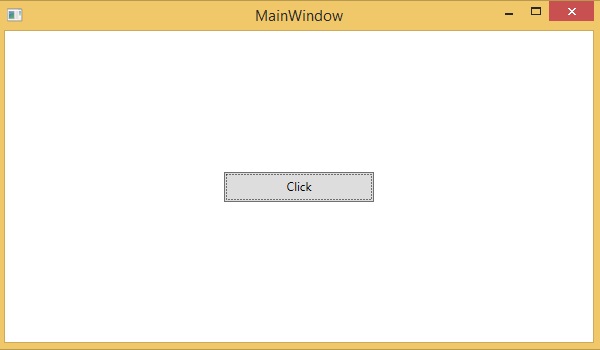
单击按钮时,将触发单击 (OnClick) 事件并显示以下消息。
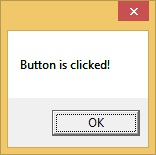
现在让我们看一个处理多个事件的稍微复杂一点的示例。
示例
以下示例包含一个带有 ContextMenu 的文本框,该文本框可操作文本框内的文本。
以下 XAML 代码创建一个 TextBox、一个 ContextMenu 和 MenuItem,它们具有一些属性和事件,例如 Checked、Unchecked 和 Click。
<Window x:Class = "XAMLContextMenu.MainWindow"
   xmlns = "http://schemas.microsoft.com/winfx/2006/xaml/presentation"
   xmlns:x = "http://schemas.microsoft.com/winfx/2006/xaml"
   Title = "MainWindow" Height = "350" Width = "604">

   <Grid>
      <TextBox Name = "textBox1" TextWrapping = "Wrap" Margin = "10" Grid.Row = "7">
         Hi, this is XAML tutorial.
         <TextBox.ContextMenu>

            <ContextMenu>
               <MenuItem Header = "_Bold" IsCheckable = "True"
                  Checked = "Bold_Checked" Unchecked = "Bold_Unchecked" />
               <MenuItem Header = "_Italic" IsCheckable = "True"
                  Checked = "Italic_Checked" Unchecked = "Italic_Unchecked" />
               <Separator />
               <MenuItem Header = "Increase Font Size" Click = "IncreaseFont_Click" />
               <MenuItem Header = "_Decrease Font Size" Click = "DecreaseFont_Click" />
            </ContextMenu>

         </TextBox.ContextMenu>
      </TextBox>
   </Grid>

</Window>
以下是使用 C# 实现的不同事件的实现,这些事件在菜单项被选中、取消选中或单击时都会触发。
using System;
using System.Collections.Generic;
using System.Linq;
using System.Text;
using System.Threading.Tasks;
using System.Windows;
using System.Windows.Controls;
using System.Windows.Data;

namespace XAMLContextMenu {
   /// <summary>
      /// Interaction logic for MainWindow.xaml
   /// </summary>

   public partial class MainWindow : Window {
      public MainWindow() {
         InitializeComponent();
      }
      private void Bold_Checked(object sender, RoutedEventArgs e) {
         textBox1.FontWeight = FontWeights.Bold;
      }
      private void Bold_Unchecked(object sender, RoutedEventArgs e) {
         textBox1.FontWeight = FontWeights.Normal;
      }
      private void Italic_Checked(object sender, RoutedEventArgs e) {
         textBox1.FontStyle = FontStyles.Italic;
      }
      private void Italic_Unchecked(object sender, RoutedEventArgs e) {
         textBox1.FontStyle = FontStyles.Normal;
      }
      private void IncreaseFont_Click(object sender, RoutedEventArgs e) {
         if (textBox1.FontSize < 18) {
            textBox1.FontSize += 2;
         }
      }
      private void DecreaseFont_Click(object sender, RoutedEventArgs e) {
         if (textBox1.FontSize > 10) {
            textBox1.FontSize -= 2;
         }
      }
   }
}
当您编译并执行上述代码时,它将产生以下输出 −
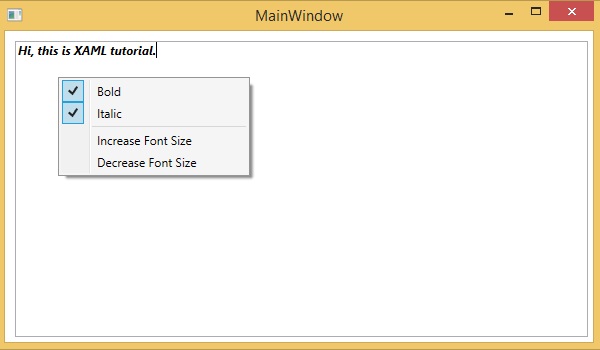
我们建议您执行上述示例代码并尝试一些其他事件。
事件
| Sr.No. | 控件和说明 |
|---|---|
| 1 | Checked 选中 ToggleButton 时触发。 (从 ToggleButton 继承) |
| 2 | Click 单击按钮控件时发生。 (从 ButtonBase 继承) |
| 3 | ContextMenuClosing 在元素上的任何上下文菜单关闭之前发生。 (从 FrameworkElement 继承。) |
| 4 | ContextMenuOpening 打开元素上的任何上下文菜单时发生。 (继承自 FrameworkElement。) |
| 5 | DataContextChanged 当 FrameworkElement.DataContext 属性的值发生更改时发生。 (继承自 FrameworkElement) |
| 6 | DragEnter 当输入系统报告以此元素为目标的底层拖动事件时发生。 (继承自 UIElement)。 |
| 7 | DragLeave 当输入系统报告以此元素为原点的底层拖动事件时发生。 (继承自 UIElement) |
| 8 | DragOver 当输入系统报告此元素作为潜在放置目标的底层拖动事件时发生。 (继承自 UIElement) |
| 9 | DragStarting 当启动拖动操作时发生。 (继承自 UIElement) |
| 10 | DropCompleted 拖放操作结束时发生。(从 UIElement 继承) |
| 11 | DropDownClosed ComboBox 的下拉部分关闭时发生。 |
| 12 | DropDownOpened ComboBox 的下拉部分打开时发生。 |
| 13 | GotFocus UIElement 获得焦点时发生。 (从 UIElement 继承) |
| 14 | Holding 当未处理的 Hold 交互发生在此元素的命中测试区域上时发生。 (从 UIElement 继承) |
| 15 | Intermediate 当 ToggleButton 的状态切换到不确定状态时触发。 (从 ToggleButton 继承) |
| 16 | IsEnabledChanged 当 IsEnabled 属性更改时发生。 (从 Control 继承) |
| 17 | KeyDown 当 UIElement 具有焦点时按下键盘键时发生。 (从 UIElement 继承) |
| 18 | KeyUp 当 UIElement 具有焦点时释放键盘键时发生。 (从 UIElement 继承) |
| 19 | LostFocus 当 UIElement 失去焦点时发生。 (从 UIElement 继承) |
| 20 | ManipulationCompleted 当对 UIElement 的操作完成时发生。 (从 UIElement 继承) |
| 21 | ManipulationDelta 当输入设备在操作过程中改变位置时发生。 (从 UIElement 继承) |
| 22 | ManipulationInertiaStarting 当输入设备在操作过程中与 UIElement 对象失去联系并且开始惯性时发生。 (从 UIElement 继承) |
| 23 | ManipulationStarted 当输入设备开始对 UIElement 进行操作时发生。 (从 UIElement 继承) |
| 24 | ManipulationStarting 首次创建操作处理器时发生。 (从 UIElement 继承) |
| 25 | SelectionChanged 当文本选择发生变化时发生。 |
| 26 | SizeChanged 当 FrameworkElement 上的 ActualHeight 或 ActualWidth 属性的值发生变化时发生。(从 FrameworkElement 继承) |
| 27 | Unchecked 当 ToggleButton 未选中时发生。 (继承自 ToggleButton) |
| 28 | ValueChanged 范围值改变时发生。(继承自 RangeBase) |

