XAML - 标记扩展
在 XAML 应用程序中,标记扩展是一种获取既不是特定 XAML 对象也不是原始类型的值的方法/技术。标记扩展可以通过打开和关闭花括号来定义,在花括号内,可以定义标记扩展的范围。
数据绑定和静态资源是标记扩展。System.xaml 中有一些预定义的 XAML 标记扩展可供使用。
让我们看一个简单的示例,其中使用了 StaticResources 标记扩展,这是一个预定义的 XAML 标记扩展。
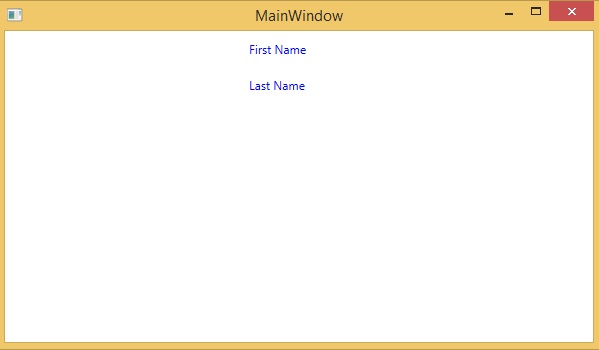
以下 XAML 代码创建了两个具有一些属性的文本块,它们的前景在 Window.Resources 中定义。
<Window x:Class = "XAMLStaticResourcesMarkupExtension.MainWindow"
   xmlns = "http://schemas.microsoft.com/winfx/2006/xaml/presentation"
   xmlns:x = "http://schemas.microsoft.com/winfx/2006/xaml"
   Title = "MainWindow" Height = "350" Width = "525">

   <Window.Resources>
      <SolidColorBrush Color = "Blue" x:Key = "myBrush"></SolidColorBrush>
   </Window.Resources>

   <Grid>
      <StackPanel Orientation = "Vertical">
         <TextBlock Foreground = "{StaticResource myBrush}" Text = "First Name"
            Width = "100" Margin = "10" />
         <TextBlock Foreground = "{StaticResource myBrush}" Text = "Last Name"
            Width = "100" Margin = "10" />
      </StackPanel>
   </Grid>

</Window>
在 Window.Resources 中,您可以看到使用 x:Key 来唯一标识在 XAML 定义的字典中创建和引用的元素,以标识资源字典中的资源。
当您编译并执行上述代码时,它将生成以下 MainWindow。您可以看到两个带有蓝色前景色的文本块。
在 XAML 中,还可以通过继承 MarkupExtension 类并重写 MarkupExtension 类中的抽象方法 ProvideValue 方法来定义自定义标记扩展。
让我们看一个自定义标记扩展的简单示例。
<Window x:Class = "XAMLMarkupExtension.MainWindow"
   xmlns = "http://schemas.microsoft.com/winfx/2006/xaml/presentation"
   xmlns:x = "http://schemas.microsoft.com/winfx/2006/xaml"
   xmlns:my = "clr-namespace:XAMLMarkupExtension"
   Title = "MainWindow" Height = "350" Width = "525">

   <Grid>
      <Button Content = "{my:MyMarkupExtension FirstStr = Markup, SecondStr = Extension}"
         Width = "200" Height = "20" />
   </Grid>

</Window>
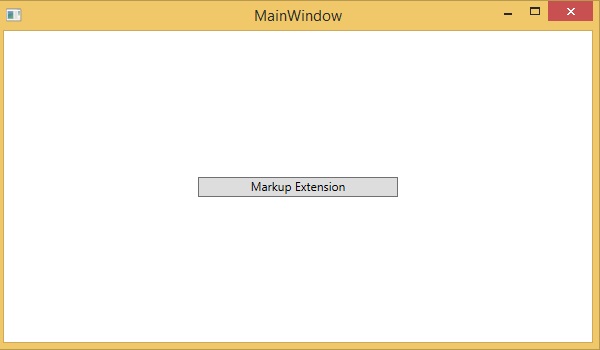
在上述 XAML 代码中,创建了一个按钮,该按钮具有一些属性,对于内容值,已使用自定义标记扩展 (my:MyMarkupExtension),其两个值"Markup"和"Extension"分别分配给 FirstStr 和 SecondStr。
实际上,MyMarkupExtension 是一个从 MarkupExtension 派生的类,如下面的 C# 实现所示。此类包含两个字符串变量 FirstStr 和 SecondStr,它们连接在一起并将该字符串从 ProvideValue 方法返回到按钮的内容。
using System;
using System.Collections.Generic;
using System.Linq;
using System.Text;
using System.Threading.Tasks;

using System.Windows;
using System.Windows.Controls;
using System.Windows.Data;
using System.Windows.Documents;
using System.Windows.Input;
using System.Windows.Markup;
using System.Windows.Media;
using System.Windows.Media.Imaging;
using System.Windows.Navigation;
using System.Windows.Shapes;

namespace XAMLMarkupExtension {
   /// <summary>
      /// Interaction logic for MainWindow.xaml
   /// </summary>

   public partial class MainWindow : Window {
      public MainWindow() {
         InitializeComponent();
      }
   }
   public class MyMarkupExtension : MarkupExtension {
      public MyMarkupExtension() { }
      public String FirstStr { get; set; }
      public String SecondStr { get; set; }

      public override object ProvideValue(IServiceProvider serviceProvider) {
        return FirstStr + " " + SecondStr;
      }
   }
}
让我们运行这个应用程序,您可以立即在 MainWindow 中看到"标记扩展"已成功用作按钮的内容。