
XAML - PasswordBox
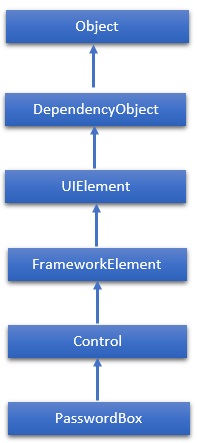
PasswordBox 是一个控件,用户可以在其中输入屏蔽密码。当用户输入密码时,不会显示文本,只显示密码字符。密码字符(通常显示为 *)可以通过 PasswordChar 属性轻松更改。 PasswordBox 类的层次继承如下 −
属性
| Sr.No. | 属性 &描述 |
|---|---|
| 1 | InputScope 获取或设置此 PasswordBox 使用的输入上下文。 |
| 2 | InputScopeProperty 标识 InputScope 依赖项属性。 |
| 3 | IsPasswordRevealButtonEnabled 获取或设置一个值,该值指定 PasswordBox 的可视 UI 是否包含用于切换显示或隐藏键入字符的按钮元素。在 Windows 10 及更高版本中,请改用 PasswordRevealMode。 |
| 4 | IsPasswordRevealButtonEnabledProperty 标识 IsPasswordRevealButtonEnabled 依赖项属性。 |
| 5 | MaxLength 获取或设置此 PasswordBox 处理的密码的最大长度。 |
| 6 | MaxLengthProperty 标识 MaxLength 依赖项属性。 |
| 7 | Password 获取或设置 PasswordBox 当前持有的密码。 |
| 8 | PasswordChar 获取或设置 PasswordBox 的屏蔽字符。 |
| 9 | PasswordCharProperty 标识 PasswordChar 依赖属性。 |
| 10 | PasswordProperty 标识 Password 依赖属性。 |
| 11 | PasswordRevealMode 获取或设置一个值,该值指定密码是始终、从不还是可选地隐藏。 |
| 12 | PasswordRevealModeProperty 标识 PasswordRevealMode 依赖项属性。 |
| 13 | Resources 获取本地定义的资源字典。在 XAML 中,您可以通过 XAML 隐式集合语法将资源项建立为 frameworkElement.Resources 属性元素的子对象元素。(从 FrameworkElement 继承) |
事件
| Sr.No. | 事件和说明 |
|---|---|
| 1 | ContextMenuOpening 当系统处理显示上下文菜单的交互时发生。 |
| 2 | GotFocus 当 UIElement 获得焦点时发生。 (从 UIElement 继承) |
| 3 | PasswordChanged 当 Password 属性的值发生更改时发生。 |
| 4 | Paste 当文本粘贴到控件中时发生。 |
方法
| Sr.No. | 方法和说明 |
|---|---|
| 1 | OnLostFocus 在 LostFocus 事件发生之前调用。(从控件继承) |
| 2 | SelectAll 选择 PasswordBox 中的所有字符。 |
| 3 | SetBinding 使用提供的绑定对象将绑定附加到 FrameworkElement。 (从 FrameworkElement 继承) |
| 4 | SetValue 设置 DependencyObject 上的依赖项属性的本地值。 (从 DependencyObject 继承) |
示例
以下示例显示了 PasswordBox、标签和按钮。 以下是创建和初始化所有这些控件的 XAML 代码。
<Window x:Class = "PasswordBox.MainWindow"
   xmlns = "http://schemas.microsoft.com/winfx/2006/xaml/presentation"
   xmlns:x = "http://schemas.microsoft.com/winfx/2006/xaml"
   Title = "MainWindow" Height = "350" Width = "604">

   <Grid>
      <PasswordBox x:Name = "pwBox"
         Height = "35"
         Width = "200"
         MaxLength = "8"
         Margin = "159,55,158,229" />
      <Label Content = "Password"
         HorizontalAlignment = "Left"
         Margin = "108,61,0,0"
         VerticalAlignment = "Top"
         Width = "70" />
      <Button Content = "Ok" HorizontalAlignment = "Left"
         Margin = "406,64,0,0"
         VerticalAlignment = "Top"
         Width = "75" Click = "Button_Click"/>
      <Label Name = "statusText"
         HorizontalAlignment = "Left"
         Margin = "159,128,0,0"
         VerticalAlignment = "Top"
         Width = "200"
         Height = "38"/>
   </Grid>
</Window>
以下是按钮点击事件的 C# 实现,程序会比较密码。如果输入的密码是"xaml1234",则会在标签上显示"密码正确"的消息。
using System.Linq;
using System.Windows;
using System.Windows.Controls;

namespace XAMLMenu {
   public partial class MainWindow : Window {
      public MainWindow() {
         InitializeComponent();
      }
      private void MenuItem_Click(object sender, RoutedEventArgs e) {
         MenuItem item = sender as MenuItem;
        this.Title = "File: " + item.Header;
      }
      private void MenuItem_Click1(object sender, RoutedEventArgs e) {
         MenuItem item = sender as MenuItem;
         this.Title = "Edit: " + item.Header;
      }
   }
}
当您编译并执行上述代码时,它将产生以下输出 −
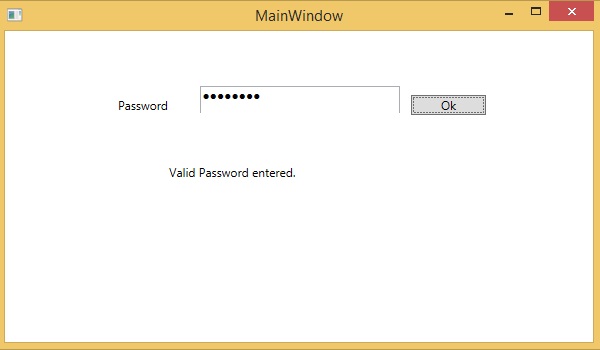
我们建议您执行上述示例代码并尝试一些其他属性和事件。
 xaml_controls.html
