
XAML - ProgressBar
ProgressBar 表示指示操作进度的控件,其典型视觉外观是随着进度的继续,以动画形式呈现填充区域的条形图。它可以以以下两种样式显示进度 −
- 显示重复图案的条形图,或
- 基于值填充的条形图。
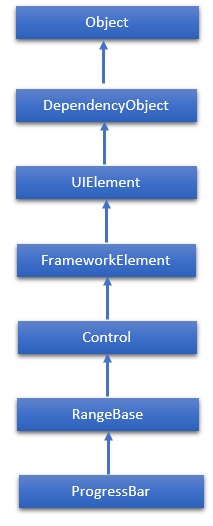
ProgressBar 类的层次继承如下 −
属性
| Sr.No. | 属性 &描述 |
|---|---|
| 1 | IsIndeterminate 获取或设置一个值,该值指示进度条是否以重复模式报告通用进度或根据 Value 属性报告进度。 |
| 2 | IsIndeterminateProperty 标识 IsIndeterminate 依赖项属性。 |
| 3 | ShowError 获取或设置一个值,该值指示进度条是否应使用向用户传达错误状态的视觉状态。 |
| 4 | ShowErrorProperty 标识 ShowError 依赖项属性。 |
| 5 | ShowPaused 获取或设置一个值,该值指示进度条是否应使用向用户传达"暂停"状态的视觉状态。 |
| 6 | ShowPausedProperty 标识 ShowPaused 依赖项属性。 |
| 7 | TemplateSettings 获取一个对象,该对象提供可引用为 TemplateBinding 的计算值定义 ProgressBar 控件模板时使用的资源。 |
事件
| Sr.No. | 事件和说明 |
|---|---|
| 1 | ManipulationCompleted 在 UIElement 上的操作完成时发生。 (从 UIElement 继承) |
| 2 | ManipulationDelta 当输入设备在操作过程中改变位置时发生。 (从 UIElement 继承) |
| 3 | ManipulationInertiaStarting 当输入设备在操作过程中与 UIElement 对象失去联系并且开始惯性时发生。 (从 UIElement 继承) |
| 4 | ManipulationStarted 当输入设备开始对 UIElement 进行操作时发生。 (从 UIElement 继承) |
| 5 | ManipulationStarting 首次创建操作处理器时发生。 (从 UIElement 继承) |
| 6 | ValueChanged 范围值更改时发生。 (从 RangeBase 继承) |
方法
| Sr.No. | 方法和说明 |
|---|---|
| 1 | OnManipulationCompleted 在 ManipulationCompleted 事件发生之前调用。 (从控件继承) |
| 2 | OnManipulationDelta 在 ManipulationDelta 事件发生之前调用。 (从控件继承) |
| 3 | OnManipulationInertiaStarting 在 ManipulationInertiaStarting 事件发生之前调用。 (从控件继承) |
| 4 | OnManipulationStarted 在 ManipulationStarted 事件发生之前调用。 (从控件继承) |
| 5 | OnManipulationStarting 在 ManipulationStarting 事件发生之前调用。 (从控件继承) |
| 6 | OnMaximumChanged 在 Maximum 属性更改时调用。 (从 RangeBase 继承) |
| 7 | OnMinimumChanged 在 Minimum 属性更改时调用。 (从 RangeBase 继承) |
| 8 | OnValueChanged 触发 ValueChanged 路由事件。(从 RangeBase 继承) |
| 9 | SetBinding 使用提供的绑定对象将绑定附加到 FrameworkElement。(从 FrameworkElement 继承) |
| 10 | SetValue 设置 DependencyObject 上依赖属性的本地值。 (继承自 DependencyObject) |
示例
以下示例展示了如何使用 ProgressBar 控件。以下是使用 IsIndeterminate 属性创建和初始化两个 ProgressBar 控件的 XAML 代码。
<Window x:Class = "ProgressBar.MainWindow"
   xmlns = "http://schemas.microsoft.com/winfx/2006/xaml/presentation"
   xmlns:x = "http://schemas.microsoft.com/winfx/2006/xaml"
   Title = "MainWindow" Height = "350" Width = "525">

   <Grid>
      <StackPanel x:Name = "LayoutRoot" >
         <Border BorderThickness = "5" BorderBrush = "LightCoral">
            <StackPanel Background = "LightBlue">
               <TextBlock HorizontalAlignment = "Center" Margin = "10"
                  Text = "Value-Based Progress Bar" />
               <ProgressBar x:Name = "pg1" Value = "100" Margin = "10" Maximum = "200"
                  Height = "15" IsIndeterminate = "False" />
            </StackPanel>
         </Border>

         <Border BorderThickness = "5" BorderBrush = "LightCoral">
            <StackPanel Background = "LightBlue">
               <TextBlock HorizontalAlignment = "Center" Margin = "10" Text = "Indeterminate Progress Bar" />
               <ProgressBar x:Name = "pg2" Margin = "10" Height = "15" IsIndeterminate = "True" />
            </StackPanel>
         </Border>
      </StackPanel>
   </Grid>

</Window>
当你编译并执行上面的代码时,它将产生以下输出−
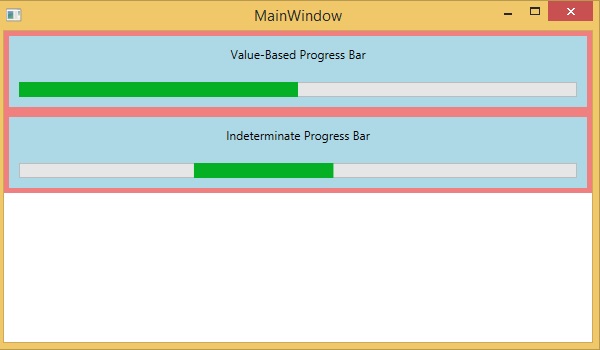
我们建议您执行上面的示例代码并尝试一些其他属性和事件。
 xaml_controls.html
