
XAML - ProgressRing
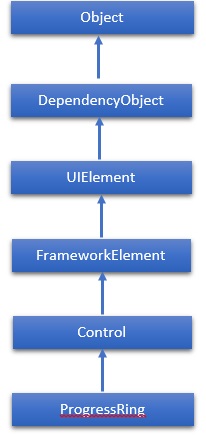
ProgressRing 是一种指示正在进行的操作的控件。典型的视觉外观是一个环形"旋转器",随着进度的继续,它会循环播放动画。这里重要的一点是 WPF 项目不支持 ProgressRing。因此,对于此控件,我们将在 Windows Store App 上工作。 ProgressRing 类的层次继承如下 −
属性
| Sr.No. | 属性 &描述 |
|---|---|
| 1 | IsActive 获取或设置一个值,该值指示 ProgressRing 是否显示进度。 |
| 2 | IsActiveProperty 标识 IsActive 依赖项属性。 |
| 3 | TemplateSettings 获取一个对象,该对象提供计算值,可在为 ProgressRing 控件定义模板时将其引用为 TemplateBinding 源。 |
事件
| Sr.No. | 事件和说明 |
|---|---|
| 1 | ManipulationCompleted 当 UIElement 上的操作完成时发生。(从 UIElement 继承) |
| 2 | ManipulationDelta 当输入设备在操作过程中改变位置时发生。 (从 UIElement 继承) |
| 3 | ManipulationInertiaStarting 当输入设备在操作过程中与 UIElement 对象失去联系并且开始惯性时发生。 (从 UIElement 继承) |
| 4 | ManipulationStarted 当输入设备开始对 UIElement 进行操作时发生。 (从 UIElement 继承) |
| 5 | ManipulationStarting 首次创建操作处理器时发生。(从 UIElement 继承) |
| 6 | ValueChanged 范围值更改时发生。(从 RangeBase 继承) |
方法
| Sr.No. | 方法 &描述 |
|---|---|
| 1 | OnManipulationCompleted 在 ManipulationCompleted 事件发生之前调用。(从控件继承) |
| 2 | OnManipulationDelta 在 ManipulationDelta 事件发生之前调用。(从控件继承) |
| 3 | OnManipulationInertiaStarting 在 ManipulationInertiaStarting 事件发生之前调用。 (从控件继承) |
| 4 | OnManipulationStarted 在 ManipulationStarted 事件发生之前调用。 (从控件继承) |
| 5 | OnManipulationStarting 在 ManipulationStarting 事件发生之前调用。 (从控件继承) |
| 6 | OnMaximumChanged 在 Maximum 属性更改时调用。 (从 RangeBase 继承) |
| 7 | OnMinimumChanged 当 Minimum 属性发生变化时调用。(从 RangeBase 继承) |
示例
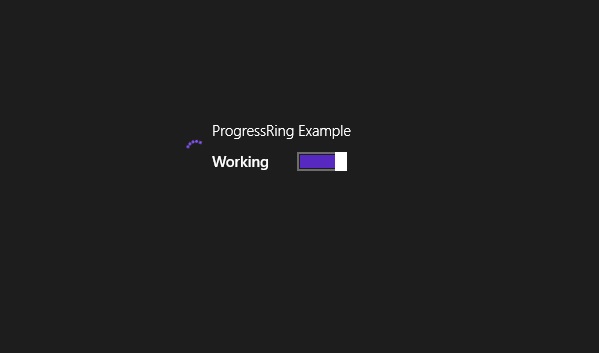
以下示例显示如何将 ProgressRing 与 ToggleSwitch 结合使用。以下是 XAML 中的代码,用于创建和初始化 ProgressRing 和 ToggleSwitch −
<Page x:Class = "ProgressRing.MainPage"
   xmlns = "http://schemas.microsoft.com/winfx/2006/xaml/presentation"
   xmlns:x = "http://schemas.microsoft.com/winfx/2006/xaml"
   xmlns:local = "using:ProgressRing"
   xmlns:d = "http://schemas.microsoft.com/expression/blend/2008"
   xmlns:mc = "http://schemas.openxmlformats.org/markup-compatibility/2006"
   mc:Ignorable = "d">

   <Grid Background = "{ThemeResource ApplicationPageBackgroundThemeBrush}">
      <StackPanel Orientation = "Horizontal" Margin = "342,0,-342,0">
         <ProgressRing x:Name = "progress1"/>
         <ToggleSwitch Header = "ProgressRing Example" OffContent = "Do work"
            OnContent = "Working" Toggled = "ToggleSwitch_Toggled"
            Margin = "0,348,0,347"/>
      </StackPanel>
   </Grid>

</Page>
下面是 Toggled 事件的 C# 实现 −
using System;
using System.Runtime.InteropServices.WindowsRuntime;
using Windows.Foundation;
using Windows.Foundation.Collections;
using Windows.UI.Xaml;
using Windows.UI.Xaml.Controls;
using Windows.UI.Xaml.Controls.Primitives;

namespace ProgressRing {
   public sealed partial class MainPage : Page {
      public MainPage() {
         this.InitializeComponent();
      }
      private void ToggleSwitch_Toggled(object sender, RoutedEventArgs e) {
         ToggleSwitch toggleSwitch = sender as ToggleSwitch;

         if (toggleSwitch != null) {
            if (toggleSwitch.IsOn == true) {
               progress1.IsActive = true;
               progress1.Visibility = Visibility.Visible;
            } else {
               progress1.IsActive = false;
               progress1.Visibility = Visibility.Collapsed;
            }
         }
      }
   }
}
当您编译并执行上述代码时,它会产生以下输出 −
我们建议您执行上述示例代码,并在 Windows 应用程序中尝试一些其他属性和事件。
 xaml_controls.html
