
XAML - SearchBox
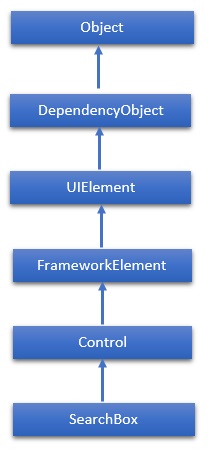
SearchBox 表示可用于输入搜索查询文本的控件。WPF 项目不支持 SearchBox,因此将在 Windows 应用程序中实现。SearchBox 类的层次继承如下 −
属性
| Sr.No. | 属性 &描述 |
|---|---|
| 1 | PlaceholderText 获取或设置控件中显示的文本,直到用户操作或其他操作更改该值。 |
| 2 | ChooseSuggestionOnEnter 获取或设置一个值,该值确定用户按下 Enter 键时是否激活建议的搜索查询。 |
| 3 | ChooseSuggestionOnEnterProperty 标识 ChooseSuggestionOnEnter 依赖项属性。 |
| 4 | FocusOnKeyboardInput 获取或设置一个值,该值确定用户是否可以通过在应用程序中的任意位置键入内容进行搜索。 |
| 5 | FocusOnKeyboardInputProperty 标识 FocusOnKeyboardInput 依赖项属性。 |
| 6 | PlaceholderTextProperty 标识 PlaceholderText 依赖项属性。 |
| 7 | QueryText 获取或设置搜索的文本内容框。 |
| 8 | QueryTextProperty 标识 QueryText 依赖项属性。 |
| 9 | SearchHistoryContext 获取或设置一个字符串,该字符串标识搜索的上下文,并用于存储用户在应用中的搜索历史记录。 |
| 10 | SearchHistoryContextProperty 标识 SearchHistoryContext 依赖项属性。 |
| 11 | SearchHistoryEnabled 获取或设置一个值,该值确定是否根据搜索历史记录生成搜索建议。 |
| 12 | SearchHistoryEnabledProperty 标识 SearchHistoryEnabled 依赖属性。 |
事件
| Sr.No. | 事件 &描述 |
|---|---|
| 1 | PrepareForFocusOnKeyboardInput 当 FocusOnKeyboardInput 属性为 true 且应用收到文本键盘输入时发生。 |
| 2 | QueryChanged 当查询文本更改时发生。 |
| 3 | QuerySubmitted 当用户提交搜索查询时发生。 |
| 4 | ResultSuggestionChosen 当用户选择建议的搜索结果时发生。 |
| 5 | SuggestionsRequested 当用户的查询文本发生变化并且应用需要提供新的建议以显示在搜索窗格中时发生。 |
方法
| Sr.No. | 方法和说明 |
|---|---|
| 1 | OnManipulationCompleted 在 ManipulationCompleted 事件发生之前调用。(从控件继承) |
| 2 | OnManipulationDelta 在 ManipulationDelta 事件发生之前调用。(从控件继承) |
| 3 | OnManipulationInertiaStarting 在 ManipulationInertiaStarting 事件发生之前调用。 (从控件继承) |
| 4 | OnManipulationStarted 在 ManipulationStarted 事件发生之前调用。 (从控件继承) |
| 5 | OnManipulationStarting 在 ManipulationStarting 事件发生之前调用。 (从控件继承) |
| 6 | OnMaximumChanged 在 Maximum 属性更改时调用。 (从 RangeBase 继承) |
| 7 | OnMinimumChanged 当 Minimum 属性更改时调用。(从 RangeBase 继承) |
| 8 | OnValueChanged 触发 ValueChanged 路由事件。(从 RangeBase 继承) |
| 9 | SetBinding 使用提供的绑定对象将绑定附加到 FrameworkElement。 (从 FrameworkElement 继承) |
| 10 | SetLocalContentSuggestionSettings 指定是否在搜索框建议中自动显示基于本地文件的建议,并定义 Windows 用于定位和过滤这些建议的条件。 |
| 11 | SetValue 设置 DependencyObject 上依赖项属性的本地值。(从 DependencyObject 继承) |
| 12 | StartDragAsync 启动拖放操作。 (从 UIElement 继承) |
| 13 | UnregisterPropertyChangedCallback 通过调用 RegisterPropertyChangedCallback 取消先前注册的更改通知。 (从 DependencyObject 继承) |
示例
以下示例显示了 SearchBox 在 XAML 应用程序中的用法。 以下是使用一些属性和事件创建和初始化 SearchBox 的 XAML 代码。
<Page x:Class = "XAML_SearchBox.MainPage"
   xmlns = "http://schemas.microsoft.com/winfx/2006/xaml/presentation"
   xmlns:x = "http://schemas.microsoft.com/winfx/2006/xaml"
   xmlns:local = "using:XAML_SearchBox"
   xmlns:d = "http://schemas.microsoft.com/expression/blend/2008"
   xmlns:mc = "http://schemas.openxmlformats.org/markup-compatibility/2006"
   mc:Ignorable = "d">

   <Grid Background = "{ThemeResource ApplicationPageBackgroundThemeBrush}">
      <SearchBox x:Name = "mySearchBox"
         FocusOnKeyboardInput = "False"
         QuerySubmitted = "mySearchBox_QuerySubmitted"
         Height = "35" Width = "400" Margin = "234,132,732,601"/>
   </Grid>

</Page>
以下是 C# 中搜索查询的实现 −
using System;
using System.Collections.Generic;
using System.IO;
using System.Linq;
using System.Runtime.InteropServices.WindowsRuntime;

using Windows.Foundation;
using Windows.Foundation.Collections;

using Windows.UI.Xaml;
using Windows.UI.Xaml.Controls;
using Windows.UI.Xaml.Controls.Primitives;
using Windows.UI.Xaml.Data;
using Windows.UI.Xaml.Input;
using Windows.UI.Xaml.Media;
using Windows.UI.Xaml.Navigation;

// The Blank Page item template is documented at http://go.microsoft.com/fwlink/?LinkId=234238

namespace XAML_SearchBox {
   /// <summary>
      /// An empty page that can be used on its own or navigated to within a Frame.
   /// </summary>

   public sealed partial class MainPage : Page {
      public MainPage() {
         this.InitializeComponent();
      }
      private void mySearchBox_QuerySubmitted(SearchBox sender,
         SearchBoxQuerySubmittedEventArgs args) {

         this.Frame.Navigate(typeof(SearchResultsPage1), args.QueryText);
      }
   }
}
在此示例的 Windows 应用项目中,添加一个名为 SearchResultsPage1.xaml 的搜索结果页。 默认实现足以运行此应用程序。
当你编译并执行上面的代码时,它将产生以下输出−
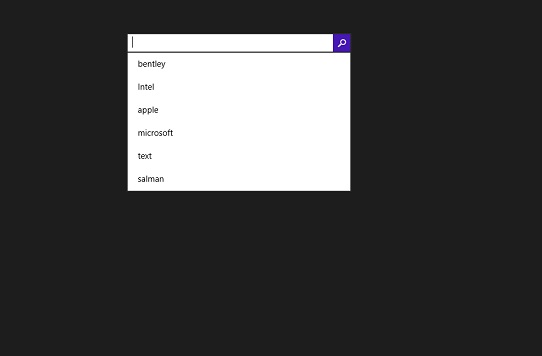
我们建议您执行上面的示例代码并尝试一些其他属性和事件。
 xaml_controls.html
