
XAML - TextBlock
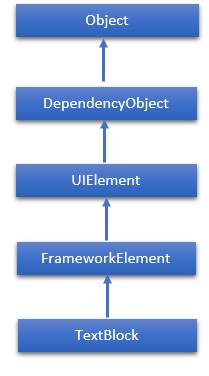
TextBlock 提供了一个轻量级控件,用于显示少量只读文本。TextBlock 类的层次继承如下 −
属性
| Sr.No. | 属性 &描述 |
|---|---|
| 1 | ContentEnd 获取 TextBlock 中文本内容结束的 TextPointer 对象。 |
| 2 | ContentStart 获取 TextBlock 中文本内容开始的 TextPointer 对象。 |
| 3 | IsTextSelectionEnabled 获取或设置一个值,该值指示 TextBlock 中是否启用了文本选择,无论是通过用户操作还是调用与选择相关的 API。 |
| 4 | IsTextSelectionEnabledProperty 标识 IsTextSelectionEnabled 依赖项属性。 |
| 5 | LineHeight 获取或设置每行内容的高度。 |
| 6 | MaxLines 获取或设置 TextBlock 中显示的最大文本行数。 |
| 7 | SelectedText 获取选定的文本范围文本。 |
| 8 | SelectionEnd 获取 TextBlock 中选定文本的结束位置。 |
| 9 | SelectionHighlightColor 获取或设置用于突出显示所选文本的画笔。 |
| 10 | SelectionStart 获取 TextBlock 中选定文本的起始位置。 |
| 11 | Text 获取或设置TextBlock。 |
| 12 | TextAlignment 获取或设置一个值,该值指示文本内容的水平对齐方式。 |
| 13 | TextTrimming 获取或设置当内容溢出内容区域时要采用的文本修剪行为。 |
| 14 | TextWrapping 获取或设置 TextBlock 如何换行。 |
事件
| Sr.No. | 事件 &描述 |
|---|---|
| 1 | ContextMenuOpening 当系统处理显示上下文菜单的交互时发生。 |
| 2 | SelectionChanged 当文本选择发生变化时发生。 |
方法
| Sr.No. | 方法 &描述 |
|---|---|
| 1 | Focus 聚焦 TextBlock,就像它是一个常规可聚焦控件一样。 |
| 2 | Select 选择 TextBlock 中的一段文本。 |
| 3 | SelectAll 选择 TextBlock 中的所有内容。 |
示例
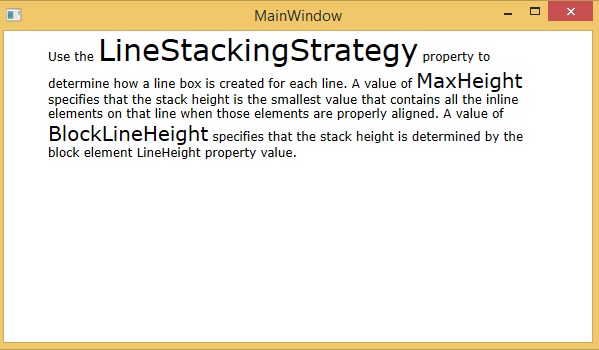
以下示例显示了 XAML 应用程序中 TextBlock 的用法。下面是创建并初始化具有一些属性的 TextBlock 的 XAML 代码。
<Window x:Class = "XAMLTextBlock.MainWindow"
   xmlns = "http://schemas.microsoft.com/winfx/2006/xaml/presentation"
   xmlns:x = "http://schemas.microsoft.com/winfx/2006/xaml"
   Title = "MainWindow" Height = "350" Width = "604">

   <Grid>
      <StackPanel>
         <TextBlock FontFamily = "Verdana"
            LineStackingStrategy = "MaxHeight"
            LineHeight = "10" Width = "500" TextWrapping = "Wrap">

            Use the <Run FontSize = "30"> LineStackingStrategy</Run>
            property to determine how a line box is created for each line.
            A value of <Run FontSize = "20">MaxHeight</Run>
            specifies that the stack height is the smallest value
            that contains all the inline elements on that line
            when those elements are properly aligned.
            A value of <Run FontSize = "20">BlockLineHeight</Run>
            specifies that the stack height is determined by
            the block element LineHeight property value.
         </TextBlock>
      </StackPanel>
   </Grid>

</Window>
当您编译并执行上述代码时,它将产生以下输出 −
我们建议您执行上述示例代码并尝试一些其他属性和事件。
 xaml_controls.html
