如何使用 Selenium WebDriver 获取响应状态码?
seleniumautomation testingtesting tools更新于 2026/2/16 17:37:17
我们可以使用 Selenium WebDriver 获取响应状态码。在执行测试时,我们可以验证从服务器获取的响应码。一些常见的 HTTP 响应码如下 −
5XX 表示服务器存在问题。
4XX 表示无法识别服务器资源。
3XX 表示请求已被重定向。
2XX 表示请求已成功执行。
创建 HttpURLConnection 类的实例以获取 HTTP 响应。要获得指向 URL 的链接,请使用 openConnection 方法。然后,我们必须使用 setRequestMethod 方法并将 HEAD 作为参数传递。
要建立连接,需要将 connect 方法应用于 HttpURLConnection 类的对象。最后,使用 getResponseCode 方法获取响应代码。
语法
HttpURLConnection cont=
(HttpURLConnection)new URL("https://www.tutorialspoint.com/index.htm").
.openConnection();
cont.setRequestMethod("HEAD");
cont.connect();
int res = cont.getResponseCode();
示例
Code Implementation
import org.openqa.selenium.By;
import org.openqa.selenium.WebDriver;
import org.openqa.selenium.WebElement;
import org.openqa.selenium.chrome.ChromeDriver;
import java.util.concurrent.TimeUnit;
import java.io.IOException;
import java.net.HttpURLConnection;
import java.net.MalformedURLException;
import java.net.URL;
import java.net.URLConnection;
public class HttpResponseStatus{
   public static void main(String[] args) throws
   MalformedURLException, IOException {
      System.setProperty("webdriver.chrome.driver",
      "C:\Users\ghs6kor\Java\chromedriver.exe");
      WebDriver driver = new ChromeDriver();
      // 等待 5 秒
      driver.manage().timeouts().implicitlyWait(8, TimeUnit.SECONDS);
      //url 启动
      driver.get("https://www.tutorialspoint.com/index.htm");
      //URL 连接
      HttpURLConnection cont=
      (HttpURLConnection)new URL("https://www.tutorialspoint.com/index.htm")
      .openConnection();
      // 将 HEAD 作为参数传递给 setRequestMethod
      cont.setRequestMethod("HEAD");
      // 获取响应码
      cont.connect();
      int rs = cont.getResponseCode();
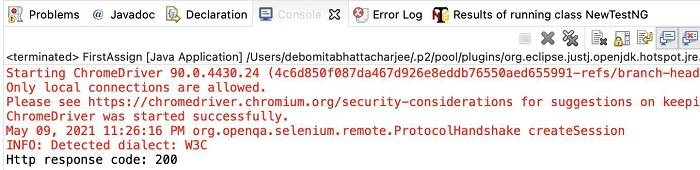
      System.out.println("Http 响应码: " + rs);
      //驱动程序退出
      driver.quit();
   }
}
输出