
HTML DOM console.table() 方法
htmlweb developmentfront end technology更新于 2025/9/24 1:16:17
HTML DOM console.table() 方法用于以井然有序的表格格式显示数据。此方法可用于可视化复杂的数组或对象。表格的组织方式是,数组中的每个元素都将成为表格中的一行。它接受两个参数:tabledata(必需)和 tablecolumns(可选)。
语法
以下是 console.table() 方法的语法 −
console.table( tabledata, tablecolumns );
此处 −
Tabledata 是必需参数值。它表示用于填充表格的数据。它可以是对象类型或数组类型。
Tablecolumns 是一个可选参数值。它是一个数组参数,用于指定应在表格中显示的列。
示例
让我们看一个 HTML DOM console.table() 方法的示例 −
<!DOCTYPE html>
<html>
<body>
<h1>console.table() Method</h1>
<p>Click on the below button to create a console table</p>
<button type="button" onclick="createTable()">TABLE</button>
<script>
   function createTable(){
      var fruit1 = { Name : "Mango", price : "100", color: "Yellow" }
      var fruit2 = { Name : "Guava", price : "50", color:"Green" }
      var fruit3 = { Name : "Strawberry", price : "150", color:"Red" }
      console.table([fruit1, fruit2, fruit3], ["Name","price"]);
   }
</script>
<p>View the table in the console tab</p>
</script>
</body>
</html>
输出
这将产生以下输出 −
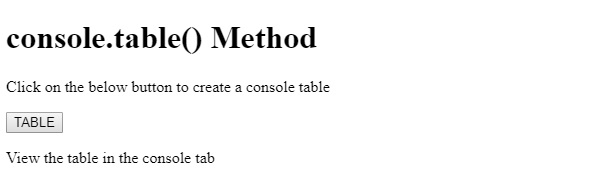
点击 TABLE 按钮并在控制台选项卡中查看它 −
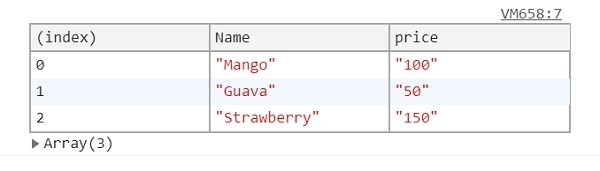
在上面的例子中 −
我们首先创建了一个按钮表,当用户点击该按钮表时,它将执行 createTable() 函数。
<button type="button" onclick="createTable()">TABLE</button>
createTable() 方法内部创建了三个对象数组。对象数组分别名为 fruit1、fruit2 和 fruit3。然后,对象数组的名称作为第一个参数 (tableData) 传递给 console 的 table() 方法。
在第二个可选参数中,我们将要包含在表中的列的名称以数组形式传递。由于我们指定了"Name"和"price"列,因此这些列将在表中可见,并且不会出现"color"列 −
function createTable(){
   var fruit1 = { Name : "Mango", price : "100", color: "Yellow" }
   var fruit2 = { Name : "Guava", price : "50", color:"Green" }
   var fruit3 = { Name : "Strawberry", price : "150", color:"Red" }
   console.table([fruit1, fruit2, fruit3], ["Name","price"]);
}
相关文章
有用资源
html 参考教程 - 该教程包含有关 html 的更多信息:https://www.cainiaomax.com/html/

