
HTML DOM 样式 backgroundClip 属性
htmlweb developmentfront end technology更新于 2025/10/2 6:36:17
backgroundClip 属性用于控制背景图像的绘制范围,即背景图像的绘制区域。它用于设置或返回该绘制区域。
语法
以下是语法 −
设置 backgroundClip 属性 −
background-clip: border-box | padding-box | content-box
值
以下是 − 的值
| Sr.No | 值 &说明 |
|---|---|
| 1 | border-box 这会将背景剪切在 border-box 内,这是默认值。 |
| 2 | padding-box 这会将背景剪切在 padding box 内。 |
| 3 | content-box 背景被剪切在内容框内。 |
示例
让我们看一个 backgroundclip 属性的示例 −
<!DOCTYPE html>
<html>
<head>
<style>
   #one {
      box-shadow: 0 0 2px black;
      padding: 18px;
      background: skyblue;
      background-clip: content-box;
   }
</style>
<script>
   function changeBackClip(){
      document.getElementById("one").style.backgroundClip="padding-box";
      document.getElementById("Sample").innerHTML="The background clip property is now padding-box";
      background-clip: border-box | padding-box | content-box
   }
</script>
</head>
<body>
<div id="one">
Phasellus eu justo lectus. Praesent et nulla facilisis, venenatis justo eget, tempor lectus.
Integer ut felis vel lectus convallis fermentum. Fusce ut felis mauris.</div>
<p>Change the above div background-clip value by clicking the below button</p>
<button onclick="changeBackClip()">CHANGE CLIP</button>
<p id="Sample"></p>
</body>
</html>
输出
这将产生以下输出 −
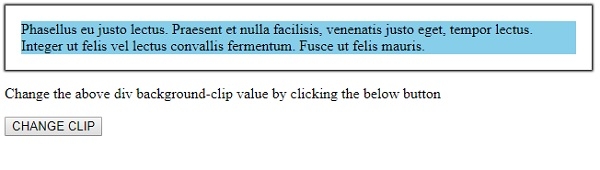
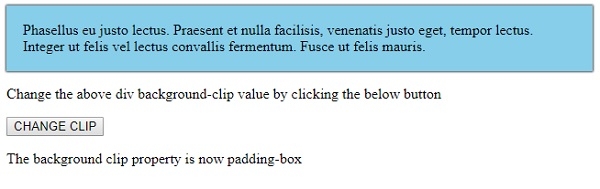
点击"更改剪辑"按钮 −
相关文章
有用资源
html 参考教程 - 该教程包含有关 html 的更多信息:https://www.cainiaomax.com/html/

