
HTML DOM 样式 borderBottomWidth 属性
htmlweb developmentfront end technology更新于 2025/10/2 7:40:17
borderBottomWidth 属性用于设置或获取元素的底部边框宽度。
语法
以下是语法 −
设置 borderBottomWidth 属性 −
object.style.borderBottomWidth = "thin|medium|thick|length|initial|inherit"
值
属性值解释如下 −
| Sr.No | 值 & |
|---|---|
| 1 | thin 指定细边框。 |
| 2 | medium 指定中等边框,为默认值。 |
| 3 | thick 指定细边框。 |
| 4 | length 用于以长度单位指定边框宽度。 |
| 5 | initial 将此属性设置为初始值。 |
| 6 | inherit 继承父属性值 |
示例
让我们来看一个 borderBottomWidth 属性的示例 −
<!DOCTYPE html>
<html>
<head>
<style>
   #DIV1{
      height: 100px;
      width: 200px;
      border: 10px groove orange;
      padding: 10px;
      border-bottom-width:30px;
   }
</style>
<script>
   function changeBottomWidth(){
      document.getElementById("DIV1").style.borderBottomWidth="1px";
      document.getElementById("Sample").innerHTML="The bottom border width is now
      decreased";
   }
</script>
</head>
<body>
<div id="DIV1">SOME SAMPLE TEXT</div>
<p>Change the above div bottom border width by clicking the below button</p>
<button onclick="changeBottomWidth()">Change Bottom Width</button>
<p id="Sample"></p>
</body>
</html>
输出
这将产生以下输出 −
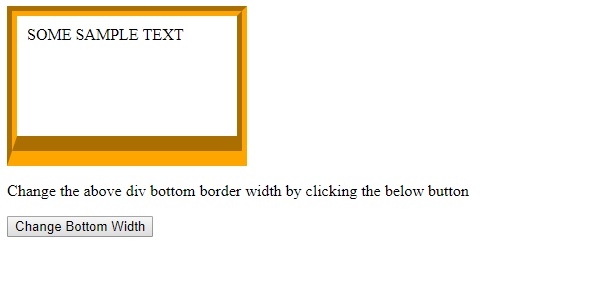
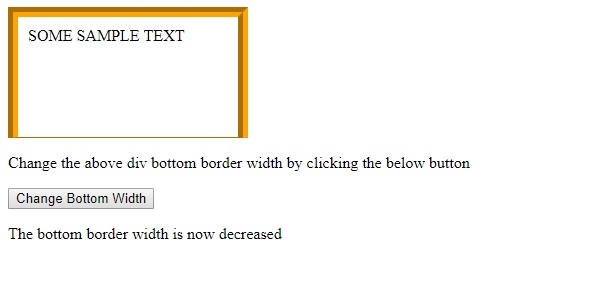
点击"更改底部宽度"按钮 −
相关文章
有用资源
html 参考教程 - 该教程包含有关 html 的更多信息:https://www.cainiaomax.com/html/

