
SectionList 组件是什么以及如何在 React Native 中使用它?
react nativejavascriptmobile development更新于 2025/7/25 17:16:17
有助于按部分呈现列表的接口。SectionList 的一些重要功能是 −
- 对列表的页眉/页脚支持
- 对部分的支持
- 滚动加载
- 下拉刷新
- 完全跨平台
基本的 SectionList 组件如下所示 −
<SectionListsections={DataContainer}keyExtractor={yourkeyextractor}renderItem={yourenderItem}renderSectionHeader={yoursectionheader}/>
要使用 SectionList,请按如下所示导入组件 −
import { SectionList } from "react-native";
以下是 SectionList 上可用的重要属性列表 −
| 属性 | 说明 |
|---|---|
| renderItem | 是呈现部分中项目的默认函数。它返回一个反应元素。 渲染函数将传递给 sectionlist,就像一个具有以下键的对象一样 − 'item'(对象)- 项目对象 'index'(数字)- 部分内项目的索引。 'section'(对象)- 部分对象。 'separators'(对象)- 是一个具有以下键的对象 −
|
| sections | 要呈现的数据。 |
| renderSectionHeader | 内容呈现在顶部。在 iOS 中,您将看到内容停靠在顶部。 |
| renderSectionFooter | 内容呈现在底部。 |
| 刷新 | 刷新时,如果需要呈现新数据,请将此属性设置为 true。 |
| ListEmptyComponent | 当列表为空时,将调用的组件类、渲染函数或渲染元素。如果您想在列表为空时执行某些操作,此组件将会很有帮助。 |
| ListFooterComponent | 组件类、渲染函数或渲染元素,将在所有项目的底部呈现。 |
| ListFooterComponentStyle | 页脚组件所需的样式可以在这里完成。 |
| ListHeaderComponent | 组件类、渲染函数或渲染元素,将在所有项目的顶部呈现。项目。 |
| ListHeaderComponentStyle | 可以在此处设置标题组件所需的样式。 |
| keyExtractor | 提取给定索引的唯一键。该键用于缓存,也用于跟踪项目重新排序。 |
示例 1:使用 SectionList 显示数据
要使用 SectionList,我们需要先将其导入,如下所示 −
import { SectionList , Text, View, StyleSheet} from "react-native";
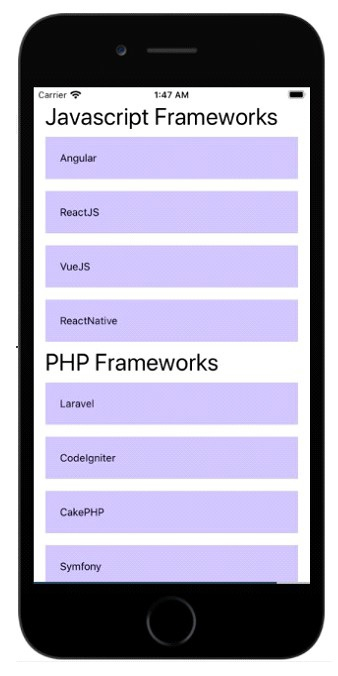
导入完成后,我需要在 SectionList 中显示数据。数据存储在 this.state.data 中,如下所示 −
this.state = {
   data: [
      {
         title: "Javascript Frameworks",
         data: ["Angular", "ReactJS", "VueJS", "ReactNative"]
      },
      {
         title: "PHP Frameworks",
         data: ["Laravel", "CodeIgniter", "CakePHP", "Symfony"]
      }
   ]
};
实现 renderItem 函数
下面的函数负责获取项目并将其显示在 Text 组件中,如下所示 −
renderItem = ({ item }) => {
   return (
      <View style={styles.item}>
         <Text >
            {item}
          </Text>
      </View>
   );
};
Text 组件显示项目并包装在 View 组件内。
实现 SectionList
以下是具有数据、renderItem、keyExtractor 和 renderSectionHeader 属性的 SectionList 实现。
<View style={styles.container}>
   <SectionList
      sections={this.state.data}
      renderItem={this.renderItem}
      keyExtractor={(item, index) => index}
      renderSectionHeader={({ section: { title } }) => (
         <Text style={styles.header}>{title}</Text>
      )}
   />
</View>
this.state.data 被赋予 data 属性,而 this.renderItem 函数被分配给 renderItem 属性。
根据您的数据,您可以确定数据数组中唯一的 key 属性,并将其赋予属性 keyExtractor。如果没有给出,它将把数组索引视为 key 值。
因此,这里唯一的 key 是 item+index,并将其分配给 keyExtractor。
keyExtractor={(item, index) => gt; item + index}
renderSectionHeader 属性负责显示标题。
import React from "react";
import { SectionList , Text, View, StyleSheet} from "react-native";
export default class App extends React.Component {
   constructor() {
      super();
      this.state = {
      data: [
         {
            title: "Javascript Frameworks",
            data: ["Angular", "ReactJS", "VueJS", "ReactNative"]
         },
         {
            title: "PHP Frameworks",
            data: ["Laravel", "CodeIgniter", "CakePHP", "Symfony"]
         }
      ]
   };
}
renderItem = ({ item }) => {
   return (
      <View style={styles.item}>
         <Text >
            {item}
         </Text>
      </View>
   );
};
render() {
   return (
      <View style={styles.container}>
         <SectionList
            sections={this.state.data}
            renderItem={this.renderItem}
            keyExtractor={(item, index) => index}
            renderSectionHeader={({ section: { title } }) => (
                  <Text style={styles.header}>{title}</Text>
               )}
            />
         </View>
      );
   }
}
const styles = StyleSheet.create({
   container: {
      flex: 1,
      marginTop:20,
      marginHorizontal: 16
   },
   item: {
      backgroundColor: "#ccc2ff",
      padding: 20,
      marginVertical: 8
   },
   header: {
      fontSize: 32,
      backgroundColor: "#fff"
   }
});
输出
示例 2
在 SectionList 中启用 stickySectionHeadersEnabled 属性
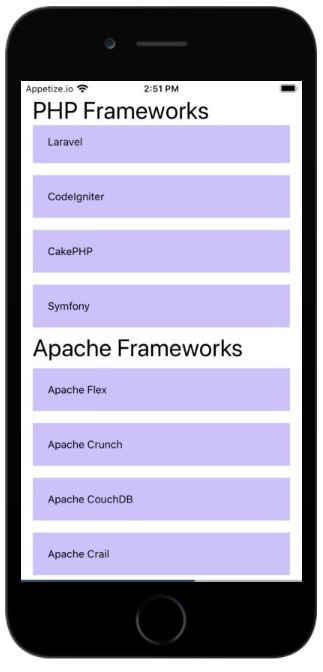
stickySectionHeadersEnabled 属性可帮助您将 sectionList 的标题粘贴在顶部。一旦用户滚动,如果下一个标题进入视图并到达顶部,它将粘贴在顶部,并且它将继续对所有标题进行相同的操作。
import React from "react";
import { SectionList , Text, View, StyleSheet} from "react-native";
export default class App extends React.Component {
   constructor() {
      super();
      this.state = {
         data: [
            {
               title: "Javascript Frameworks",
               data: ["Angular", "ReactJS", "VueJS", "ReactNative"]
            },
            {
               title: "PHP Frameworks",
               data: ["Laravel", "CodeIgniter", "CakePHP", "Symfony"]
            },
            {
               title: "Apache Frameworks",
               data: ["Apache Flex", "Apache Crunch", "Apache CouchDB", "Apache Crail"]
            }
         ]
      };
   }
   renderItem = ({ item }) => {
      return (
         <View style={styles.item}>
            <Text >
               {item}
            </Text>
         </View>
      );
   };
   render() {
      return (
         <View style={styles.container}>
            <SectionList
               stickySectionHeadersEnabled={true}
               sections={this.state.data}
               renderItem={this.renderItem}
               keyExtractor={(item, index) => index}
               renderSectionHeader={({ section: { title } }) => (
                  <Text style={styles.header}>{title}</Text>
               )}
            />
         </View>
      );
   }
}
const styles = StyleSheet.create({
   container: {
      flex: 1,
      marginTop:20,
      marginHorizontal: 16
   },
   item: {
      backgroundColor: "#ccc2ff",
      padding: 20,
      marginVertical: 8
   },
   header: {
      fontSize: 32,
      backgroundColor: "#fff"
   }
});
输出
相关文章
有用资源
javascript 参考教程 - 该教程包含有关 javascript 的更多信息:https://www.cainiaomax.com/javascript/

