
C# - Continue 语句
C# continue 语句
C# 中的 continue 语句与 break 语句类似。不过,continue 语句并非强制终止循环,而是强制执行循环的下一次迭代,并跳过其间的任何代码。
对于 for 循环,continue 语句会执行循环的条件测试和增量部分。对于 while 和 do...while 循环,continue 语句会将程序控制权交给条件测试。
语法
C# 中 continue 语句的语法如下:-
continue;
流程图
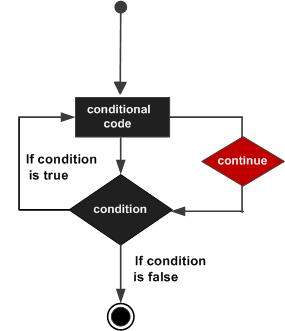
在 do while 循环中使用 continue 语句
在此示例中,当 a 变为 15 时,我们使用 continue 语句跳过迭代 -
using System;
namespace Loops {
   class Program {
      static void Main(string[] args) {
         /* 局部变量定义 */
         int a = 10;

         /* 循环执行 */
         do {
            if (a == 15) {
               /* 跳过迭代 */
               a = a + 1;
               continue;
            }
            Console.WriteLine("value of a: {0}", a);
            a++;
         }
         while (a < 20);
         Console.ReadLine();
      }
   }
}
Output
当编译并执行上述代码时,它会产生以下结果 -
value of a: 10
value of a: 11
value of a: 12
value of a: 13
value of a: 14
value of a: 16
value of a: 17
value of a: 18
value of a: 19
在 for 循环中使用 continue 语句
在本例中,我们使用 continue 语句跳过当前迭代并进入循环的下一次迭代 -
using System;
class ContinueExample {
   static void Main() {
      for (int i = 1; i <= 10; i++) {
         // 跳过偶数
         if (i % 2 == 0) {
            // 跳转到下一次迭代
            continue;
         }
         Console.WriteLine("Odd number: " + i);
      }
      Console.WriteLine("Loop completed.");
   }
}
输出
以下是上述代码的输出 -
Odd number: 1
Odd number: 3
Odd number: 5
Odd number: 7
Odd number: 9
Loop completed.

