
C# - Do...While 循环
与在循环开始时测试循环条件的 for 和 while 循环不同,do...while 循环在循环结束时检查其条件。
C# do while 循环
C# 中的 do-while 循环类似于 while 循环,但它保证循环体至少执行一次,即使条件为假。这使得它在循环体必须在评估条件之前至少运行一次的场景中非常有用。
do while 循环的语法
以下是 C# do...while 循环的语法 -
do {
   statement(s);
} while( condition );
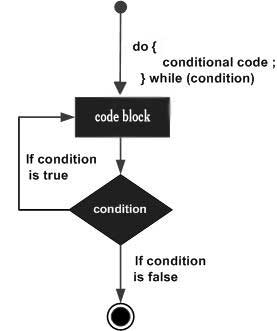
请注意,条件表达式出现在循环末尾,因此循环中的语句在条件测试之前会执行一次。
如果条件为真,控制流将跳转回 do 语句,并再次执行循环中的语句。此过程重复进行,直到给定条件变为假。
do-while 循环流程图
do-while 循环示例
练习这些示例,以提高您在 C# 中使用 do-while 循环的实践技能。
示例 1
在下面的示例中,我们使用 do-while 循环打印从 10 到 19 的数字 -
using System;
namespace Loops {
   class Program {
      static void Main(string[] args) {
         /* 局部变量定义 */
         int a = 10;

         /* 循环执行 */
         do {
            Console.WriteLine("value of a: {0}", a);
            a = a + 1;
         }
         while (a < 20);
         Console.ReadLine();
      }
   }
}
当编译并执行上述代码时,它会产生以下结果 -
value of a: 10
value of a: 11
value of a: 12
value of a: 13
value of a: 14
value of a: 15
value of a: 16
value of a: 17
value of a: 18
value of a: 19
示例 2
此示例演示了一个猜数字游戏,用户需要不断猜测,直到输入正确的数字。
using System;
class GuessingGame {
   static void Main() {
      int secretNumber = 7;
      int guess;
      Console.WriteLine("Guess the secret number between 1 and 10!");
      do {
         guess = 7;
         Console.WriteLine("Number to be guess is: "+ guess);

         if (guess < secretNumber) {
            Console.WriteLine("Too low! Try again.");
         } else if (guess > secretNumber) {
            Console.WriteLine("Too high! Try again.");
         }
      } while (guess != secretNumber);
      Console.WriteLine("Congratulations! You guessed the correct number.");
   }
}
以下是上述代码的输出 -
Guess the secret number between 1 and 10!
Number to be guess is: 7
Congratulations! You guessed the correct number.
嵌套 do-while 循环
嵌套 do-while 循环是指一个 do-while 循环嵌套在另一个 do-while 循环中。它会根据条件在另一个循环中执行一个循环。
示例
using System;

class Program
{
    static void Main()
    {
        int i = 1;

        do
        {
            int j = 1;
            do
            {
                Console.Write($"{i}x{j}={i * j}	");
                j++;
            } while (j <= 3);

            Console.WriteLine();
            i++;
        } while (i <= 3);
    }
}
以下是上述代码的输出 -
1x1=1   1x2=2   1x3=3
2x1=2   2x2=4   2x3=6
3x1=3   3x2=6   3x3=9
do-while 循环的用例
以下是 do-while 循环的一些常见用例,以及示例和输出:
1. 用户输入验证
确保用户输入有效后再继续操作。
using System;

class Program
{
    static void Main()
    {
        int number;
        do
        {
            Console.Write("Enter a positive number: ");
            number = Convert.ToInt32(Console.ReadLine());
        } while (number
以下是上述代码的输出 -

Enter a positive number: -5
Enter a positive number: 0
Enter a positive number: 3
You entered: 3


2. 菜单驱动程序
至少显示一次菜单,并根据用户选择继续显示。

using System;

class Program
{
    static void Main()
    {
        int choice;
        do
        {
            Console.WriteLine("Menu:");
            Console.WriteLine("1. Option 1");
            Console.WriteLine("2. Option 2");
            Console.WriteLine("3. Exit");
            Console.Write("Enter your choice: ");
            choice = Convert.ToInt32(Console.ReadLine());
        } while (choice != 3);

        Console.WriteLine("Program exited.");
    }
}

以下是上述代码的输出 -

Menu:
1. Option 1
2. Option 2
3. Exit
Enter your choice: 1

Menu:
1. Option 1
2. Option 2
3. Exit
Enter your choice: 3
Program exited.


3. 重试机制
重试操作,直至成功或达到最大尝试次数。

using System;

class Program
{
    static void Main()
    {
        bool success;
        int attempts = 0;
        do
        {
            attempts++;
            Console.WriteLine($"Attempt {attempts}: Trying to connect...");
            success = (new Random().Next(1, 4) == 2);
        } while (!success && attempts < 5);

        Console.WriteLine(success ? "Connection successful!" : "Failed after 5 attempts.");
    }
}

以下是上述代码的输出 -

Attempt 1: Trying to connect...
Attempt 2: Trying to connect...
Attempt 3: Trying to connect...
Connection successful!


4. 密码验证
提示用户输入密码,直到输入正确为止。

using System;

class Program
{
    static void Main()
    {
        string password;
        do
        {
            Console.Write("Enter the password: ");
            password = Console.ReadLine();
        } while (password != "secure123");

        Console.WriteLine("Access granted.");
    }
}

以下是上述代码的输出 -

Enter the password: test
Enter the password: hello
Enter the password: secure123
Access granted.


5. 倒计时器
执行倒计时,确保至少循环一次后停止。

using System;
using System.Threading;

class Program
{
    static void Main()
    {
        int countdown = 5;
        do
        {
            Console.WriteLine($"Countdown: {countdown}");
            countdown--;
            Thread.Sleep(1000);
        } while (countdown > 0);

        Console.WriteLine("Time's up!");
    }
}

以下是上述代码的输出 -

Countdown: 5
Countdown: 4
Countdown: 3
Countdown: 2
Countdown: 1
Time's up!

