
Flex - ComboBox 控件
当用户从 ComboBox 控件的下拉列表中选择一个项目时,数据项将显示在控件的提示区域中。
ComboBox 和 DropDownList 控件之间的一个区别是,ComboBox 控件的提示区域是使用 TextInput 控件实现的,而对于 DropDownList 控件,它是 Label 控件。因此,用户可以编辑控件的提示区域以输入不是可用选项之一的值。
类声明
以下是 spark.components.ComboBox 类的声明 −
public class ComboBox
   extends DropDownListBase
      implements IIMESupport
公共属性
| Sr.No | 属性 &描述 |
|---|---|
| 1 | enableIME : Boolean [只读] |
| 2 | imeMode : String |
| 3 | itemMatchingFunction : Function = null 指定一个回调函数,用于在用户将字符输入提示区域时搜索项目列表。 |
| 4 | labelToItemFunction : Function 指定一个回调函数,用于将提示区域输入的新值与数据提供程序中的数据项具有相同的数据类型。 |
| 5 | maxChars : int 提示区域可以包含的最大字符数,由用户输入。 |
| 6 | openOnInput : Boolean = true 如果为 true,则在用户编辑提示区域时打开下拉列表。 |
| 7 | prompt : String 当输入文本为null。 |
| 8 | restrict : String 指定用户可以输入到提示区域的字符集。 |
公共方法
| Sr.No | 方法 &描述 |
|---|---|
| 1 | ComboBox() 构造函数。 |
继承的方法
此类从以下类继承方法 −
- spark.components.supportClasses.DropDownListBase
- spark.components.List
- spark.components.supportClasses.ListBase
- spark.components.SkinnableDataContainer
- spark.components.supportClasses.SkinnableContainerBase
- spark.components.supportClasses.可换肤组件
- mx.core.UIComponent
- mx.core.FlexSprite
- flash.display.Sprite
- flash.display.DisplayObjectContainer
- flash.display.InteractiveObject
- flash.display.DisplayObject
- flash.events.EventDispatcher
- 对象
弹性ComboBox 控件示例
让我们按照以下步骤通过创建测试应用程序来检查 ComboBox 控件在 Flex 应用程序中的使用情况 −
| 步骤 | 描述 |
|---|---|
| 1 | 在包com.tutorialspoint.client下创建一个名为 HelloWorld 的项目,如 Flex - 创建应用程序 一章中所述。 |
| 2 | 按照以下说明修改 HelloWorld.mxml。保持其余文件不变。 |
| 3 | 编译并运行应用程序以确保业务逻辑按要求运行。 |
以下是修改后的 mxml 文件 src/com.tutorialspoint/HelloWorld.mxml 的内容
<?xml version = "1.0" encoding = "utf-8"?>
<s:Application xmlns:fx = "http://ns.adobe.com/mxml/2009"
   xmlns:s = "library://ns.adobe.com/flex/spark"
   xmlns:mx = "library://ns.adobe.com/flex/mx"
   width = "100%" height = "100%" minWidth = "500" minHeight = "500">

   <fx:Style source = "/com/tutorialspoint/client/Style.css" />
   <fx:Script>
      <![CDATA[
         import mx.collections.ArrayCollection;

         [Bindable]
         public var data:ArrayCollection = new ArrayCollection (
         [
            {value:"France", code:"FR"},
            {value:"Japan", code:"JP"},
            {value:"India", code:"IN"},
            {value:"Russia", code:"RS"},
            {value:"United States", code:"US"}
         ]
         );

         private function mappingFunction(input:String):Object {
            switch (input){
               case "France":
                  return {value:input, code:"FR"};
               case "Japan":
                  return {value:input, code:"JP"};
               case "India":
                  return {value:input, code:"IN"};
               case "Russia":
                  return {value:input, code:"RS"};
               case "United States":
                  return {value:input, code:"US"};
            }
            return null;
         }

      ]]>
   </fx:Script>

   <fx:Declarations>
      <mx:DateFormatter id = "dateFormatter" />
   </fx:Declarations>

   <s:BorderContainer width = "550" height = "400" id = "mainContainer"
      styleName = "container">
      <s:VGroup width = "100%" height = "100%" gap = "50" horizontalAlign = "center"
         verticalAlign = "middle">
         <s:Label id = "lblHeader" text = "Form Controls Demonstration"
            fontSize = "40" color = "0x777777" styleName = "heading" />

         <s:Panel id = "comboBoxPanel" title = "Using ComboBox" width = "420"
            height = "200">
         <s:layout>
            <s:VerticalLayout  gap = "10" verticalAlign = "middle"
               horizontalAlign = "center" />
         </s:layout>

         <s:HGroup>
            <s:Label text = "Index :" /> <s:Label
               text = "{comboBox.selectedIndex}" fontWeight = "bold" />
            <s:Label text = "Value :" /> <s:Label
               text = "{comboBox.selectedItem.value}" fontWeight = "bold" />
            <s:Label text = "Code :" /> <s:Label
               text = "{comboBox.selectedItem.code}" fontWeight = "bold" />
         </s:HGroup>

         <s:ComboBox  id = "comboBox"  dataProvider = "{data}" width = "150"
            labelToItemFunction = "{mappingFunction}" selectedIndex = "0"
            labelField = "value" />
         </s:Panel>
      </s:VGroup>
   </s:BorderContainer>
</s:Application>
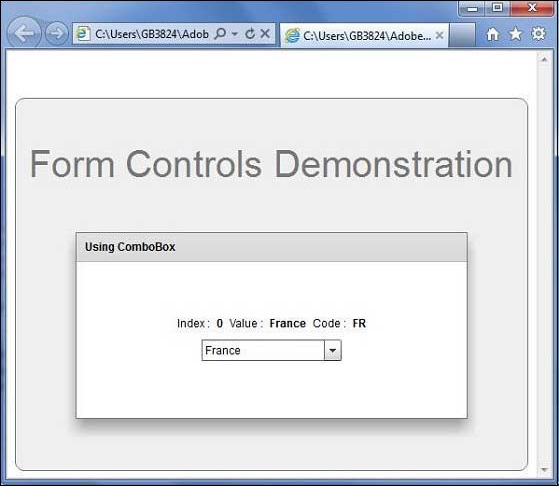
完成所有更改后,让我们像在 Flex - 创建应用程序 一章中一样,以正常模式编译并运行应用程序。如果您的应用程序一切正常,它将产生以下结果:[ 在线试用 ]
 flex_form_controls.html
