Flex - 带皮肤的样式
什么是皮肤?
Flex 中的皮肤是完全自定义 UI 组件外观的过程。
皮肤可以定义组件的文本、图像、过滤器、转换和状态。
皮肤可以创建为单独的 mxml 或 ActionScript 组件。
使用皮肤,我们可以控制 UI 组件的所有视觉方面。
定义皮肤的过程对于所有 UI 组件都是相同的。
步骤 1 - 创建皮肤
使用选项 文件 > 新建 > 启动创建 MXML 皮肤向导MXML 皮肤。
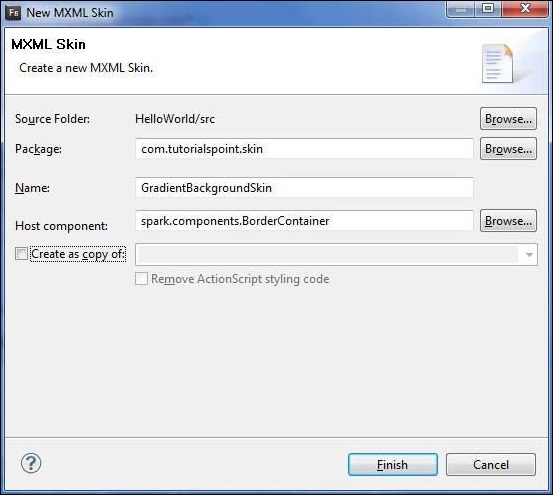
输入包为com.tutorialspoint.skin,命名为GradientBackgroundSkin,并选择主机组件为现有的 flex BorderContainer 控件spark.component.BorderContainer。
现在您已经为 BorderContainer 创建了皮肤。修改 mxml 皮肤文件src/com.tutorialspoint/skin/GradientBackgroundSkin.mxml的内容。
按如下方式更新填充层 −
<!-- fill -->
<s:Rect id = "backgroundRect" left = "0" right = "0" height = "100%" top = "0">
   <s:fill>
      <s:LinearGradient rotation = "90">
         <s:GradientEntry color = "0x888888" ratio = "0.2" />
         <s:GradientEntry color = "0x111111" ratio = "1" />
      </s:LinearGradient>
   </s:fill>
</s:Rect>
步骤 2:应用皮肤
您可以通过两种方式在组件上应用皮肤 −
在 MXML 脚本中应用皮肤(静态)
使用其 skinClass 属性将 GradientBackgroundSkin 应用于 ID 为 mainContainer 的 BorderContainer。
<s:BorderContainer width = "560" height = "500" id = "mainContainer"
   styleName = "container">
   <s:VGroup width = "100%" height = "100%" gap = "50"
      horizontalAlign = "center" verticalAlign = "middle"
      skinClass = "com.tutorialspoint.skin.GradientBackgroundSkin">
在 ActionScript 中应用皮肤(动态)
使用 skinClass 属性将 GradientBackgroundSkin 应用于 ID 为 mainContainer 的 BorderContainer。
protected function gradientBackground_clickHandler(event:MouseEvent):void {
    mainContainer.setStyle("skinClass", GradientBackgroundSkin);
}
带皮肤的 Flex 样式示例
让我们按照以下步骤通过创建测试应用程序来查看 Flex 应用程序中皮肤的实际操作−
| 步骤 | 描述 |
|---|---|
| 1 | 按照 Flex - 创建应用程序 一章中的说明,在com.tutorialspoint.client 包下创建一个名为 HelloWorld 的项目。 |
| 2 | 按照上述说明,在com.tutorialspoint.skin 包下创建皮肤 GradientBackgroundSkin.mxml。其余文件保持不变。 |
| 3 | 按照以下说明修改 HelloWorld.mxml。保持其余文件不变。 |
| 4 | 编译并运行应用程序以确保业务逻辑按要求运行。 |
以下是 GradientBackgroundSkin.mxml 文件 src/com/tutorialspoint/skin/GradientBackg roundSkin.mxml 的内容。
<?xml version = "1.0" encoding = "utf-8"?>
<s:Skin xmlns:fx = "http://ns.adobe.com/mxml/2009"
   xmlns:s = "library://ns.adobe.com/flex/spark"
   xmlns:mx = "library://ns.adobe.com/flex/mx">

   <!-- host component -->
   <fx:Metadata>
      [HostComponent("spark.components.BorderContainer")]
   </fx:Metadata>

   <!-- states -->
   <s:states>
      <s:State name = "disabled" />
      <s:State name = "disabled" />
      <s:State name = "normal" />
   </s:states>

   <!-- SkinParts
   name = contentGroup, type = spark.components.Group, required = false
   -->

   <!-- fill -->
   <s:Rect id = "backgroundRect" left = "0" right = "0" height = "100%" top = "0">
      <s:fill>
         <s:LinearGradient rotation = "90">
            <s:GradientEntry color = "0x111111" ratio = "0.2" />
            <s:GradientEntry color = "0x888888" ratio = "1" />
         </s:LinearGradient>
      </s:fill>
   </s:Rect>

   <!-- must specify this for the host component -->
   <s:Group id = "contentGroup" left = "0" right = "0" top = "0" bottom = "0" />
</s:Skin>
以下是修改后的 HelloWorld.mxml filesrc/com/tutorialspoint/client/HelloWorld.mxml 的内容。
<?xml version = "1.0" encoding = "utf-8"?>
<s:Application xmlns:fx = "http://ns.adobe.com/mxml/2009"
   xmlns:s = "library://ns.adobe.com/flex/spark"
   xmlns:mx = "library://ns.adobe.com/flex/mx"
   width = "100%" height = "100%" minWidth = "500" minHeight = "500"
   initialize = "application_initializeHandler(event)">

   <fx:Style source = "/com/tutorialspoint/client/Style.css" />
   <fx:Script>
      <![CDATA[
         import com.tutorialspoint.skin.GradientBackgroundSkin;
         import mx.controls.Alert;
         import mx.events.FlexEvent;
         import spark.skins.spark.BorderContainerSkin;

         protected function btnClickMe_clickHandler(event:MouseEvent):void {
            Alert.show("Hello World!");
         }

         protected function application_initializeHandler(event:FlexEvent):void {
            lblHeader.text = "My Hello World Application";
         }

         protected function gradientBackground_clickHandler(event:MouseEvent):void {
            mainContainer.setStyle("skinClass", GradientBackgroundSkin );
         }

         protected function standardBackground_clickHandler(event:MouseEvent):void {
            mainContainer.setStyle("skinClass", BorderContainerSkin );
         }
      ]]>
   </fx:Script>

   <fx:Declarations>
      <s:RadioButtonGroup id = "selectorGroup" />
   </fx:Declarations>

   <s:BorderContainer width = "500" height = "500" id = "mainContainer"
      skinClass = "spark.skins.spark.BorderContainerSkin"
      horizontalCenter = "0" verticalCenter = "0" cornerRadius = "10">

      <s:VGroup width = "100%" height = "100%" gap = "50" horizontalAlign = "center"
         verticalAlign = "middle">
         <s:Label id = "lblHeader" fontSize = "40" color = "green"
            styleName = "heading" />
         <s:Button label = "Click Me!" id = "btnClickMe"
            click = "btnClickMe_clickHandler(event)" />
         <s:RadioButton color = "gray" fontWeight = "bold"
            group = "{selectorGroup}" label = "Standard Background"
            click = "standardBackground_clickHandler(event)" selected = "true" />
         <s:RadioButton color = "gray" fontWeight = "bold"
            group = "{selectorGroup}" label = "Gradient Background"
            click = "gradientBackground_clickHandler(event)" />
      </s:VGroup>
   </s:BorderContainer>
</s:Application>
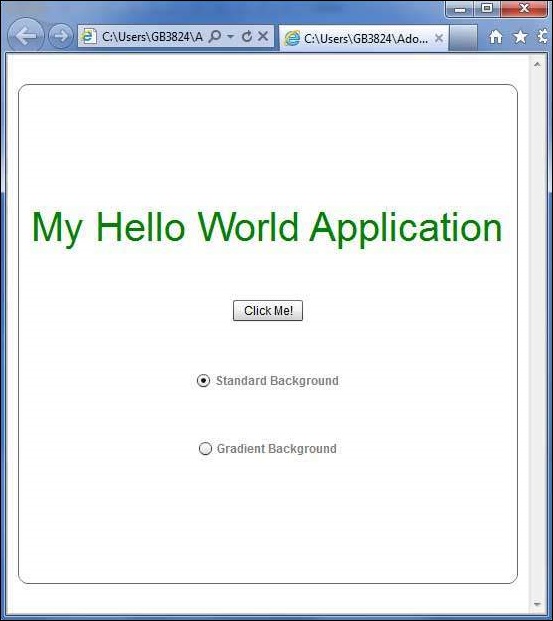
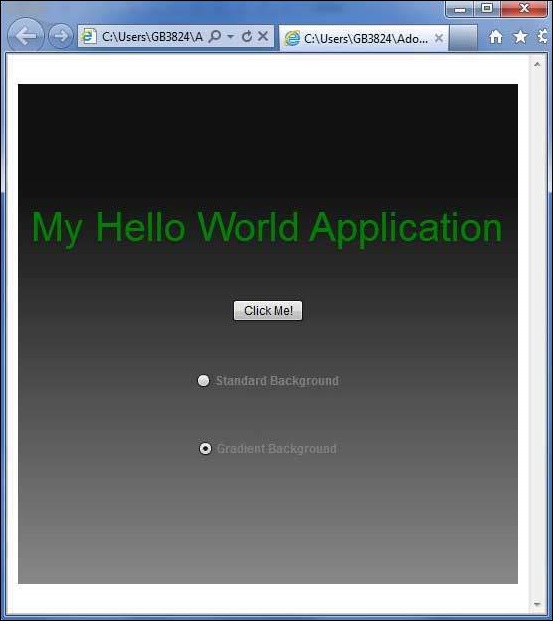
完成所有更改后,让我们像在 Flex - 创建应用程序 一章中一样,以正常模式编译并运行应用程序。如果您的应用程序一切正常,它将产生以下结果:[ 在线试用 ]