
Flex - DataGrid 控件
简介
DataGrid 控件在可滚动的网格上方显示一行列标题。
类声明
以下是 spark.components.DataGrid 类的声明 −
public class DataGrid
   extends SkinnableContainerBase
      implements IFocusManagerComponent, IIMESupport
公共属性
以下是 DataGrid 控件的公共属性。
| Sr.No | 属性 &描述 |
|---|---|
| 1 | columnsLength : int [只读] 如果指定了列 IList,则返回 columns.length 的值,否则返回 0。 |
| 2 | dataProvider : IList 与网格中的行相对应的数据项列表。 |
| 3 | dataProviderLength : int [只读] 如果指定了 dataProvider IList,则返回 dataProvider.length 的值,否则返回 0。 |
| 4 | dataTipField : String 数据提供程序中显示为数据提示的字段的名称。 |
| 5 | dataTipFunction : Function 指定在数据提供程序的每个项目上运行的回调函数以确定其数据提示。 |
| 6 | editable : Boolean GridColumn editable 属性的默认值,指示相应单元格的数据提供程序项目是否可以编辑。 |
| 7 | editorColumnIndex : int [只读] 正在编辑的单元格的从零开始的列索引。 |
| 8 | editorRowIndex : int [只读] 正在编辑的单元格的从零开始的行索引。 |
| 9 | enableIME : Boolean [只读] 指示组件获得焦点时是否应启用 IME 的标志。 |
| 10 | imeMode : String GridColumn imeMode 属性的默认值,指定 IME(输入法编辑器)模式。 |
| 11 | itemEditor : IFactory GridColumn itemEditor 属性的默认值,指定用于创建项目编辑器实例的 IGridItemEditor 类。 |
| 12 | itemEditorInstance : IGridItemEditor [只读] 对项目编辑器当前活动实例的引用(如果存在)。 |
| 13 | itemRenderer : IFactory 用于未指定列的项目渲染器。 |
| 14 | preserveSelection : Boolean 如果为 true,则在数据提供程序刷新其集合时保留选择。 |
| 15 | requestedColumnCount : int 此网格的测量宽度足够大,可以显示前 requestedColumnCount 个列。 |
| 16 | requestedMaxRowCount : int 网格的测量高度足够大,可以显示不超过 requestedMaxRowCount 行。 |
| 17 | requestedMinColumnCount : int 此网格的测量宽度足够大,可以显示至少 requestedMinColumnCount 列。 |
| 18 | requestedMinRowCount : int 此网格的测量高度足够大,可以显示至少 requestedMinRowCount 行。 |
| 19 | requestedRowCount : int 此网格的测量高度足够大,可以显示前 requestedRowCount 行。 |
| 20 | requireSelection : Boolean 如果为 true 且 choiceMode 属性不是 GridSelectionMode.NONE,则必须始终在网格中选择一个项目。 |
| 21 | resizableColumns : Boolean 指示用户是否可以更改列的大小。 |
| 22 | rowHeight : Number 如果 variableRowHeight 为 false,则此属性指定每行的实际高度(以像素为单位)。 |
| 23 | selectedCell : CellPosition 如果 choiceMode 为 GridSelectionMode.SINGLE_CELL 或 GridSelectionMode.MULTIPLE_CELLS,则返回第一个选定的单元格,从第 0 行第 0 列开始,逐行逐列,然后移动到下一行。 |
| 24 | selectedCells : Vector.<CellPosition> 如果selectionMode是GridSelectionMode.SINGLE_CELL或GridSelectionMode.MULTIPLE_CELLS,则返回一个CellPosition对象向量,表示所选单元格在网格中的位置。 |
| 25 | selectedIndex : int 如果selectionMode是GridSelectionMode.SINGLE_ROW或GridSelectionMode.MULTIPLE_ROWS,则返回第一个选定行的rowIndex。 |
| 26 | selectedIndices : Vector.<int> 如果selectionMode是GridSelectionMode.SINGLE_ROW或GridSelectionMode.MULTIPLE_ROWS,则返回所选行索引的Vector。 |
| 27 | selectedItem : Object 如果selectionMode是GridSelectionMode.SINGLE_ROW或GridSelectionMode.MULTIPLE_ROWS,则返回数据提供程序中当前选定的项目,如果未选定任何行,则返回未定义的项目。 |
| 28 | selectedItems : Vector.<Object> 如果selectionMode是GridSelectionMode.SINGLE_ROW或GridSelectionMode.MULTIPLE_ROWS,返回当前选定的 dataProvider 项的 Vector。 |
| 29 | selectionLength : int [只读] 如果 choiceMode 是 GridSelectionMode.SINGLE_ROW 或 GridSelectionMode.MULTIPLE_ROWS,则返回选定行数。 |
| 30 | selectionMode : String 控件的选择模式。 |
| 31 | showDataTips : Boolean 如果为 true,则所有可见单元格均会显示 dataTip。 |
| 32 | sortableColumns : Boolean 指定用户是否可以交互方式对列进行排序。 |
| 33 | typicalItem : Object 网格的布局确保未指定宽度的列足够宽,以显示此默认数据提供程序项目的项目渲染器。 |
| 34 | variableRowHeight : Boolean 如果为 true,则每行的高度是迄今为止显示的单元格的首选高度的最大值。 |
| 35 | columns : IList 此网格显示的 GridColumn 对象列表。 |
公共方法
以下是 DataGrid 控件的公共属性。
| Sr.No | 方法 &描述 |
|---|---|
| 1 | DataGrid() 构造函数。 |
| 2 | addSelectedCell(rowIndex:int, columnIndex:int):Boolean 如果selectionMode为GridSelectionMode.SINGLE_CELL或GridSelectionMode.MULTIPLE_CELLS,则将单元格添加到选择并将插入符号位置设置为单元格。 |
| 3 | addSelectedIndex(rowIndex:int):Boolean 如果selectionMode为GridSelectionMode.MULTIPLE_ROWS,则将此行添加到选择并将插入符号位置设置为此行。 |
| 4 | clearSelection():Boolean 如果selectionMode不是GridSelectionMode.NONE,则删除所有选定的行和单元格。 |
| 5 | endItemEditorSession(cancel:Boolean = false):Boolean 关闭当前活动的编辑器,并可选择通过调用项目编辑器的save()方法来保存编辑器的值。 |
| 6 | ensureCellIsVisible(rowIndex:int, columnIndex:int = -1):void 如有必要,请设置 verticalScrollPosition 和 HorizontalScrollPosition 属性,以使指定单元格完全可见。 |
| 7 | invalidateCell(rowIndex:int, columnIndex:int):void 如果指定单元格可见,则重新显示。 |
| 8 | invalidateTypicalItem():void |
| 9 | removeSelectedCell(rowIndex:int, columnIndex:int):Boolean 如果selectionMode为GridSelectionMode.SINGLE_CELL 或 GridSelectionMode.MULTIPLE_CELLS,从选择中移除单元格并将插入符号位置设置为该单元格。 |
| 10 | removeSelectedIndex(rowIndex:int):Boolean 如果selectionMode是GridSelectionMode.SINGLE_ROW或GridSelectionMode.MULTIPLE_ROWS,则从选择中移除此行并将插入符号位置设置为此行。 |
| 11 | selectAll():Boolean 如果selectionMode是GridSelectionMode.MULTIPLE_ROWS,则选择所有行并移除插入符号,或者如果selectionMode是GridSelectionMode.MULTIPLE_CELLS,则选择所有单元格并移除插入符号。 |
| 12 | selectCellRegion(rowIndex:int, columnIndex:int, rowCount:uint, columnCount:uint):Boolean 如果selectionMode是GridSelectionMode.MULTIPLE_CELLS,将选择设置为单元格区域中的所有单元格,并将插入符号位置设置为单元格区域中的最后一个单元格。 |
| 13 | selectIndices(rowIndex:int, rowCount:int):Boolean 如果selectionMode为GridSelectionMode.MULTIPLE_ROWS,则将选择设置为指定的行,并将插入符号位置设置为endRowIndex。 |
| 14 | selectionContainsCell(rowIndex:int, columnIndex:int):Boolean 如果selectionMode为GridSelectionMode.SINGLE_CELL或GridSelectionMode.MULTIPLE_CELLS,则返回true,如果单元格在当前选择中。 |
| 15 | selectionContainsCellRegion(rowIndex:int, columnIndex:int, rowCount:int, columnCount:int):Boolean 如果selectionMode为GridSelectionMode.MULTIPLE_CELLS,则如果单元格区域中的单元格在当前选择中,则返回true。 |
| 16 | selectionContainsIndex(rowIndex:int):Boolean 如果selectionMode为GridSelectionMode.SINGLE_ROW或GridSelectionMode.MULTIPLE_ROWS,则如果索引处的行在当前选择中,则返回true。 |
| 17 | selectionContainsIndices(rowIndices:Vector.<int>):Boolean 如果selectionMode为GridSelectionMode.MULTIPLE_ROWS,则如果索引中的行在当前选择中,则返回true。 |
| 18 | setSelectedCell(rowIndex:int, columnIndex:int):Boolean 如果selectionMode为GridSelectionMode.SINGLE_CELL或GridSelectionMode.MULTIPLE_CELLS,则将选择和插入符号位置设置为此单元格。 |
| 19 | setSelectedIndex(rowIndex:int):Boolean 如果selectionMode为GridSelectionMode.SINGLE_ROW或GridSelectionMode.MULTIPLE_ROWS,则将选择和插入符号位置设置为此行。 |
| 20 | sortByColumns(columnIndices:Vector.<int>, isInteractive:Boolean = false):Boolean 按一列或多列对DataGrid进行排序,然后刷新显示。 |
| 21 | startItemEditorSession(rowIndex:int, columnIndex:int):Boolean 在网格中选定的单元格上启动编辑器会话。 |
受保护的方法
| Sr.No | 方法 &描述 |
|---|---|
| 1 | commitCaretPosition(newCaretRowIndex:int, newCaretColumnIndex:int):void 更新网格的插入符号位置。 |
| 2 | commitInteractiveSelection(selectionEventKind:String, rowIndex:int, columnIndex:int, rowCount:int = 1, columnCount:int = 1):Boolean 响应更改选择的用户输入(鼠标或键盘),此方法将调度selectionChanging事件。 |
活动
| Sr.No | 活动 &描述 |
|---|---|
| 1 | caretChange 当插入符号的位置、大小或可见性由于用户交互或以编程方式设置而发生变化时,由网格皮肤部分分派。 |
| 2 | gridClick 当鼠标在单元格上单击时,由网格皮肤部分分派。 |
| 3 | gridDoubleClick 当鼠标在单元格上双击时,由网格皮肤部分分派。 |
| 4 | gridItemEditorSessionCancel 在项目编辑器关闭且未保存其数据后分派。 |
| 5 | gridItemEditorSessionSave 在项目编辑器中的数据已保存到数据提供程序且编辑器已关闭后分派。 |
| 6 | gridItemEditorSessionStart 在项目编辑器打开后立即分派。 |
| 7 | gridItemEditorSessionStarting 当请求新的项目编辑器会话时分派。 |
| 8 | gridMouseDown 当鼠标按钮在网格单元上按下时由网格皮肤部件分派。 |
| 9 | gridMouseDrag 如果鼠标在按钮释放之前移动,则在 gridMouseDown 事件之后由网格皮肤部件分派。 |
| 10 | gridMouseUp 当鼠标按钮被释放时,gridMouseDown 事件之后由网格皮肤部件调度,即使鼠标不再位于网格内。 |
| 11 | gridRollOut 当鼠标离开网格单元时,grid皮肤部件调度。 |
| 12 | gridRollOver 当鼠标进入网格单元时,grid皮肤部件调度。 |
| 13 | selectionChange 选择发生变化时分派。 |
| 14 | selectionChanging 选择即将发生变化时分派。 |
| 15 | sortChange 对数据提供者的集合应用排序后分派。 |
| 16 | sortChanging 对数据提供者的集合应用排序前分派集合。 |
继承的方法
此类从以下类继承方法 −
- spark.components.supportClasses.SkinnableContainerBase
- spark.components.supportClasses.SkinnableComponent
- mx.core.UIComponent
- mx.core.FlexSprite
- flash.display.Sprite
- flash.display.DisplayObjectContainer
- flash.display.InteractiveObject
- flash.display.DisplayObject
- flash.events.EventDispatcher
- Object
Flex DataGrid 控件示例
让我们按照以下步骤通过创建测试应用程序检查 DataGrid 控件在 Flex 应用程序中的使用情况 −
| 步骤 | 描述 |
|---|---|
| 1 | 在包 com.tutorialspoint.client 下创建一个名为 HelloWorld 的项目,如 Flex - 创建应用程序 一章中所述。 |
| 2 | 按照以下说明修改 HelloWorld.mxml。保持其余文件不变。 |
| 3 | 编译并运行应用程序以确保业务逻辑按要求运行。 |
以下是修改后的 mxml 文件 src/com.tutorialspoint/HelloWorld.mxml 的内容。
<?xml version = "1.0" encoding = "utf-8"?>
<s:Application xmlns:fx = "http://ns.adobe.com/mxml/2009"
   xmlns:s = "library://ns.adobe.com/flex/spark"
   xmlns:mx = "library://ns.adobe.com/flex/mx"
   width = "100%" height = "100%" minWidth = "500" minHeight = "500">

   <fx:Style source = "/com/tutorialspoint/client/Style.css" />
   <fx:Script>
      <![CDATA[
         import mx.collections.ArrayCollection;
         [Bindable]
         public var data:ArrayCollection = new ArrayCollection ([
            {value:"France", code:"FR"},
            {value:"Japan", code:"JP"},
            {value:"India", code:"IN"},
            {value:"Russia", code:"RS"},
            {value:"United States", code:"US"}
         ]);
      ]]>
   </fx:Script>

   <s:BorderContainer width = "630" height = "480" id = "mainContainer"
      styleName = "container">
      <s:VGroup width = "100%" height = "100%" gap = "50"
         horizontalAlign = "center" verticalAlign = "middle">
         <s:Label id = "lblHeader" text = "Complex Controls Demonstration"
            fontSize = "40" color = "0x777777" styleName = "heading" />

         <s:Panel id = "dataGridPanel" title = "Using DataGrid"
            width = "500" height = "300">
            <s:layout>
               <s:VerticalLayout  gap = "10" verticalAlign = "middle"
                  horizontalAlign = "center" />
            </s:layout>

            <s:DataGrid dataProvider = "{data}" id = "dataGrid">
               <s:columns>
                  <s:ArrayList>
                     <s:GridColumn dataField = "code" width = "100"
                        headerText = "Code" />
                     <s:GridColumn dataField = "value" width = "200"
                        headerText = "Value" />
                  </s:ArrayList>
               </s:columns>
            </s:DataGrid>

            <s:HGroup width = "60%">
               <s:Label text = "Code :" />
               <s:Label text = "{dataGrid.selectedItem.code}" fontWeight = "bold" />
               <s:Label text = "Value :" />
               <s:Label text = "{dataGrid.selectedItem.value}" fontWeight = "bold" />
            </s:HGroup>
         </s:Panel>
      </s:VGroup>
   </s:BorderContainer>
</s:Application>
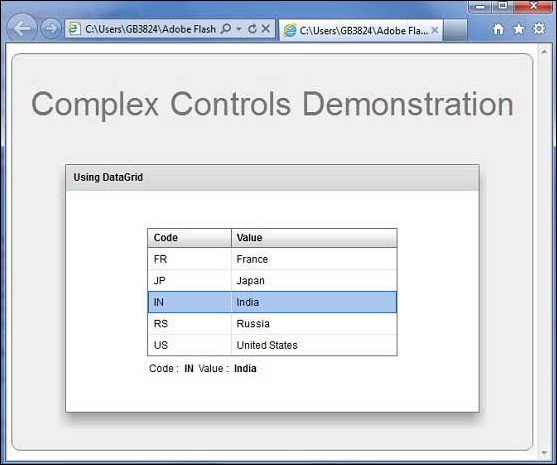
完成所有更改后,让我们像在 Flex - 创建应用程序 一章中一样,以正常模式编译并运行应用程序。如果您的应用程序一切正常,它将产生以下结果:[ 在线试用 ]
 flex_complex_controls.html
