
Flex - RichTextEditor 控件
RichTextEditor 控件为用户提供输入和格式化文本的选项。用户可以更改字体系列、颜色、大小和样式,以及其他属性,如文本对齐、项目符号和 URL 链接。该控件由一个带有两个控件的面板控件组成
用户可以在其中输入文本的文本区域控件。
带有格式控件的容器,可让用户指定文本特征。格式控件会影响正在输入的文本或选定的文本。
类声明
以下是 mx.controls.RichTextEditor 类的声明 −
public class RichTextEditor
   extends Panel
公共属性
| Sr.No | 属性 &描述 |
|---|---|
| 1 | alignToolTip : String = "Align" 当用户将鼠标悬停在文本对齐按钮上时显示的工具提示。 |
| 2 | boldToolTip : String = "Bold" 当用户将鼠标悬停在文本加粗按钮上时显示的工具提示。 |
| 3 | bulletToolTip : String = "Bullet" 当用户将鼠标悬停在项目符号列表上时显示的工具提示按钮。 |
| 4 | colorPickerToolTip : String = "Color" 当用户将鼠标悬停在 ColorPicker 控件上时显示的工具提示。 |
| 5 | defaultLinkProtocol : String 在链接文本开头使用的默认协议字符串。 |
| 6 | fontFamilyToolTip : String = "Font Family" 当用户将鼠标悬停在字体下拉菜单上时显示的工具提示列表。 |
| 7 | fontSizeToolTip : String = "字体大小" 当用户将鼠标悬停在字体大小下拉列表上时显示的工具提示。 |
| 8 | htmlText : String 包含 HTML 标记的文本,显示在 RichTextEditor 控件的 TextArea 子控件中。 |
| 9 | italicToolTip : String = "斜体" 当用户将鼠标悬停在文本斜体上时显示的工具提示按钮。 |
| 10 | linkToolTip : String = "Link" 当用户将鼠标悬停在链接文本输入字段上时显示的工具提示。 |
| 11 | selection : mx.controls.textClasses:TextRange [只读] 包含 TextArea 子控件中选定文本的 TextRange 对象。 |
| 12 | showControlBar : Boolean 指定是否显示包含文本格式的控制栏控件。 |
| 13 | showToolTips : Boolean 指定是否显示文本格式控件的工具提示。 |
| 14 | text : String 在 RichTextEditor 控件的 TextArea 子控件中显示的无标记纯文本。 |
| 15 | underlineToolTip : String = "Underline" 当用户将鼠标悬停在文本下划线上时显示的工具提示按钮。 |
公共方法
| Sr.No | 方法 &描述 |
|---|---|
| 1 | RichTextEditor() 构造函数。 |
事件
| Sr.No | 事件 &描述 |
|---|---|
| 1 | change 当用户更改 TextArea 控件中的文本内容或格式时分派。 |
继承的方法
此类从以下类继承方法 −
- mx.containers.Panel
- mx.core.Container
- mx.core.UIComponent
- mx.core.FlexSprite
- flash.display.Sprite
- flash.display.DisplayObjectContainer
- flash.display.InteractiveObject
- flash.display.DisplayObject
- flash.events.EventDispatcher
- Object
Flex RichTextEditor 控件示例
让我们按照以下步骤通过创建测试应用程序 − 来检查 Flex 应用程序中 RichTextEditor 控件的使用情况 −
| 步骤 | 描述 |
|---|---|
| 1 | 在 com.tutorialspoint.client 包下创建一个名为 HelloWorld 的项目,如 Flex - 创建应用程序 一章中所述。 |
| 2 | 按照下文所述修改 HelloWorld.mxml。保持其余文件不变。 |
| 3 | 编译并运行应用程序以确保业务逻辑按要求运行。 |
以下是修改后的 mxml 文件 src/com.tutorialspoint/HelloWorld.mxml 的内容。
<?xml version = "1.0" encoding = "utf-8"?>
<s:Application xmlns:fx = "http://ns.adobe.com/mxml/2009"
   xmlns:s = "library://ns.adobe.com/flex/spark"
   xmlns:mx = "library://ns.adobe.com/flex/mx"
   width = "100%" height = "100%" minWidth = "500" minHeight = "500">

   <fx:Style source = "/com/tutorialspoint/client/Style.css" />
   <fx:Script>
      <![CDATA[
         private var richTextString:String = "You can enter text into the"
            +" <b>RichTextEditor control</b>.Click <b>"
            +"<font color = '#BB50AA'>buttons</font></b> to display"
            +" entered text as <i>plain text</i>, "
            +"or as <i>HTML-formatted</i> text.";
      ]]>
   </fx:Script>

   <s:BorderContainer width = "630" height = "480" id = "mainContainer"
      styleName = "container">
      <s:VGroup width = "100%" height = "100%" gap = "50"
         horizontalAlign = "center" verticalAlign = "middle">
         <s:Label id = "lblHeader" text = "Complex Controls Demonstration"
            fontSize = "40" color = "0x777777" styleName = "heading" />

         <s:Panel id = "richTextEditorPanel" title = "Using RichTextEditor"
            width = "500" height = "300">
            <s:layout>
               <s:VerticalLayout  gap = "10" verticalAlign = "middle"
                  horizontalAlign = "center" />
            </s:layout>

            <mx:RichTextEditor id = "richTextEditor" title = "RichTextEditor"
               width = "90%" height = "150"
               borderAlpha = "0.15"
               creationComplete = "richTextEditor.htmlText = richTextString;" />
            <s:TextArea id = "richText" width = "90%" height = "50" />

            <s:HGroup>
               <s:Button label = "Show Plain Text"
                  click = "richText.text = richTextEditor.text;" />
               <s:Button label = "Show HTML Markup"
                  click = "richText.text = richTextEditor.htmlText;" />
            </s:HGroup>
         </s:Panel>
      </s:VGroup>
   </s:BorderContainer>
</s:Application>
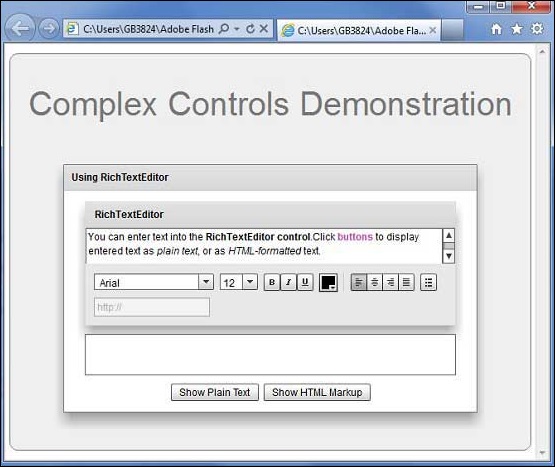
完成所有更改后,让我们像在 Flex - 创建应用程序 一章中一样,以正常模式编译并运行应用程序。如果您的应用程序一切正常,它将产生以下结果:[ 在线试用 ]
 flex_complex_controls.html
