
Flex - ToggleButtonBar 控件
简介
ToggleButtonBar 控件提供一组水平或垂直按钮,可保持其选中或取消选中状态。
类声明
以下是 mx.controls.ToggleButtonBar 类的声明 −
public class ToggleButtonBar
extends ButtonBar
公共属性
| Sr.No | 属性 &描述 |
|---|---|
| 1 | selectedIndex : int [override] 所选按钮的索引。 |
| 2 | toggleOnClick : Boolean 指定用户是否可以取消选择当前选定的按钮。 |
公共方法
| Sr.No | 方法 &描述 |
|---|---|
| 1 | ToggleButtonBar() 构造函数。 |
继承的方法
此类从以下类继承方法 −
- mx.controls.ButtonBar
- mx.controls.NavBar
- mx.containers.Box
- mx.core.Container
- mx.core.UIComponent
- mx.core.FlexSprite
- flash.display.Sprite
- flash.display.DisplayObjectContainer
- flash.display.InteractiveObject
- flash.display.DisplayObject
- flash.events.EventDispatcher
- Object
Flex ToggleButtonBar 控件示例
让我们按照以下步骤通过创建测试应用程序 − 来检查 ToggleButtonBar 控件在 Flex 应用程序中的使用情况 −
| 步骤 | 说明 |
|---|---|
| 1 | 按照 Flex - 创建应用程序 一章中的说明,在 com.tutorialspoint.client 包下创建一个名为 HelloWorld 的项目。 |
| 2 | 按照下面的说明修改 HelloWorld.mxml。保持其余文件不变。 |
| 3 | 编译并运行应用程序以确保业务逻辑按要求运行。 |
以下是修改后的 mxml 文件 src/com.tutorialspoint/HelloWorld.mxml 的内容。
<?xml version = "1.0" encoding = "utf-8"?>
<s:Application xmlns:fx = "http://ns.adobe.com/mxml/2009"
   xmlns:s = "library://ns.adobe.com/flex/spark"
   xmlns:mx = "library://ns.adobe.com/flex/mx
   width = "100%" height = "100%" minWidth = "500" minHeight = "500">

   <fx:Style source = "/com/tutorialspoint/client/Style.css" />
   <fx:Script>
      <![CDATA[
         import mx.events.ItemClickEvent;
         private function sectionClickHandler(event:ItemClickEvent):void {
            sectionContents.text = "Contents for " + event.label;
         }
      ]]>
   </fx:Script>

   <fx:Declarations>
      <fx:Array id = "sectionList">
         <fx:String>Section 1</fx:String>
         <fx:String>Section 2</fx:String>
         <fx:String>Section 3</fx:String>
         <fx:String>Section 4</fx:String>
         <fx:String>Section 5</fx:String>
      </fx:Array>
   </fx:Declarations>

   <s:BorderContainer width = "630" height = "480" id = "mainContainer"
      styleName = "container">
      <s:VGroup width = "100%" height = "100%" gap = "50"
         horizontalAlign = "center" verticalAlign = "middle">
         <s:Label id = "lblHeader" text = "Complex Controls Demonstration"
            fontSize = "40" color = "0x777777" styleName = "heading" />

         <s:Panel id = "toggleButtonBarPanel" title = "Using ToggleButtonBar"
            width = "500" height = "300" >
            <s:layout>
               <s:VerticalLayout  gap = "10" verticalAlign = "middle"
                  horizontalAlign = "center" paddingTop = "10" />
            </s:layout>

            <mx:ToggleButtonBar itemClick = "sectionClickHandler(event);"
               dataProvider = "{sectionList}" />
            <s:BorderContainer width = "90%" height = "70%"
               borderColor = "0x323232">
               <s:VGroup verticalAlign = "middle"
                  horizontalAlign = "center" width = "100%" height = "100%">
                  <s:Label id = "sectionContents"
                     text = "Contents for Section 1" />
               </s:VGroup>
            </s:BorderContainer>
         </s:Panel>
      </s:VGroup>
   </s:BorderContainer>
</s:Application>
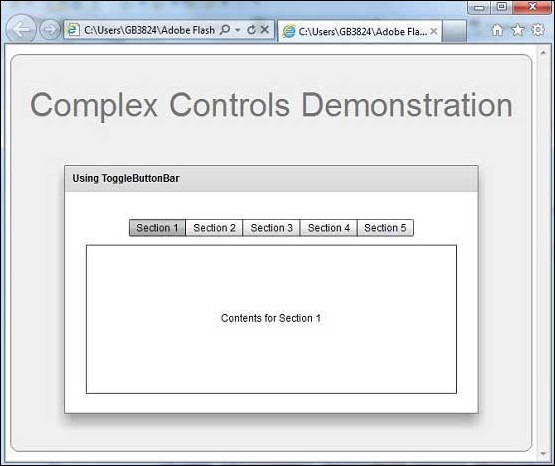
完成所有更改后,让我们像在 Flex - 创建应用程序 一章中一样,以正常模式编译并运行应用程序。如果您的应用程序一切正常,它将产生以下结果:[ 在线试用 ]
 flex_complex_controls.html
