GraphQL - React 集成
React 是一个用于构建用户界面的 Javascript 库。本章介绍如何将 GraphQL 与 React 应用程序集成。
插图
设置 React 项目的最快方法是使用 Create React App 工具。在后续部分中,我们将学习如何设置服务器和客户端。
设置服务器
要设置服务器,请按照以下步骤 −
步骤 1 − 下载并安装项目所需的依赖项
创建文件夹 react-server-app。从终端将目录更改为 react-server-app。按照环境设置章节中说明的步骤 3 到 5 进行操作。
步骤 2 −创建 Schema
在项目文件夹 react-server-app 中添加 schema.graphql 文件并添加以下代码 −
type Query
{
   greeting: String
   sayHello(name:String!):String
}
该文件定义了两个查询 -greeting和sayHello。sayHello查询接受一个字符串参数并返回另一个字符串。sayHello()函数的参数不为空。
步骤3 − 创建解析器
在项目文件夹中创建文件resolvers.js并添加以下代码−
const Query =
{
    greeting: () => 'Hello GraphQL From TutorialsPoint !!' ,
    sayHello:(root,args,context,info) => `Hi ${args.name} GraphQL server says Hello to you!!`
}
module.exports = {Query}
这里greeting和sayHello是两个解析器。在 sayHello resolver 中,传递给 name 参数的值可以通过 args 访问。要访问模块外的解析器函数,必须使用 module.exports 导出 Query 对象。
第 4 步 − 运行应用程序
创建一个 server.js 文件。请参阅环境设置章节中的第 8 步。在终端中执行命令 npm start。服务器将在 9000 端口上启动并运行。在这里,我们使用 GraphiQL 作为客户端来测试应用程序。
打开浏览器并输入 URL http://localhost:9000/graphiql。在编辑器中输入以下查询−
{
   greeting,
   sayHello(name:"Mohtashim")
}
服务器的响应如下所示 −
{
   "data": {
      "greeting": "Hello GraphQL  From TutorialsPoint !!",
      "sayHello": "Hi Mohtashim GraphQL server says Hello to you!!"
   }
}
设置客户端
为客户端打开一个新终端。在执行客户端应用程序之前,应保持服务器终端运行。React 应用程序将在端口号 3000 上运行,服务器应用程序将在端口号 9000 上运行。
步骤 1 − 创建一个 React 项目 hello-world-client
在客户端终端中,输入以下命令 −
npx create-react-app hello-world-client
这将安装典型 React 应用程序所需的一切。npx 实用程序和 create-react-app 工具创建一个名为 hello-world-client 的项目。安装完成后,在 VSCode 中打开该项目。
步骤 2 −启动 hello-world-client
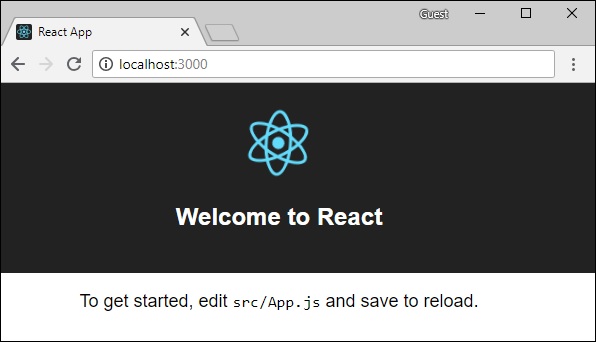
将终端中的当前文件夹路径更改为 hello-world-client。输入 npm start 以启动项目。这将在端口 3000 上运行开发服务器,并自动打开浏览器并加载索引页。
这在下面给出的屏幕截图中显示 −
步骤 3 − 修改应用组件
在 src 文件夹中的 App.js 中,添加两个函数,一个用于加载问候语,另一个用于加载 sayHello 消息。
以下是 loadGreeting 函数,它发送 GraphQL 查询以进行问候。
async function loadGreeting() {
   const response = await fetch('http://localhost:9000/graphql', {
      method:'POST',

      headers:{'content-type':'application/json'},
      body:JSON.stringify({query:'{greeting}'})
   })

   const rsponseBody = await response.json();
   return rsponseBody.data.greeting;

   console.log("end of function")
}
Following is the loadSayhello function which sends GraphQL query for sayHello −
async function  loadSayhello(name) {
   const response = await fetch('http://localhost:9000/graphql', {
      method:'POST',
      headers:{'content-type':'application/json'},
      body:JSON.stringify({query:`{sayHello(name:"${name}")}`})
   })
}
完整的 App.js 文件如下所示−
import React, { Component } from 'react';
import logo from './logo.svg';
import './App.css';

async function loadGreeting() {
   const response =  await fetch('http://localhost:9000/graphql', {
      method:'POST',
      headers:{'content-type':'application/json'},
      body:JSON.stringify({query:'{greeting}'})
   })
   const rsponseBody =  await response.json();
   return rsponseBody.data.greeting;
   console.log("end of function")
}

async function  loadSayhello(name) {
   const response =  await fetch('http://localhost:9000/graphql', {
      method:'POST',
      headers:{'content-type':'application/json'},
      body:JSON.stringify({query:`{sayHello(name:"${name}")}`})
   })
   const rsponseBody =  await response.json();
   return rsponseBody.data.sayHello;
}

class App extends Component {
   constructor(props) {
      super(props);
      this.state =  {greetingMessage:'',sayHelloMessage:'',userName:''}
      this.updateName =  this.updateName.bind(this);
      this.showSayHelloMessage =  this.showSayHelloMessage.bind(this);
      this.showGreeting =  this.showGreeting.bind(this);
   }

   showGreeting() {
      loadGreeting().then(g => this.setState({greetingMessage:g+" :-)"}))
   }

   showSayHelloMessage() {
      const name = this.state.userName;
      console.log(name)
      loadSayhello(name).then(m => this.setState({sayHelloMessage:m}))
   }

   updateName(event) {
      this.setState({userName:event.target.value})
   }
   render() {
      return (
         <div className = "App">
            <header className = "App-header">
               <img src = {logo} className = "App-logo" alt = "logo" />
               <h1 className = "App-title">Welcome to React</h1>
            </header>
            <br/><br/>
            <section>
               <button id = "btnGreet" onClick = {this.showGreeting}>Greet</button>
               <br/> <br/>
               <div id = "greetingDiv">
                  <h1>{this.state.greetingMessage}</h1>
               </div>
            </section>

            <hr/>

            <section>
               Enter a name:<input id = "txtName" type = "text" onChange = {this.updateName}
               value = {this.state.userName}/>
               <button id = "btnSayhello" onClick = {this.showSayHelloMessage}>SayHello</button>
               <br/>
               user name is:{this.state.userName}    <br/>
               <div id = "SayhelloDiv">
                  <h1>{this.state.sayHelloMessage}</h1>
               </div>
            </section>
         </div>
      );
   }
}

export default App;
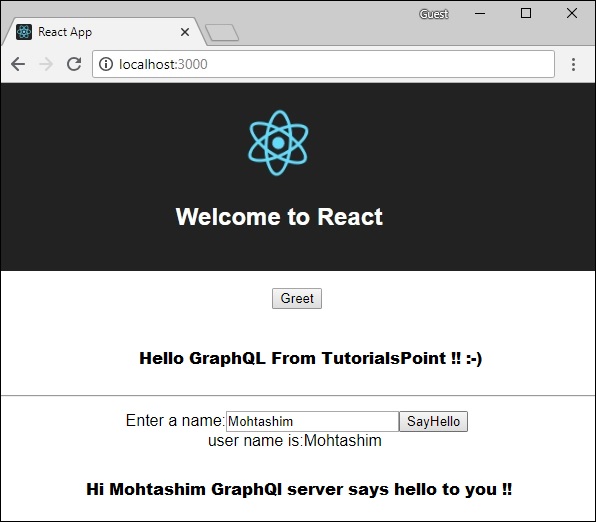
两个应用程序运行后,单击greet按钮。接下来,在文本框中输入名称,然后单击sayHello按钮。输出将如下所示 −