下载和上传图片
在本章中,我们将了解如何从互联网上下载图片、对图片执行一些图片处理技术,然后再次将处理后的图片上传到服务器。
下载图片
为了从网站下载图片,我们使用名为 URL 的 Java 类,该类可在 java.net 包下找到。其语法如下 −
String website = "http://tutorialspoint.com";
URL url = new URL(website);
除了上述方法外,类 URL 中还有其他方法可用,如下所述 −
| Sr.No. | 方法 &描述 |
|---|---|
| 1 |
public String getPath() 返回 URL 的路径。 |
| 2 |
public String getQuery() 返回 URL 的查询部分。 |
| 3 |
public String getAuthority() 返回 URL 的权限。 |
| 4 |
public int getPort() 它返回 URL 的端口。 |
| 5 |
public int getDefaultPort() 它返回 URL 协议的默认端口。 |
| 6 |
public String getProtocol() 它返回 URL 的协议。 |
| 7 |
public String getHost() 它返回URL。 |
示例
以下示例演示如何使用 java URL 类从互联网下载图像 −
import java.io.FileOutputStream;
import java.io.IOException;
import java.io.InputStream;
import java.io.OutputStream;

import java.net.URL;

public class Download {

   public static void main(String[] args) throws Exception {

      try{
         String fileName = "digital_image_processing.jpg";
         String website = "http://tutorialspoint.com/java_dip/images/"+fileName;

         System.out.println("Downloading File From: " + website);

         URL url = new URL(website);
         InputStream inputStream = url.openStream();
         OutputStream outputStream = new FileOutputStream(fileName);
         byte[] buffer = new byte[2048];

         int length = 0;

         while ((length = inputStream.read(buffer)) != -1) {
            System.out.println("Buffer Read of length: " + length);
            outputStream.write(buffer, 0, length);
         }

         inputStream.close();
         outputStream.close();

      } catch(Exception e) {
         System.out.println("Exception: " + e.getMessage());
      }
   }
}
输出
执行上述命令时,将看到以下输出。
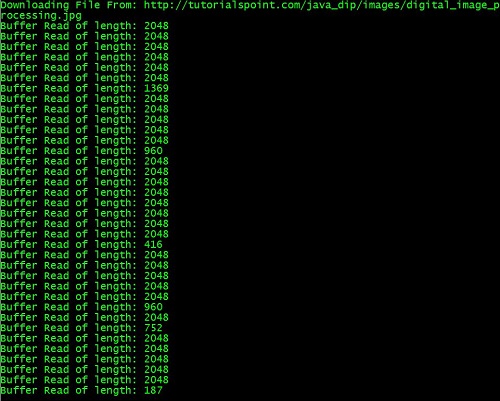
它将从服务器下载以下图像。

上传图像
让我们看看如何将图像上传到 Web 服务器。我们将 BufferedImage 转换为字节数组,以便将其发送到服务器。
我们使用 Java 类 ByteArrayOutputStream,该类可在 java.io 包下找到。其语法如下所示 −
ByteArrayOutputStream baos = new ByteArrayOutputStream();
ImageIO.write(image, "jpg", baos);
为了将图像转换为字节数组,我们使用 ByteArrayOutputStream 类的 toByteArray() 方法。其语法如下所示 −
byte[] bytes = baos.toByteArray();
除了上述方法外,ByteArrayOutputStream 类中还有其他方法可用,如下所述 −
| Sr.No. | 方法 &描述 |
|---|---|
| 1 |
public void reset() 此方法将字节数组输出流的有效字节数重置为零,以便丢弃流中累积的所有输出。 |
| 2 |
public byte[] toByteArray() 此方法创建一个新分配的字节数组。其大小将是输出流的当前大小,缓冲区的内容将被复制到其中。它将输出流的当前内容作为字节数组返回。 |
| 3 |
public String toString() 将缓冲区内容转换为字符串。将根据默认字符编码进行翻译。它返回从缓冲区内容翻译的字符串。 |
| 4 |
public void write(int w) 它将指定的数组写入输出流。 |
| 5 |
public void write(byte []b, int of, int len) 它将从偏移量 off 开始的 len 个字节写入流。 |
| 6 |
public void writeTo(OutputStream outSt) 它将此流的全部内容写入指定的流参数。 |
示例
以下示例演示了如何使用 ByteArrayOutputStream 将图像上传到服务器 −
Client Code
import javax.swing.*;
import java.net.*;
import java.awt.image.*;
import javax.imageio.*;
import java.io.*;
import java.awt.image.BufferedImage;
import java.io.ByteArrayOutputStream;
import java.io.File;
import java.io.IOException;
import javax.imageio.ImageIO;

public class Client{
   public static void main(String args[]) throws Exception{

      Socket soc;
      BufferedImage img = null;
      soc=new Socket("localhost",4000);
      System.out.println("Client is running. ");

      try {
         System.out.println("Reading image from disk. ");
         img = ImageIO.read(new File("digital_image_processing.jpg"));
         ByteArrayOutputStream baos = new ByteArrayOutputStream();

         ImageIO.write(img, "jpg", baos);
         baos.flush();

         byte[] bytes = baos.toByteArray();
         baos.close();

         System.out.println("Sending image to server. ");

         OutputStream out = soc.getOutputStream();
         DataOutputStream dos = new DataOutputStream(out);

         dos.writeInt(bytes.length);
         dos.write(bytes, 0, bytes.length);

         System.out.println("Image sent to server. ");

         dos.close();
         out.close();

      } catch (Exception e) {
         System.out.println("Exception: " + e.getMessage());
         soc.close();
      }
      soc.close();
   }
}
服务器代码
import java.net.*;
import java.io.*;
import java.awt.image.*;

import javax.imageio.*;
import javax.swing.*;

class Server {
   public static void main(String  args[]) throws Exception{
      ServerSocket server=null;
      Socket socket;
      server = new ServerSocket(4000);
      System.out.println("Server Waiting for image");

      socket = server.accept();
      System.out.println("Client connected.");

      InputStream in = socket.getInputStream();
      DataInputStream dis = new DataInputStream(in);

      int len = dis.readInt();
      System.out.println("Image Size: " + len/1024 + "KB");

      byte[] data = new byte[len];
      dis.readFully(data);
      dis.close();
      in.close();

      InputStream ian = new ByteArrayInputStream(data);
      BufferedImage bImage = ImageIO.read(ian);

      JFrame f = new JFrame("Server");
      ImageIcon icon = new ImageIcon(bImage);
      JLabel l = new JLabel();

      l.setIcon(icon);
      f.add(l);
      f.pack();
      f.setVisible(true);
   }
}
输出
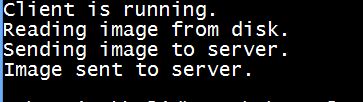
客户端输出
执行客户端代码时,客户端会出现以下输出 −
服务器端输出
执行服务器代码时,服务器会出现以下输出−
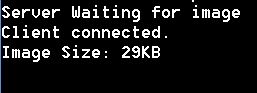
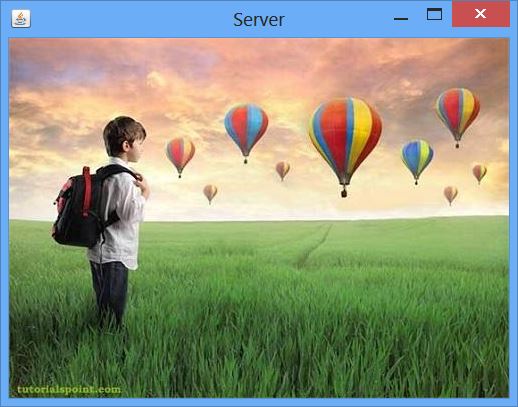
服务器图片后,会显示如下图收到的图片−