
JavaFX 效果 - DropShadow 阴影效果
将此效果应用于节点时,将在指定节点后面创建阴影。
包 javafx.scene.effect 中名为 DropShadow 的类表示阴影效果。此类包含九个属性,它们是 −
color − 此属性属于 Color 类型,表示阴影的颜色。
blur type − 此属性属于 − BlurType 类型,表示用于模糊阴影的模糊效果的类型。
radius − 此属性属于 double 类型,表示阴影模糊内核的半径。
width −此属性为 double 类型,表示阴影模糊内核的宽度。
height − 此属性为 double 类型,表示阴影模糊内核的高度。
input − 此属性为 Effect 类型,表示阴影效果的输入。
spread − 此属性为 double 类型;表示阴影的扩散。
offsetX − 此属性为 double 类型,表示 x 方向上的阴影偏移(以像素为单位)。
offset −此属性为 double 类型,表示 y 方向上的阴影偏移(以像素为单位)。
示例
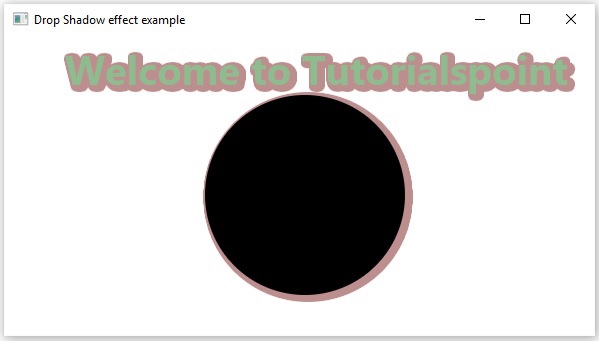
以下程序是演示 JavaFX 阴影效果的示例。在这里,我们在场景中绘制文本"Welcome to Tutorialspoint"和一个圆圈。
我们将阴影效果应用于这些。将此代码保存在名为 DropShadowEffectExample.java 的文件中。
import javafx.application.Application;
import javafx.scene.Group;
import javafx.scene.Scene;
import javafx.scene.effect.BlurType;
import javafx.scene.effect.DropShadow;
import javafx.scene.paint.Color;
import javafx.scene.shape.Circle;
import javafx.stage.Stage;
import javafx.scene.text.Font;
import javafx.scene.text.FontWeight;
import javafx.scene.text.Text;

public class DropShadowEffectExample extends Application {
   @Override
   public void start(Stage stage) {
        //创建 Text 对象
        Text text = new Text();

        //设置文本的字体
        text.setFont(Font.font(null, FontWeight.BOLD, 40));

        //设置文本的位置
        text.setX(60);
        text.setY(50);

        //设置要嵌入的文本。
        text.setText("Welcome to Tutorialspoint");

        //设置文本的颜色
        text.setFill(Color.DARKSEAGREEN);

        //绘制圆圈
        Circle circle = new Circle();

        //设置圆心
        circle.setCenterX(300.0f);
        circle.setCenterY(160.0f);

        //设置圆半径
        circle.setRadius(100.0f);

        //实例化 Shadow 类
        DropShadow dropShadow = new DropShadow();

        //设置阴影的模糊类型
        dropShadow.setBlurType(BlurType.GAUSSIAN);

        //设置阴影的颜色
        dropShadow.setColor(Color.ROSYBROWN);

        //设置阴影的高度
        dropShadow.setHeight(5);

        //设置阴影的宽度
        dropShadow.setWidth(5);

        //设置阴影的半径
        dropShadow.setRadius(5);

        //设置阴影的偏移量
        dropShadow.setOffsetX(3);
        dropShadow.setOffsetY(2);

        //设置阴影的扩散
        dropShadow.setSpread(12);

        //将阴影效果应用于文本
        text.setEffect(dropShadow);

        //将阴影效果应用于圆圈
        circle.setEffect(dropShadow);

        //创建 Group 对象
        Group root = new Group(circle, text);

        //创建 scene 对象
        Scene scene = new Scene(root, 600, 300);

        //为 Stage 设置标题
        stage.setTitle("Drop Shadow effect example");

        //将 scene 添加到舞台(Stage)
        stage.setScene(scene);

        //显示舞台(Stage)内容
        stage.show();
   }
   public static void main(String args[]){
      launch(args);
   }
}
使用以下命令从命令提示符编译并执行保存的 java 文件。
javac DropShadowEffectExample.java
java DropShadowEffectExample
执行时,上述程序将生成一个 JavaFX 窗口,如下所示。
 javafx_effects.html
